





What goes in a failed payments dashboard in Metabase?
A failed payments dashboard surfaces the involuntary churn hiding in your billing data — payments that decline and the revenue you recover (or lose) through dunning. It's often the fastest recurring-revenue win because the customers still want the product. Build it from billing data synced into a database — see Stripe, Recurly, or Chargebee for the connection.
For: Finance, RevOps, growth. Refresh: daily — dunning is time-sensitive. Source: modeled charges/invoices with status, decline reason, and retry/recovery events.
What does a failed payments dashboard look like?
Here’s the layout this guide builds: how much revenue is failing and how much dunning is recovering, then why payments decline, then the accounts and invoices a human should chase. Read it daily — a failed payment left alone for a week is usually involuntary churn.
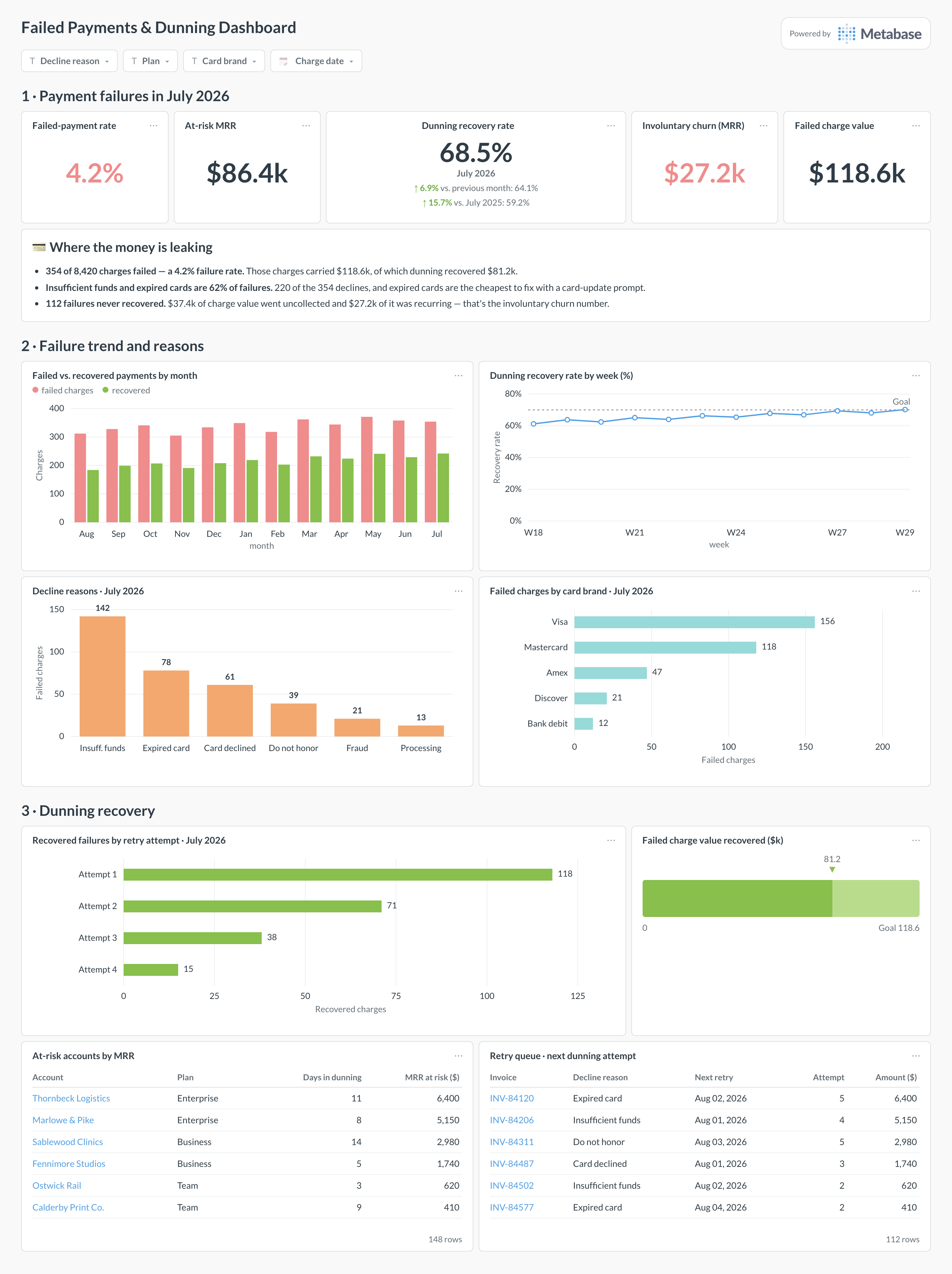
An example failed payments dashboard in Metabase, built from Stripe, Recurly, or Chargebee billing data. Figures are illustrative.
Which cards belong on a failed payments dashboard?
Headline KPIs
- Failed-payment rate
- At-risk MRR — recurring revenue on failing subscriptions
- Dunning recovery rate
- Involuntary churn (MRR lost to failed payments)
Trend & breakdown
- Failed vs. recovered payments by month
- Decline reasons (insufficient funds, expired card, etc.)
- Recovery by retry attempt number
- At-risk accounts by MRR (table)
What data does a failed payments dashboard need?
- A modeled
charges/invoicestable with status and timestamps. - Decline / failure reason codes.
- Retry attempts and recovery timestamps for dunning performance.
- A link to the subscription and its MRR for at-risk revenue.
How do you build a failed payments dashboard?
- Sync your billing tool into a database (Stripe, Recurly, or Chargebee).
- Model charges/invoices with a consistent status and join to subscriptions for MRR at risk.
- Flag recovered payments (a later success after a failure) to measure dunning.
- Create one card per metric; add filters for reason, plan, and date.
Example card SQL
-- Failed-payment rate and dunning recovery by month.
SELECT
date_trunc('month', c.created_at)                       AS month,
COUNT(*)                                                AS charges,
COUNT(*) FILTER (WHERE c.status = 'failed')             AS failed,
ROUND(100.0 * COUNT(*) FILTER (WHERE c.status = 'failed')
      / NULLIF(COUNT(*), 0), 2)                         AS failed_rate_pct,
ROUND(100.0 * COUNT(*) FILTER (WHERE c.recovered_at IS NOT NULL)
      / NULLIF(COUNT(*) FILTER (WHERE c.status = 'failed'), 0), 1)
                                                        AS recovery_rate_pct
FROM charges c
GROUP BY date_trunc('month', c.created_at)
ORDER BY month;