Data segregation
Set strong boundaries around your multi-tenant data
Methods to fit your configuration preferences and security requirements. Give and restrict data access down to the row- and column-level.
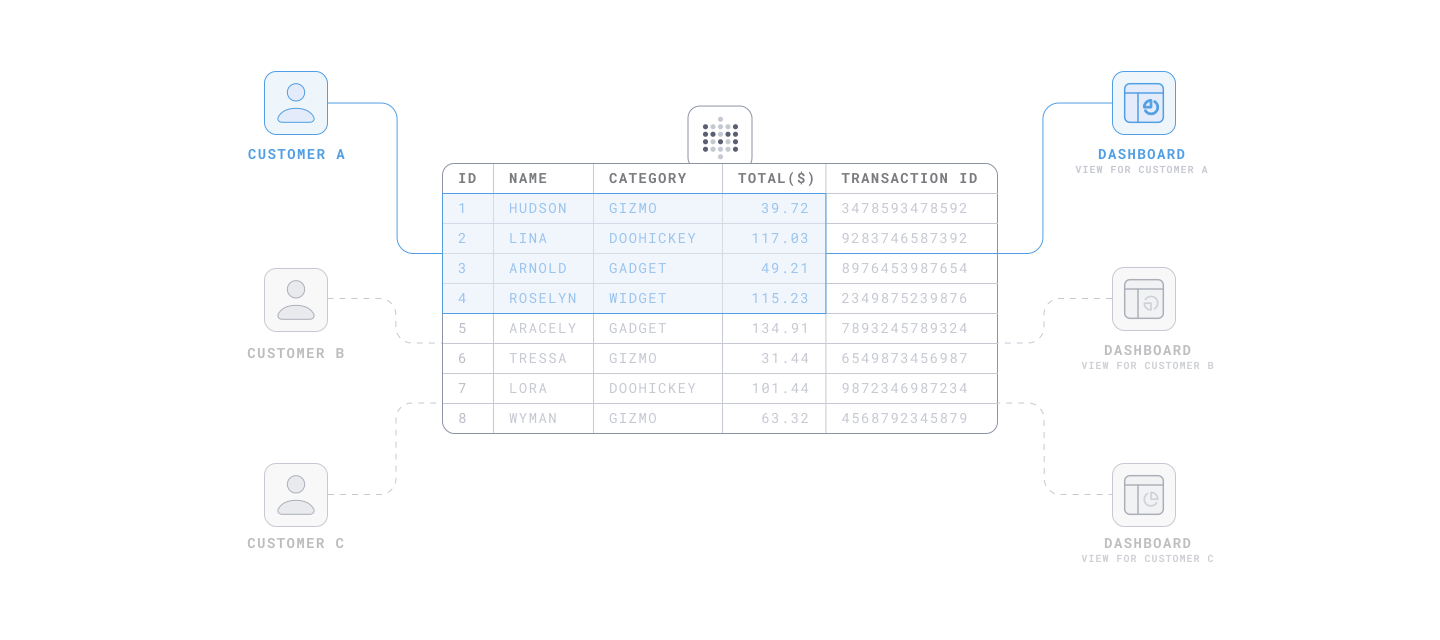
Row and column-level security
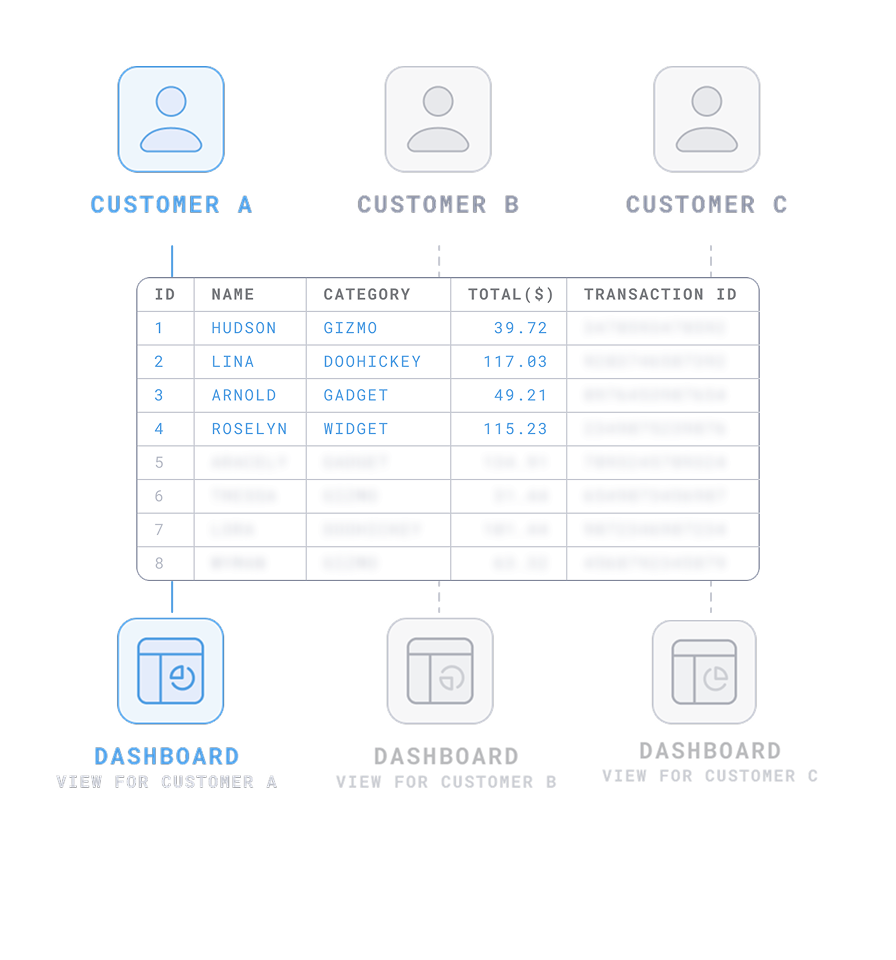
Define rules in Metabase that limit which rows and columns each group can see based on attributes you set.
Learn more about row-level securityConnection impersonation
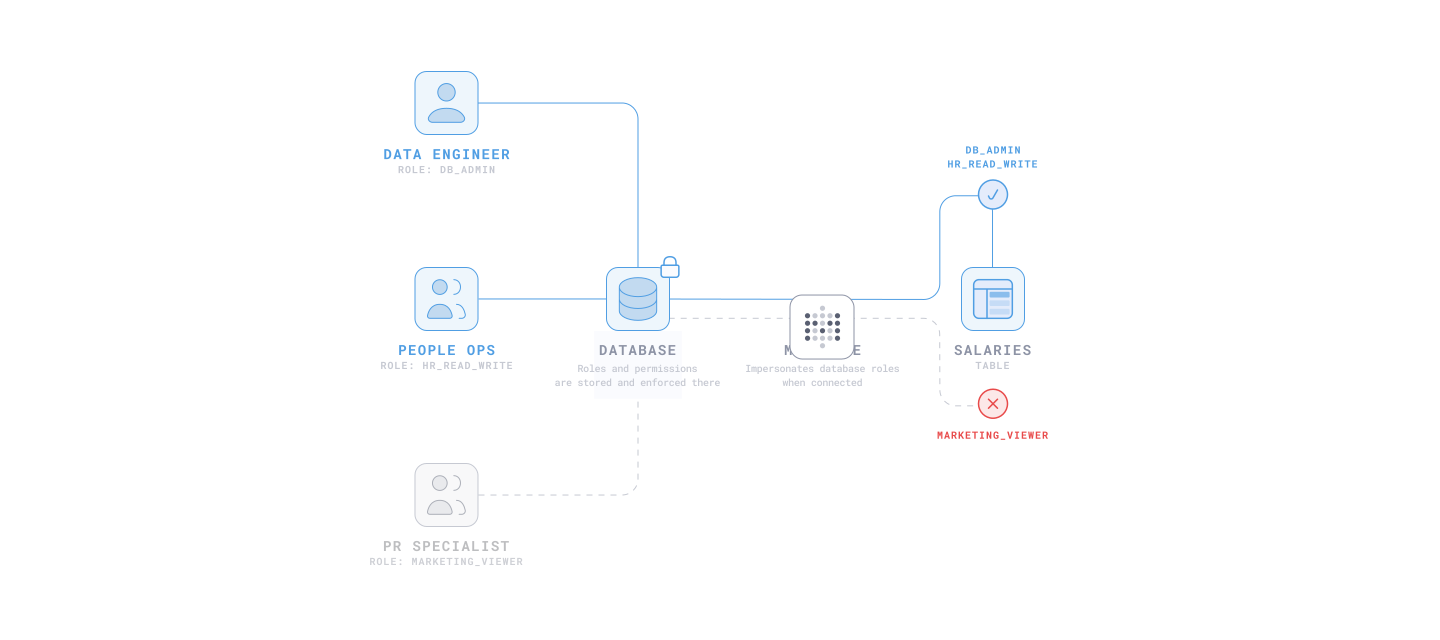
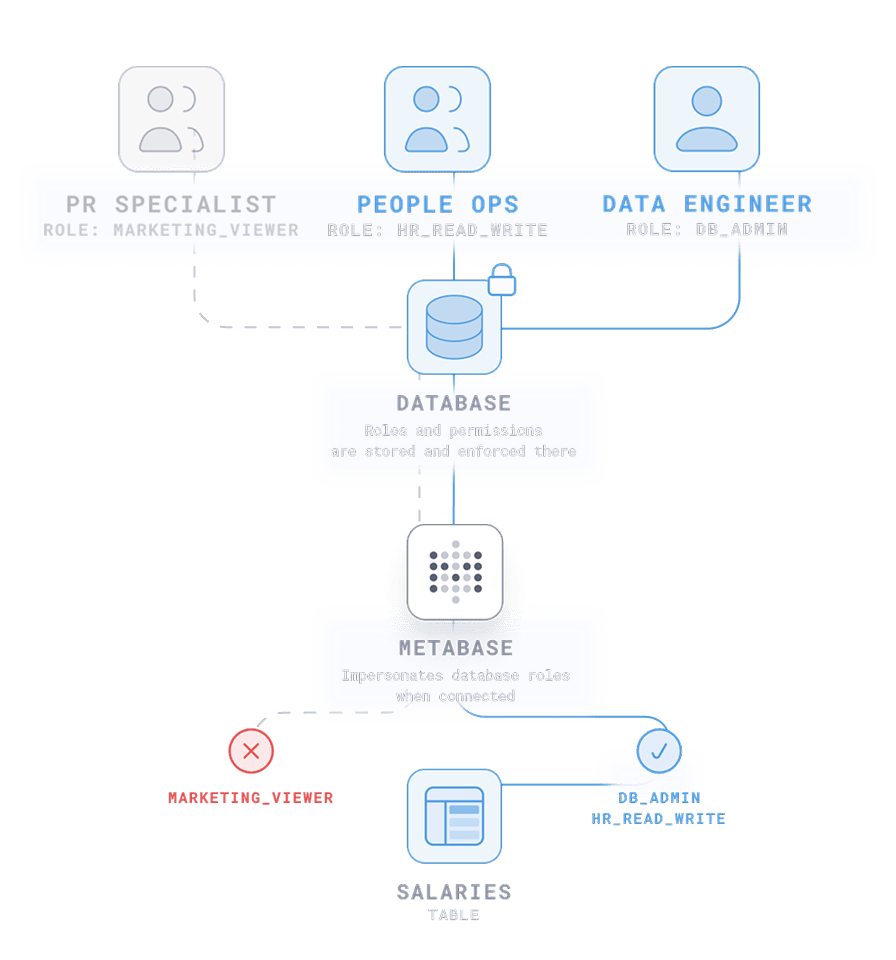
Database-managed row-level permissions: Metabase impersonates database roles to enforce data visibility while still allowing SQL editor access.
Learn more about connection impersonationDatabase routing
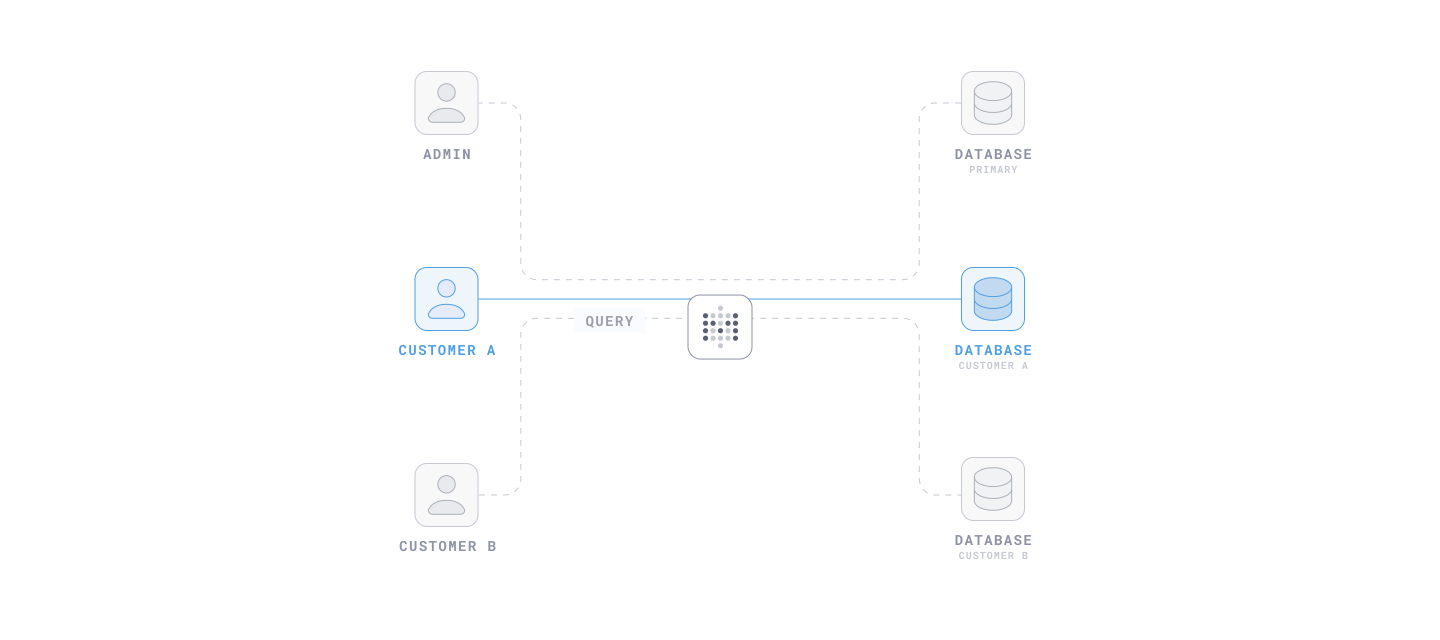
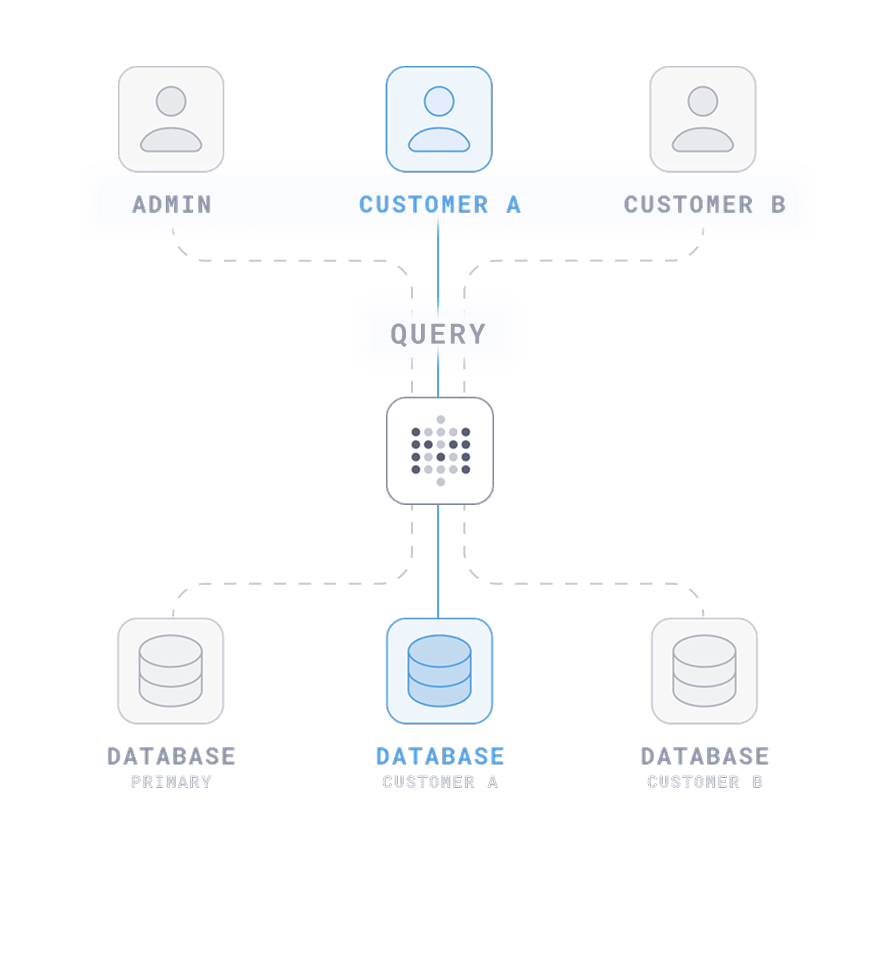
In one-DB-per-tenant setups, Metabase routes each customer’s queries to their own database while keeping shared content in a primary DB.
Learn more about database routingLocked parameters
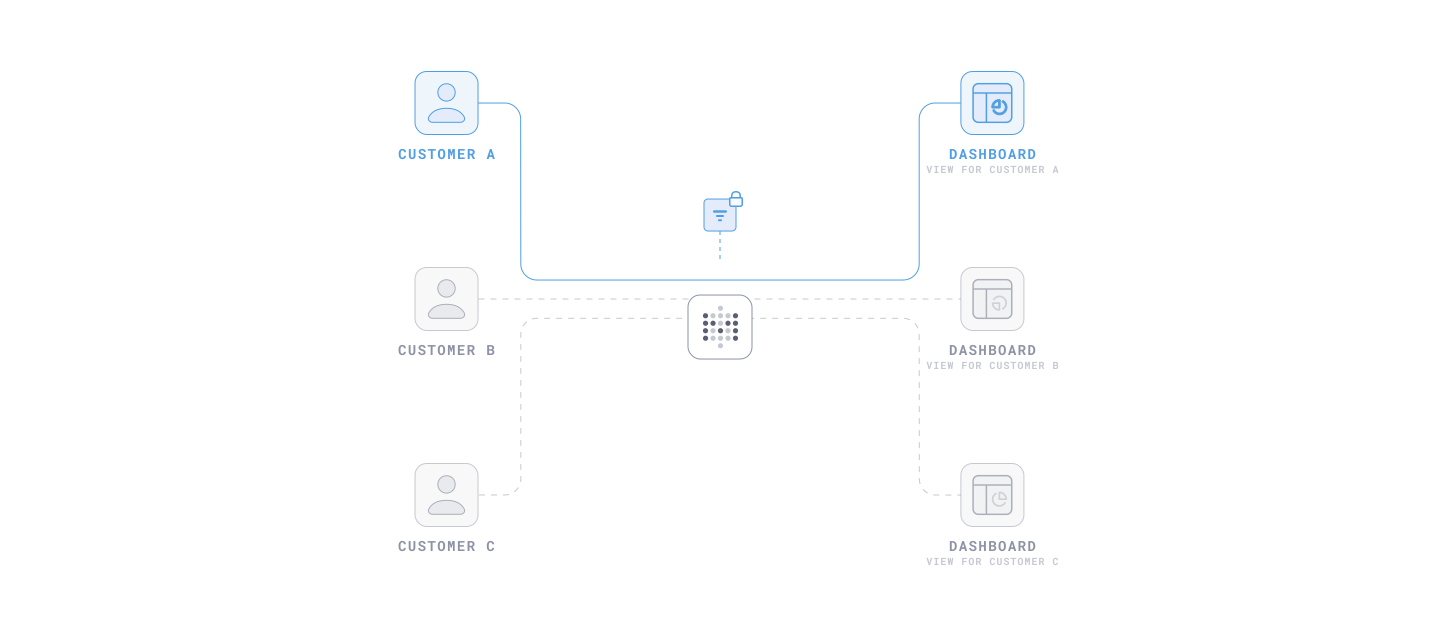
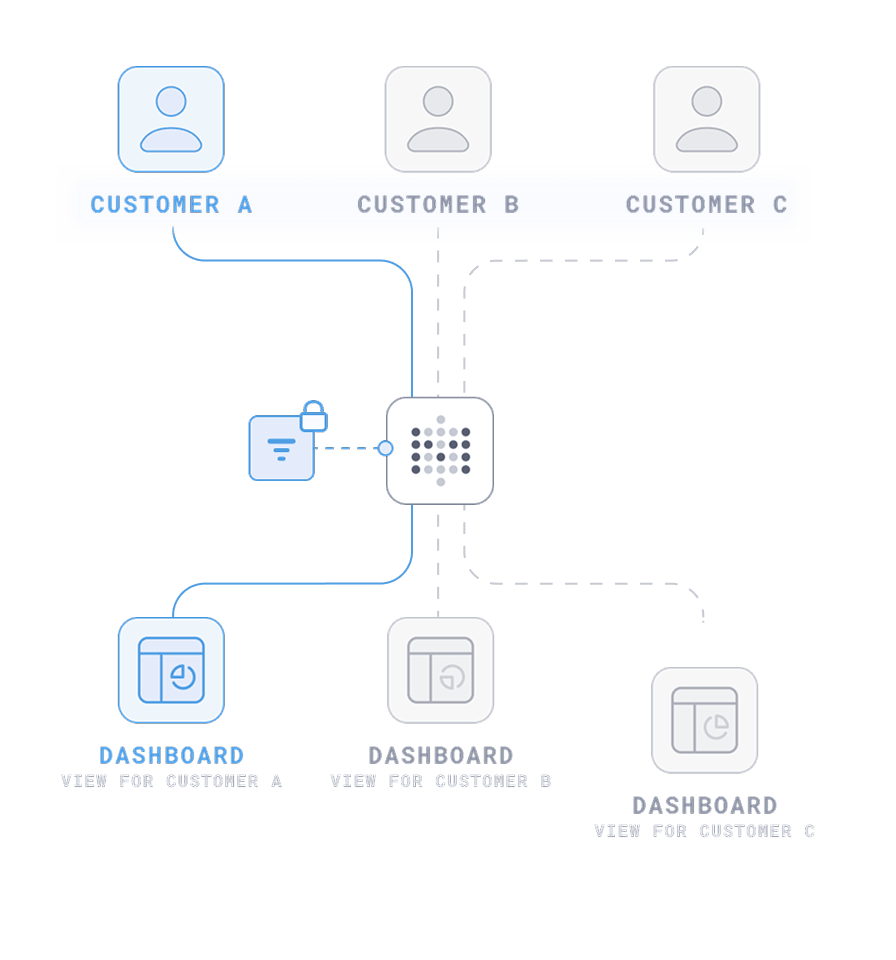
Lightweight data restriction for basic embedding setups, with locked paramters passed from your web app that users can’t modify.
Learn more about locked parametersCompare
What does it mean
When to use it
Example use case
Tradeoffs / when it's not a fit
Row-level security
Set in the Metabase UI
Define rules inside Metabase that restrict which rows and columns users can see. Based on attributes like user ID, group, region, etc. Applied to questions and dashboards, not native SQL.
- You need granular control over what data each person can see and use
- You want UI-driven control over access
- You need flexible control per group/org
For internal business intelligence: West coast fleet managers in a nationwide logistics firm can only see data relating West Coast fleet and delivery data.
- Doesn't apply to native / SQL queries
- You're using a non-SQL DB, like Druid (although Metabase does support basic RLS with MongoDB)
Connection impersonation
DB-enforced RLS
Metabase connects as the actual user (or role) in the DB. You define RLS policies, roles, and access controls in the database itself. Metabase just passes through the user identity (e.g. via SET ROLE or proxy users).
- You want to centralize access logic in the DB
- Native queries must respect access control
- You have higher concerns about misconfiguration of user attributes
- DBAs manage security centrally
Set role-based permissions for users of your HR SaaS app so managers can only see data for their direct reports.
- Not all DBs support it
- Adds complexity (user management, setup)
- Doesn't cache well in Metabase
- Less friendly for smaller teams or non-DBAs
Database routing
For one-DB-per-tenant setups
When you store tenant data in separate databases, DB routing ensures that each tenant can only see results from their corresponding database. Admins can build dashboards and questions in a primary db then route the queries to the right DB based on user attributes.
- You want the strongest isolation. Ideal for compliance or noisy neighbors, especially in multi-tenant embedded analytics contexts
- You have higher concerns about misconfiguration of user attributes
- Avoids cross-tenant performance impact
Acme's queries go to Acme's database when they run a query through an embedded dashboard in a SaaS app and backend data is separated at the DB level.
- Not necessary if you don't need to separate tenant data at the DB-level
- Higher operational complexity - you'd prefer to manage permissions in the Metabase UI
Locked parameters
Embed dashboards with filtered results before they're displayed (e.g. org_id = 123). These filters are invisible and tamper-proof. Controlled via attributes from your host app, like username or tenant_ID.
- Lightweight tenant isolation for embedded analytics
- Simple but safe access control
- Avoids exposing sensitive filters to end users
On embedded dashboards in your ecommerce app, show sales per seller using hidden seller ID passed by your host app.
- No user login, SSO, or role awareness
- Not recommended for high-risk data
Row-level security
Set in the Metabase UI
What does it mean
Define rules inside Metabase that restrict which rows and columns users can see. Based on attributes like user ID, group, region, etc. Applied to questions and dashboards, not native SQL.
When to use it
- You need granular control over what data each person can see and use
- You want UI-driven control over access
- You need flexible control per group/org
Example use case
For internal business intelligence: West coast fleet managers in a nationwide logistics firm can only see data relating West Coast fleet and delivery data.
Tradeoffs / when it's not a fit
- Doesn't apply to native / SQL queries
- You're using a non-SQL DB, like Druid (although Metabase does support basic RLS with MongoDB)
Connection impersonation
DB-enforced RLS
What does it mean
Metabase connects as the actual user (or role) in the DB. You define RLS policies, roles, and access controls in the database itself. Metabase just passes through the user identity (e.g. via SET ROLE or proxy users).
When to use it
- You want to centralize access logic in the DB
- Native queries must respect access control
- You have higher concerns about misconfiguration of user attributes
- DBAs manage security centrally
Example use case
Set role-based permissions for users of your HR SaaS app so managers can only see data for their direct reports.
Tradeoffs / when it's not a fit
- Not all DBs support it
- Adds complexity (user management, setup)
- Doesn't cache well in Metabase
- Less friendly for smaller teams or non-DBAs
Database routing
For one-DB-per-tenant setups
What does it mean
When you store tenant data in separate databases, DB routing ensures that each tenant can only see results from their corresponding database. Admins can build dashboards and questions in a primary db then route the queries to the right DB based on user attributes.
When to use it
- You want the strongest isolation. Ideal for compliance or noisy neighbors, especially in multi-tenant embedded analytics contexts
- You have higher concerns about misconfiguration of user attributes
- Avoids cross-tenant performance impact
Example use case
Acme's queries go to Acme's database when they run a query through an embedded dashboard in a SaaS app and backend data is separated at the DB level.
Tradeoffs / when it's not a fit
- Not necessary if you don't need to separate tenant data at the DB-level
- Higher operational complexity - you'd prefer to manage permissions in the Metabase UI
Locked parameters
What does it mean
Embed dashboards with filtered results before they're displayed (e.g. org_id = 123). These filters are invisible and tamper-proof. Controlled via attributes from your host app, like username or tenant_ID.
When to use it
- Lightweight tenant isolation for embedded analytics
- Simple but safe access control
- Avoids exposing sensitive filters to end users
Example use case
On embedded dashboards in your ecommerce app, show sales per seller using hidden seller ID passed by your host app.
Tradeoffs / when it's not a fit
- No user login, SSO, or role awareness
- Not recommended for high-risk data