AI governance

AI analytics with zero compromises

Stay in control over what AI can see and do, who can use it, which models it runs on, and how many tokens Metabot can spend.
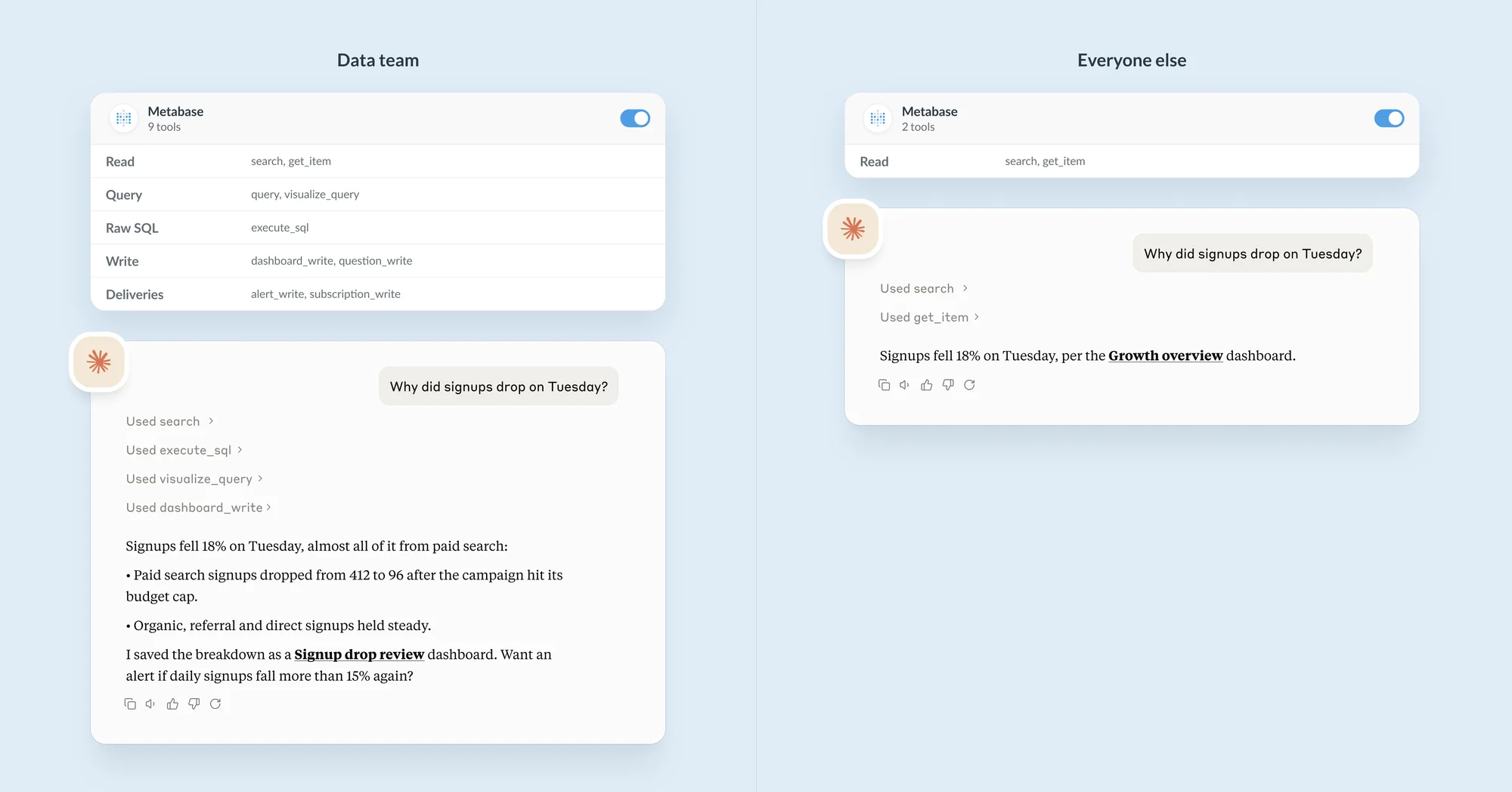
The same question asked from Claude by the data team and by everyone else. The data team's tools can run SQL and save a dashboard; everyone else's can only search and read.

Decide what AI can see and do

Metabot and the agents your team connects through the MCP server start from the permissions you already have, and you can narrow them from there.

  • Never more than the person asking — AI queries run with each person's data permissions, including row and column security.
  • Only the content you've approved — limit Metabot to verified content, official collections, and content published to the Library, so answers come from definitions your data team signed off on.
  • Only the tools you allow — choose which MCP tools each group can use, like raw SQL for analysts and read-only tools for everyone else.
  • Every answer shows its work — open the query behind any Metabot answer to check it.
Metabot answering a question using a verified model, with the chart it built

Token limits keep AI spend predictable

Set Metabot token limits per group and a total cap for your instance, so one team can't blow your token budget in one afternoon.

  • Limit by tokens or by message count.
  • Reset limits daily, weekly, or monthly.
  • Write the message people see when they hit a limit, like where to ask for more.
Setting AI token limits by token or message count

Connect to the AI provider you already have a contract with.

Or, on Metabase Cloud, leave it with us. Get AI analytics with flexibility over the provider, model, and deployment. See pricing for how AI is billed.

  • Bring your own key — connect Anthropic, OpenAI, Amazon Bedrock, Google Gemini Enterprise, Microsoft Azure, Mistral, OpenRouter, or another supported provider.
  • Run your own model — self-hosting Metabase? Serve an open model on your own infrastructure with vLLM or Ollama.
  • Metabase AI service (Metabase Cloud only) — no key to manage. We pick and run a well-performing model for you.
  • The Metabase MCP server — point Claude, Cursor, or any agent at your Metabase directly. No API key or model config in Metabase.
Connecting Metabase to an AI provider with your own API key and model

Your data, your models, your servers. AI included.

Metabase sends queries to your database and gets results back. AI works the same way.

  • Your data stays where it is — Metabase queries your warehouse in place. We don't ingest, copy, or store your data to train anything; in-database analytics was the whole premise Metabase started with.
  • Nothing has to leave your network — self-host Metabase with a model you host yourself, and analytics and AI run entirely on infrastructure you control.
  • Go fully offline — for regulated industries and air-gapped environments, see how data sovereignty works at Metabase.
Metabase sends a query to your database and gets results back, without copying your data out

Decide who gets AI, and how it behaves

Turn AI on for the teams that need it, and shape how it answers.

  • Per-group feature access — choose which groups can chat with Metabot, have it write SQL, or use other AI tools.
  • System prompts — add instructions to shape tone, naming conventions, or business context.
  • Custom branding — give Metabot a name and icon that fits your org, so it's consistent everywhere your team uses it.
  • One switch to turn it all off — disable every AI feature across your instance, including the MCP server and embedded chat, without disconnecting your provider.
Enabling AI feature access for a specific user group

See everything, audit anything

The AI usage analytics dashboard is where a security review starts — see who's using AI and what Metabot spends in tokens, review logs, and catch anything unexpected.

AI usage analytics dashboard showing token spend and conversation logs
  • Usage over time

    Metabot conversations, messages, and tokens, broken out by person, group, and tenant.

  • Conversation logs

    What was asked, which queries Metabot ran and the tables they touched, and how many tokens it used.

  • MCP and CLI analytics

    Which AI clients connect, which tools they call, by whom, and what failed.

  • Authorization logs

    Every MCP client that registered, and who approved or denied its access.

Govern AI inside your product, customer by customer

If you embed Metabase in your product, AI governance applies to your customers the same way it applies to your team.

  • Each customer's permissions, enforced — embedded AI chat runs as the signed-in user, with their row and column security, so one customer never sees another's data.
  • Per-tenant AI access — decide which of your customers get AI, and which AI tools they can use.
  • Per-tenant token limits — give each customer a shared token or message pool, so their usage stays within what they pay you for.
  • Per-tenant logs — conversations and token use broken out by tenant, visible to you as the embedder.
AI chat embedded in a white-labeled product

Frequently asked questions

Does Metabase AI respect row-level security and data permissions?
Yes. Metabot runs every query with the permissions of the person asking, including row and column security, so it can only read data that person can see. Agents connected through the Metabase MCP server get the same data permissions, and can only use the MCP tools an admin allows for their group.
Can I limit AI to less data than a user can see?
Yes. Admins can restrict Metabot to verified content, official collections, and content published to the Library, so it builds answers only from definitions your data team approved. For agents connected through the Metabase MCP server, admins choose which tools each group can use, such as blocking raw SQL.
How do I set AI token limits in Metabase?
Go to Admin > AI > Usage controls and set a token or message limit for each user group, each tenant, and your whole instance, then choose whether limits reset daily, weekly, or monthly. Group limits apply to each person in the group; a tenant limit is one pool shared by everyone in that tenant. Token limits apply to Metabot. Agents connected through the Metabase MCP server run on their own model, outside Metabase, so they don't count toward these limits. Token limits are available on Pro and Enterprise. See AI usage limits.
Can I control which MCP tools an AI agent can use in Metabase?
Yes. On Pro and Enterprise, admins choose which Metabase MCP server tools each group's AI clients can use: read, query, raw SQL, write, and deliveries. For example, analysts can run SQL from Claude or Cursor while everyone else gets read-only tools. Blocked tools are hidden from the client and refused if called. See MCP tools access.
What data does Metabase send to the AI provider?
Metabase sends your prompts, table and field names, and a sample of field values, so Metabot knows how your data is stored. If Metabot can read query results, it also sends column names and a limited number of rows; admins can turn that off. Everything goes to the AI provider you connect, or to the Metabase AI service on Metabase Cloud. If you self-host Metabase and run your own model, none of it leaves your network. See AI privacy.
Can I use my own LLM or a self-hosted model with Metabase?
Yes. Metabase connects to Anthropic, OpenAI, Amazon Bedrock, Google Gemini Enterprise, Microsoft Azure, Mistral, OpenRouter and other AI providers with your own API key. If you self-host Metabase, you can also run an open model on your own infrastructure with vLLM or Ollama. The Metabase AI service, where Metabase runs the model for you, is only available on Metabase Cloud.
How do I audit AI usage in Metabase?
Use AI usage auditing, available on Pro and Enterprise. It shows Metabot conversations, messages, and tokens by person, group, and tenant, plus full conversation logs with the queries Metabot ran and the tables they touched. MCP analytics show which AI clients connected and which tools they called, and the MCP authorization log records every client that registered and who approved it.
Can I turn off AI in Metabase?
Yes. Turn AI off for specific groups in AI feature access, or turn off every AI feature at once with the Disable all AI features switch. That switch hides Metabot, inline SQL generation, the MCP server, the Agent API, and embedded AI chat, without disconnecting your AI provider.
Can I set AI limits for each customer in embedded analytics?
Yes. With tenants, you can turn AI on or off for each customer, set a token or message limit shared by everyone in that tenant, and see conversations and token use broken out by tenant. Embedded AI chat runs with each signed-in user's permissions, including row and column security.
Do Metabase's AI controls work with self-hosted Metabase?
Yes. Per-group controls, token limits, and AI usage auditing work the same on self-hosted Metabase and Metabase Cloud. Self-hosted, you connect your own AI provider or run an open model yourself; the Metabase AI service is only available on Metabase Cloud. For fully offline setups, see air-gapped deployment.
Is Metabase AI available in open source?
Yes. Metabot, AI Research, and the Metabase MCP server are available in every edition of Metabase, including open source, when you connect your own AI provider. Per-group AI controls, token limits, system prompts, and AI usage auditing are available on Pro and Enterprise.