





What goes in an MRR dashboard in Metabase?
An MRR dashboard is the single view of recurring revenue and how it's moving month to month. It's the number the whole company steers by. Build it from billing data synced into a database — see Stripe, Chargebee, Paddle, or Recurly for the connection.
For: Founders, finance, RevOps. Refresh: daily is plenty. Source: a modeled monthly MRR table (one row per subscription per month), normalized to a monthly amount and one currency.
What does an MRR dashboard look like?
Here’s the layout this guide builds, at a monthly grain: the headline recurring-revenue numbers first, then how MRR moved this month and where it sits by plan and region. Read it at close to explain the month, and mid-month to see whether expansion is keeping pace with churn.
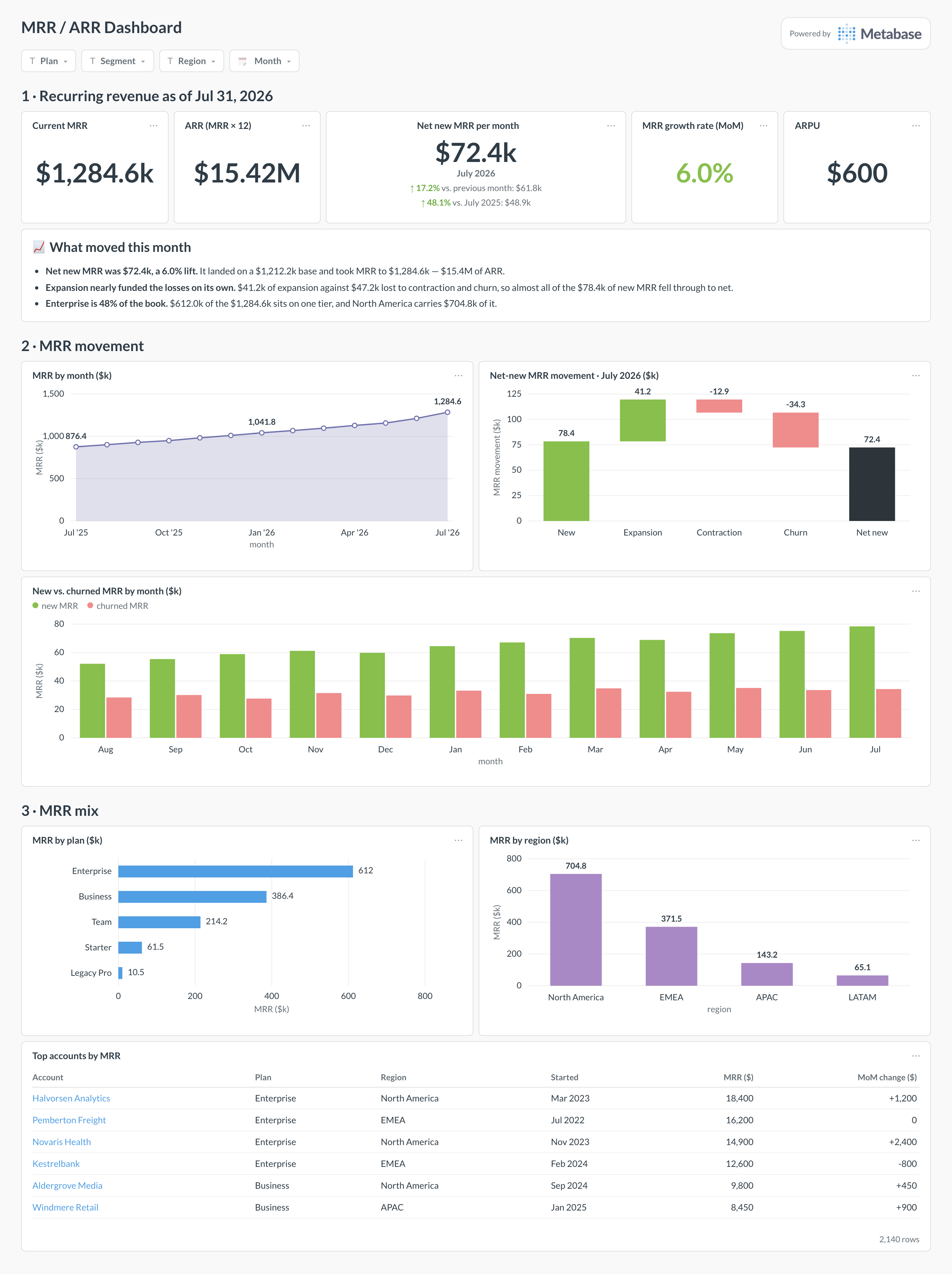
An example MRR dashboard in Metabase, built from Stripe, Chargebee, or Paddle billing data. Figures are illustrative.
Which cards belong on an MRR dashboard?
Headline KPIs (top row)
- Current MRR and ARR (MRR × 12)
- Net new MRR this month
- MRR growth rate (month over month)
- ARPU — MRR ÷ active accounts
Movement
- MRR by month (trend)
- Net-new MRR waterfall — new, expansion, contraction, churn
- New vs. churned MRR by month
Mix
- MRR by plan / tier
- MRR by segment or region
- Top accounts by MRR (table)
What data does an MRR dashboard need?
- A modeled monthly MRR table — one row per subscription per month, with the amount normalized to a monthly value and one reporting currency.
- Subscription start, plan changes, and cancellation events to split net-new MRR into new, expansion, contraction, and churn.
- Plan, segment, and region attributes for the mix cards.
How do you build an MRR dashboard?
- Sync your billing tool into a database (Stripe, Chargebee, Paddle, or Recurly).
- Build the monthly MRR model: normalize every plan to a monthly amount, convert to one currency, one row per subscription per month.
- Derive movement categories (new / expansion / contraction / churn) from period-over-period changes per subscription.
- Create one saved question per card; add filters for plan, segment, and date.
Example card SQL
-- Monthly MRR with net-new movement, from a monthly MRR model:
-- one row per subscription per month with a normalized monthly amount.
WITH by_month AS (
SELECT
  month,
  SUM(mrr)                                    AS mrr,
  LAG(SUM(mrr)) OVER (ORDER BY month)         AS prev_mrr
FROM modeled_mrr
GROUP BY month
)
SELECT
month,
mrr,
mrr - COALESCE(prev_mrr, 0)                   AS net_new_mrr
FROM by_month
ORDER BY month;