4 min read

‧ 4 min read

Releasing Metabase used to involve working through a long checklist by hand. Today, we ship a new patch every day without anyone lifting a finger. Here’s how we got there.
When I was first assigned a rotation as release manager back in 2022, releasing Metabase involved following a long, complex checklist: build a binary on a local developer machine, do some manual click testing to verify the integrity of the binary, and run some scripts to containerize it and finally upload it to Docker Hub and our website. It wasn’t a terrible process, especially because we only delivered a new minor version of Metabase every other week (or less), and a new major version every three to four months.
I knew we could do better for a few reasons:
This entailed converting a mishmash of Bash and Clojure scripts into a more coherent (and tested) set of TypeScript functions.
The initial draft of the process had three independent workflows:
Each workflow ran on its own, handing off GitHub artifacts to the next. Having separate workflows kept things fairly manual, but it was helpful to have a high degree of control as we automated a critical system.
Eventually, we realized that there was really no reason for Build and Test to be separate. There was never a situation where we wanted to build an artifact but not test it, so we streamlined the process down to two workflows:
Our build process was also pretty wasteful, taking around 30 minutes. But we had an idea. We were already building binaries as part of our testing process, we just weren’t assigning versions to these binaries. So our next step was to skip the build, and instead grab the most recently built binary and tag it with the release version. Besides cutting nearly half an hour from the release process, this also gave us much more confidence in the integrity of our builds. From then on, every binary we released went through not just our pre-release smoke tests, but our full test suite.
As we gained confidence with this workflow and it really became a matter of just firing off a couple of GitHub Actions, we moved from releasing every other week to every week. We would often release minor versions of multiple major Metabase versions each week (like v61.2 and v60.9).
As we got used to shipping faster, our success team in particular was jazzed about our ability to ship bug fixes to specific customers more quickly, and even the weekly cadence started to feel unnecessarily slow. Why shouldn’t we ship bug fixes to customers as quickly as possible? So, starting in August 2024, we started releasing patches every week day.
But my laziness grew even stronger. I realized there was no sense in having someone kick off a daily patch by hand. So we put releases on a cron schedule, with some very conservative testing gates. Every afternoon, the process releases a patch for the two most recent major Metabase versions, built from the latest commit that passed all tests. This fully autonomous release pattern required chaining all of our release steps together:
For a while, we released patches every day in this manner, until we started asking why a human needed to be involved at all in minor releases. We couldn’t think of a good reason, so we set up a weekly cron for minor releases as well.
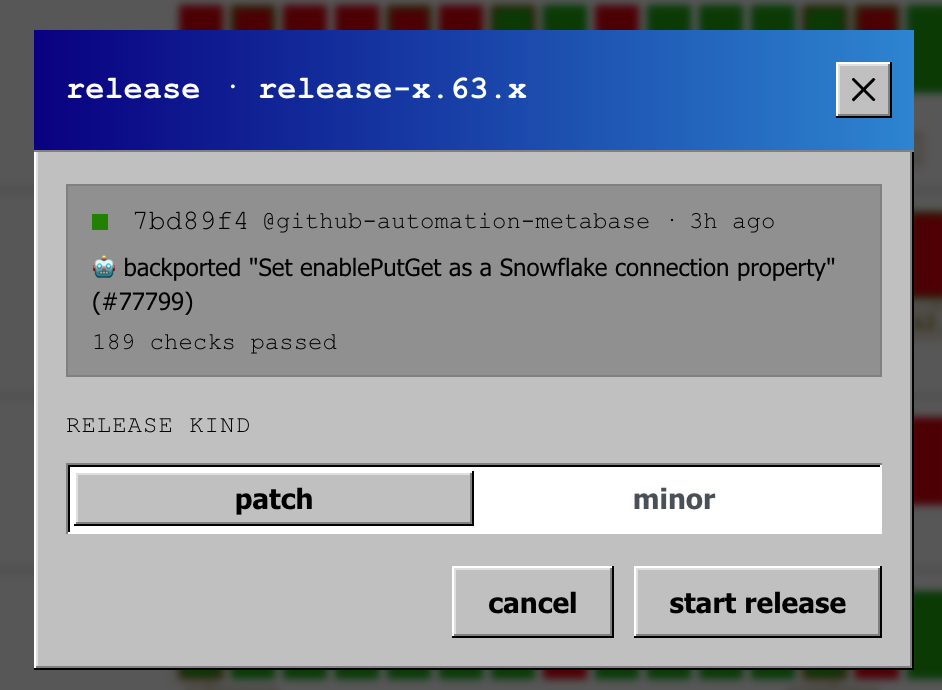
With everything moving this fast, why not release on demand whenever we have a change for Metabase Cloud, or a customer needs an urgent fix? So we built a UI in our internal CI system that makes releasing a new version of Metabase a literal three-click affair.
The Windows 95 theme made it even faster.
It turns out that laziness, applied consistently for a few years, looks a lot like continuous delivery.
You don’t need to upgrade your Metabase every day, but if you’re waiting on a fix, you can get it the same day it gets fixed, not in two weeks. If you’re on Metabase Cloud, you get it without doing anything. If you self-host, grab the patch when you need it, or stay on your current version until you’re ready.
And if you’re interested in helping us ship continuously, we’re always hiring.