6 min read

Reproducing bug reports is one of the most time-consuming parts of maintaining an open source project. We built an AI agent called Repro-Bot to help us with this task. In this post, we’re sharing how we built it and show you how you can build your own. If you want to skip ahead and check out our code, take a look at the Repro-Bot repo!
Think about how you, a human person, would reproduce a bug report:
This process is a mix of judgement calls (like ”fix it,” or what constitutes a relevant change), and chores like setting up the environment, following the steps, and asking the same questions over and over.
Repro-Bot automates the boring parts and gets us started on fixing the issue.
As Repro-Bot attempts to repro an issue, it generates a report with its findings, a pointer to where in the code the bug probably occurs, etc.. For example, here is the first part of its output for this issue about disappearing percentages on some pie charts.
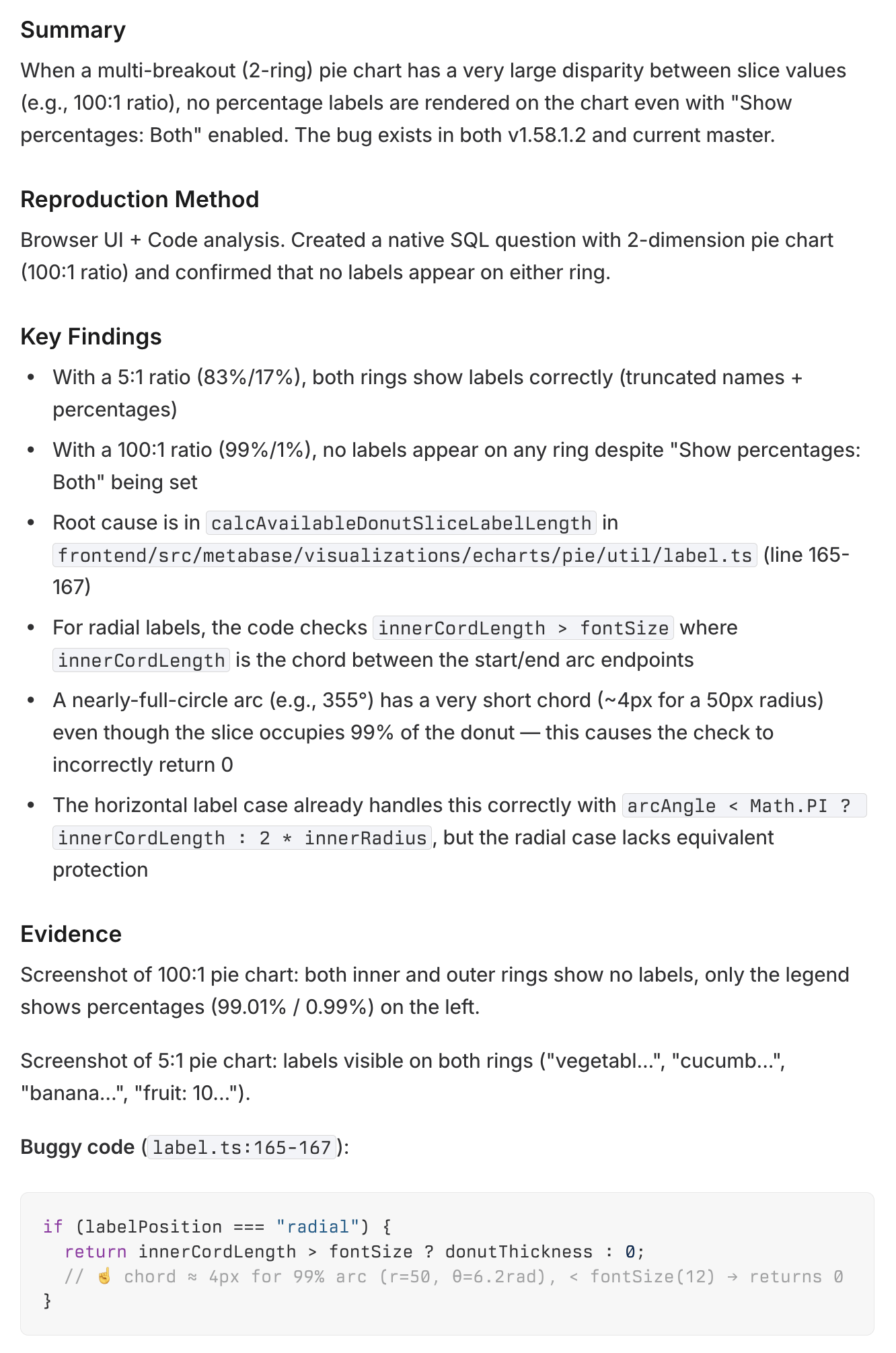
This information helps us respond to the person who reported the issue faster and get more details from them while it’s still fresh in their mind. We’ve also cleared out a number of issues from our backlog that Repro-Bot confirmed we had already fixed.
Of course, Repro-Bot isn’t infallible. Sometimes it can’t repro an issue. Sometimes it thinks it has reproduced a bug when it hasn’t. But even in those cases, Repro-Bot’s reports are still valuable. They give us hints and chronicle dead-ends, both of which save devs time getting to the root cause.
The details of Repro-Bot are quite specific to Metabase, but we’ll walk you through its inner workings so you can build a similar agent for your own codebase and development setup. You can also fork our repo and adapt it to your workflow.
Repro-Bot needs to be able to perform these tasks:
Here’s how we approached each one.
We use GitHub to collect reported bugs, and Linear to manage development work. To run Repro-Bot, a human tags a bug on GitHub with .Run Repro-Bot, which triggers a GitHub action that runs the workflow described above.
Running the bot is not an automated task by design: a human in the loop is essential to prevent injection attacks. Most issues come from our public GitHub issues, so it would be trivial for somebody to poison context. To guard against this, we sandbox the agent and limit its permissions. We also require a human to review issues before running it to make sure there is nothing suspicious in the issue.
We intentionally did not ask Repro-Bot to fix the issue. We had initially wanted to make a more end-to-end bot that could do it all, but that wider scope opened up a number of wrong paths the bot could go down. Keeping the agent’s purview limited keeps its output manageable, and we can always introduce more automation downstream.
We think that Repro-Bot is an interesting approach to using LLMs and AI tooling for software development, because it’s not about code generation. Our Repro-Bot repo is very specific to our setup, but with the code as a starting point and the description above, you can build your own.
Repro-Bot has become part of our daily development work, and continues to save us time. We hope that it inspires others to build (and share!) similar tools for themselves.