Jul 20, 2026 in Engineering

11 min read

How we picked LibreChat — and ended up with a Slack agent

Arkadi Yaroslavtsev Portrait
Arkadi Yaroslavtsev
How we picked LibreChat — and ended up with a Slack agent Image
Share this article

Like a lot of projects on Metabase’s Cloud team, this one started as a boring corporate-IT problem that quietly turned into something I use every single day. We set out to consolidate a pile of AI logins behind one managed front door. We came out the other side running a self-hosted chat platform, with a couple of fixes upstreamed to the OSS project, and a Slack agent that answers questions about our infrastructure.

Fighting AI login sprawl

The original ask was modest and sane. AI tooling was sprawling everywhere: everyone had their own ChatGPT login, their own Anthropic key, a Claude Desktop here, a Cursor license there. Tokens for GitHub, Notion, and Slack were copy-pasted into a dozen different places on a dozen different laptops.

We wanted one place that:

  • Connected to Anthropic and OpenAI, and ideally OpenRouter, behind a single account, instead of N individual licenses
  • Had real auth, so we weren’t managing one-off logins
  • Centralized the integration tokens (GitHub PATs, Notion integration, Slack credentials) so they lived in one managed place instead of on everyone’s machine

That was the whole charter. Everything else in this post is stuff we piled on top.

LibreChat vs LobeChat vs Open WebUI: evaluation criteria

I’d been a heavy MCP user locally for a while: Claude Code and Cursor wired up to GitHub, Notion, and Slack, plus the Anthropic memory and sequential-thinking servers, context7 docs, and many more. The thing that kept nagging me was that the interesting part was never any single model. It was the idea of a single frontend that could fan out to many models (or just point at OpenRouter), fork a conversation mid-stream to a different provider, share a prompt library across a team, and most importantly speak MCP, so we could plug our own tools into it.

So we drew up a short list of self-hostable, open-source chat frontends:

My evaluation criteria, in order of how much I actually cared:

  1. Ease of deployment and management. This is something we have to run, indefinitely. Not a weekend toy.
  2. MCP configuration. How painful is it to add a new MCP server? Can someone who isn’t me do it?
  3. OAuth support. Both for people signing in, and ideally for per-person OAuth out to downstream MCP servers.

The differences between the three chat frontends in feel were small. The differences in operability and MCP depth were not.

LibreChat won on operability, not looks

Thanks largely to the legwork our ops engineer put in standing each option up for real, we were able to compare the three chat frontend candidates.

Open WebUI got a genuine deployment and a couple of weeks of tire-kicking. It’s polished, with all the enterprise-y admin knobs you’d want. But the dealbreaker showed up fast: first-class support was effectively OpenAI-only. To get Anthropic working you installed a community “function,” literally a chunk of Python someone wrote to talk to the Anthropic API. For a tool we wanted to standardize the whole company on, “paste in a third-party script to reach one of your two primary providers” wasn’t a great place to start. MCP support at the time was similarly second-class.

LobeChat was fine. Nice enough to look at, but nothing about it pulled ahead on the things I cared about, and a few things (deployment story, MCP configuration) felt thinner.

LibreChat won on the criteria that mattered:

  • A clean, Helm-based deployment we could fold into our existing GitOps flow. Adding an MCP server became “open a PR, CI redeploys, the tool shows up.”
  • Native, first-class support for both Anthropic and OpenAI, and a straightforward path to OpenRouter, so we could offer a long menu of models from one place.
  • The deepest, most serious MCP integration of the three. Given where this was heading, that ended up being the deciding factor.
  • A RAG API surface (LangChain + Postgres/pgvector + FastAPI) that we could build on — though not one that worked for our needs out of the box. LibreChat’s built-in RAG was designed for per-user file uploads: each user could attach documents to a conversation and ask questions about them. That’s a fine feature, but it wasn’t what we needed. We wanted shared, team-wide knowledge retrieval — a persistent memory layer the agent could read from and write to across every conversation. So we built our own RAG system and exposed it as a custom MCP server, which became the backbone of the agent’s long-term memory and the foundation for connecting it to internal tools like Notion, Linear, and GitHub.

So LibreChat it was. We stood up the chat, wired in a dedicated service account for the GitHub integration, plugged in our provider keys, and we were off.

MCP compatibility was the whole ballgame

The first time I asked our LibreChat “what are the last ten PRs merged by the embedding team, and what are their product docs in Notion?”, it just went and did it. LibreChat chained the GitHub MCP and the Notion MCP together. I was genuinely a little stunned at how well it worked.

Over the following weeks we kept adding MCP servers: GitHub, Notion, Grafana, and eventually our own Metabase MCP server. Each MCP landed as a config change in the chart. Each one made the whole thing more useful, and the surprising part was how usable the combination became. At that point the frontend was almost incidental; the value was the graph of tools behind it.

The flip side of that is a lesson worth stating plainly: an MCP server is only as good as the API it wraps. The Notion MCP, for instance, is hamstrung because it still goes through Notion’s search under the hood, and Notion search is… Notion search. That pushed us toward setting up our own RAG and memory tooling instead of having every conversation re-search Notion from scratch.
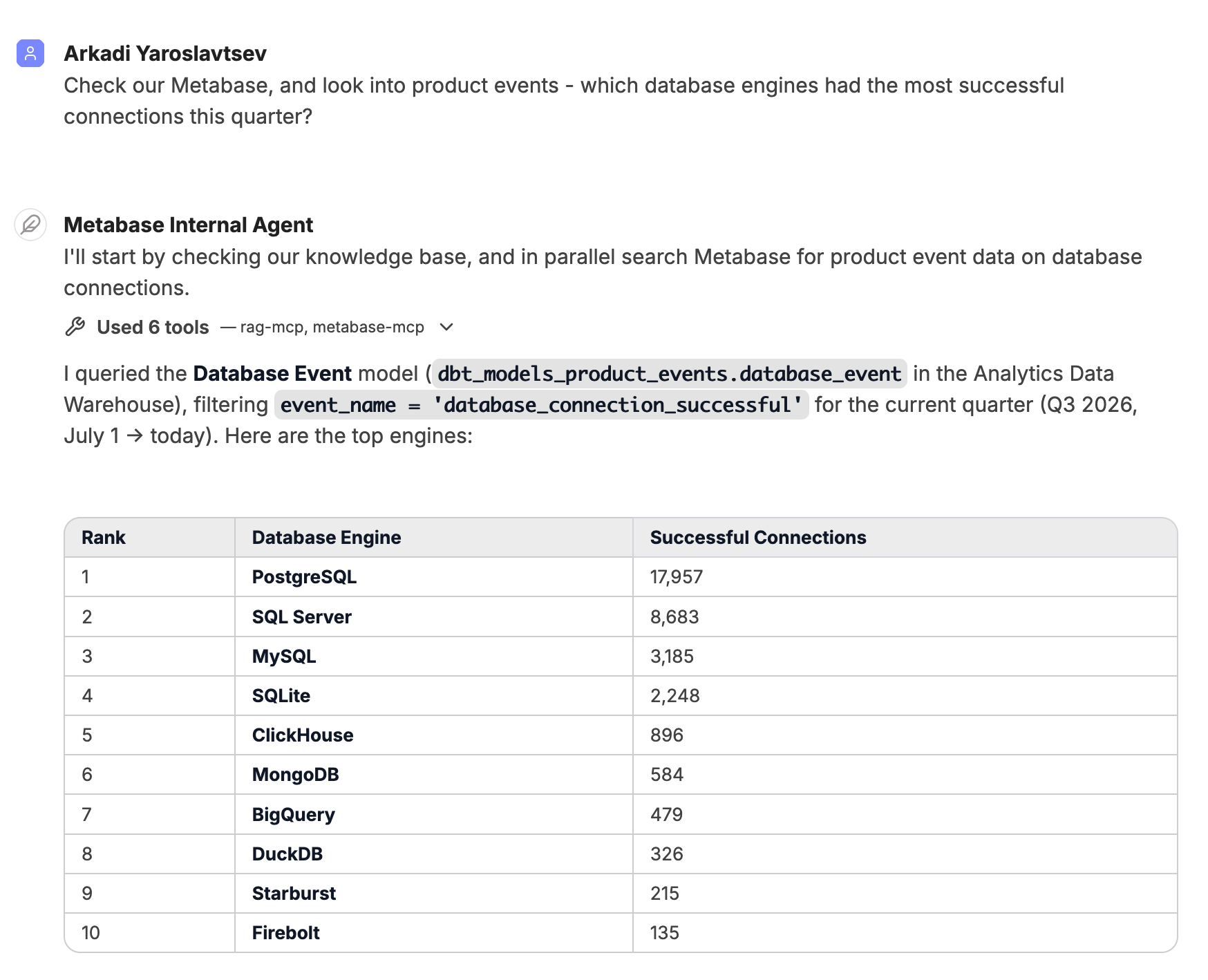
Librechat checking Metabase

What broke, and how we got around it

Nobody should pretend that self-hosting a fast-moving, early-beta OSS AI product is smooth. A non-exhaustive list of what we hit, and how we worked around it:

  • File uploads were broken out of the box. They need the RAG API configured, which isn’t obvious. Once we stood up the separate RAG deployment with pgvector, uploads started working. PDFs uploaded instantly; CSVs were slow or failed outright.
  • The CSV upload saga. We chased an intermittent “field larger than field limit” error, plus cases where uploads worked for some people and failed consistently for others. Our embeddings were partly at fault: when we hit provider rate limits or ran out of credits, the upload pipeline simply fell over. We added a fallback key for OCR on uploads, and started exploring self-hosted embeddings (Ollama / vLLM), so we weren’t at the mercy of a single provider’s quota.
  • The 128-tool ceiling. When we added the Linear MCP, we blew past the model’s tool-array limit, and had to selectively disable tools. This limit eventually pushed us toward per-agent tool scoping and agent chaining instead of “every tool, all the time.”
  • OAuth MCPs in agent mode. Early on, LibreChat didn’t support OAuth-based MCP servers from a shared agent. Each request needed to carry the user’s own identity and permissions, not the admin’s. This constraint shaped a lot of the per-user-auth design that came later.
  • Memory is per person, not global. LibreChat’s memory is scoped to each person. Great for “remember our past chats,” useless for “here’s the shared map of how our Notion, GitHub, and Linear fit together.” Rather than fight the per-person constraint, we built a shared knowledge base on top of the RAG API and exposed it as our own memory MCP, so anyone can store and retrieve shared facts, and the agent consults our memory MCP first before going off to search.

Contributing fixes back upstream

The part that felt most like real engineering — as opposed to configuration and workarounds — was contributing fixes back upstream: we didn’t just consume an open-source project, we contributed back to it. To make it more interesting, our AI coding tools themselves struggled with some of the more cutting-edge issues around MCP auth that were simply too new to have any effective training.

Once we leaned hard on OAuth-based MCP servers, things got flaky in a way that was maddening to debug. One of our engineers dug in and found a real bug in how LibreChat handled OAuth refresh flows. We fixed it in our own deployment first, confirmed the servers that had been the main culprits went rock-solid, and then opened a fix upstream. The before/after on the previously-flaky servers was night and day.

Another bug fix we contributed: bringing the still-experimental memory feature online surfaced a bug I had to patch by hand in the database.

That’s the deal with running beta features in production: you become a contributor whether you planned to or not. The broader takeaway stuck with the whole team: vibe-coding and good OSS will get you to “working” eventually, but you still need to figure out which problems you’ll need to think through. Self-hosting forced us to actually understand the system, which paid off later.

Enter the Slack agent

By early this year, LibreChat had become part of how I actually worked. My day-to-day experience had gotten extremely smooth — mostly thanks to the shared RAG memory and the sheer volume of use. The natural next question: why does all this power have to live behind a web UI I have to go open?

So at the Cloud team’s offsite hackathon, I built LibreBot, a Slack agent on top of our LibreChat deployment. You DM it or @mention it, and it figures out which tool to reach for on its own across Linear, Metabase, Notion, GitHub, Grafana, Slack, and a web-search fallback.

A few design decisions that mattered:

  • Per-person auth. The Slack bot is a 1:1 mirror of your OAuth state in the LibreChat web UI. When you first say hi, it walks you through generating a personal API key that ties your Slack identity to your LibreChat identity. The upshot: when the agent acts, it acts as you — your permissions, your access. The flip side, which generated some good support threads, is that if your Grafana or Linear OAuth has expired in the web UI, you have to re-auth there, because the bot mirrors exactly what you’ve got connected. A surprising share of the early “it’s broken for me” reports came down to a single disconnected OAuth MCP.
  • A search-strategy system prompt. The agent checks shared memory first, then reaches into Notion, GitHub, Linear, Slack, or Grafana as appropriate, and only hits the web as a last resort. The agent also writes anything it learns back into shared memory for next time.
  • Scheduled prompts, streaming responses, and Slack-flavored Markdown so the output actually reads well inside a thread.

Within days, people were using the Slack agent for things I hadn’t scripted: summarizing what a team merged yesterday, triaging an incident, doing a multi-week reliability deep-dive on one of our internal instances by correlating Grafana metrics, Loki logs, and Slack threads in a single conversation. A teammate’s separate hackathon project — a pricing knowledge-base agent — even folded in, so pricing questions were now just an @mention away.
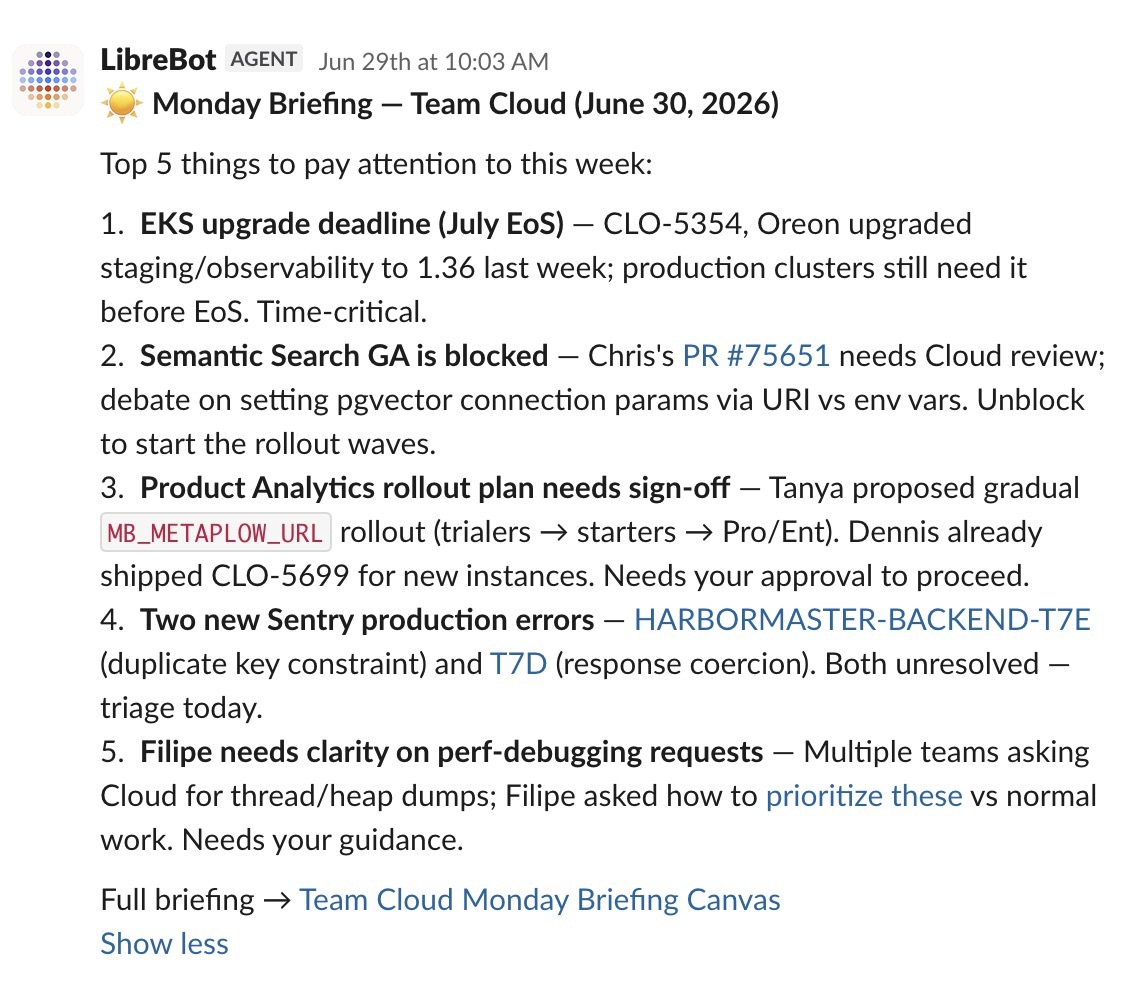
Librebot Slack Agent briefing Team Cloud

What I’d tell my past self

  • Pick the tool you can operate, not the one with the best demo. LibreChat didn’t win on looks. It won because we could deploy and manage it cleanly through our existing GitOps flow, and because MCP was a first-class citizen.
  • MCP compatibility was the right thing to over-index on. Everything good that followed — the cross-tool chaining, the shared RAG memory, and the Slack agent — flowed from that one bet.
  • Running beta OSS in production means contributing to it. Budget for that. OSS tools like LibreChat save us a real amount of money in scattered licenses, and save us from a real amount of risk in copy-pasted tokens. The least we can do is give back to the project.
  • Solve the boring problem first. Get the unglamorous corporate-IT foundation solid, and the interesting experiments become almost free to run on top of it.

The least glamorous work — the Helm chart, the GitOps flow, the RAG and pgvector deployment, the embeddings plumbing, the runbook, the upstream fixes — is what everything else got to stand on.

More from Metabase Engineering

You might also enjoy

PA: a persistent agent for developer workflow automation ImageJun 16, 2026 in Engineering

PA: a persistent agent for developer workflow automation

We built a lightweight CLI agent system that automates boring developer tasks and gives back about 15% of the day.

Filipe Silva Portrait
Filipe Silva

‧ 7 min read

Welcome to the strip mining era of open source security ImageMay 14, 2026 in Engineering

Welcome to the strip mining era of open source security

In 2026, LLM-powered code scanners are uncovering security vulnerabilities in open source projects at 10x the historical rate. Here's what OSS maintainers and users need to do about it.

Sameer Al-Sakran Portrait
Sameer Al-Sakran

‧ 8 min read

All posts
Subscribe to newsletter
Updates and news from Metabase