





In this release
Metabase 64
Security hardening across Metabase, required 2FA, IP allowlists, MCP server improvements, Metabot on any model, and more.

The Metabase Team
· Oct 15, 2026 · 11 min readWelcome to the Metabase security hardening issue. A mix of fixes, minimizing attack surfaces, and giving you more control over your own instance: who can get in, from where, and what it can connect to.
- If you’re hosted on Metabase Cloud, we are rolling out v64 this week. If you’d like to get it sooner, just let us know. Email help@metabase.com and we’ll upgrade you.
- If you’re self-hosting Metabase, you (or your admin) can follow the docs on how to upgrade. Be sure to check out our security best practices checklist.
Metabase 64 is an LTS version. Learn more about version support.
Security
Tighter checks on every request, query and permission
Most of the hardening is structural: rather than patching individual issues, it adds layers that rule out whole kinds of attacks.
- Stricter validation on query inputs. We tightened how Metabase validates the parts of a query you can influence, and reviewed query compilation for every supported database, so values like filters, date units, regex patterns and type casts reach your database as data, not as SQL.
- The API only accepts documented use. Metabase no longer supports using its API in undocumented ways (see breaking changes below).
- Permissions hold at every stage. To run a question, you now need View access to everything it’s built on: models, metrics and other questions, all the way down.
- Public links and embeds send less. They now send only the data needed to render what you shared. Native queries behind public links no longer include their template tags, and questions moved to the trash stop serving. Metabot’s reasoning is hidden in embedded sessions. In multi-tenant setups, tenant endpoints and subscription recipients are scoped to each tenant.
- Deactivating someone ends their sessions permanently including if their account is reactivated later.
- Less leaves your instance. Database secrets are no longer included in serialization exports. Subscription and alert recipients are encrypted at rest, and your allowed email domains are enforced when a message is sent, not only when it’s saved.
Another layer between your database and your Metabase
If you self-host, two environment variables add a layer of protection that lives outside your application database. MB_SESSION_SECRET_KEY signs session keys, so access to the application database alone can’t create a working session. MB_ENCRYPTION_SECRET_KEY encrypts sensitive values stored there, like database credentials and two-factor authentication secrets. Both work on every plan, including open source.
Set it up: follow Protect secrets and data at rest in the security best practices guide.
Make two-factor authentication a requirement
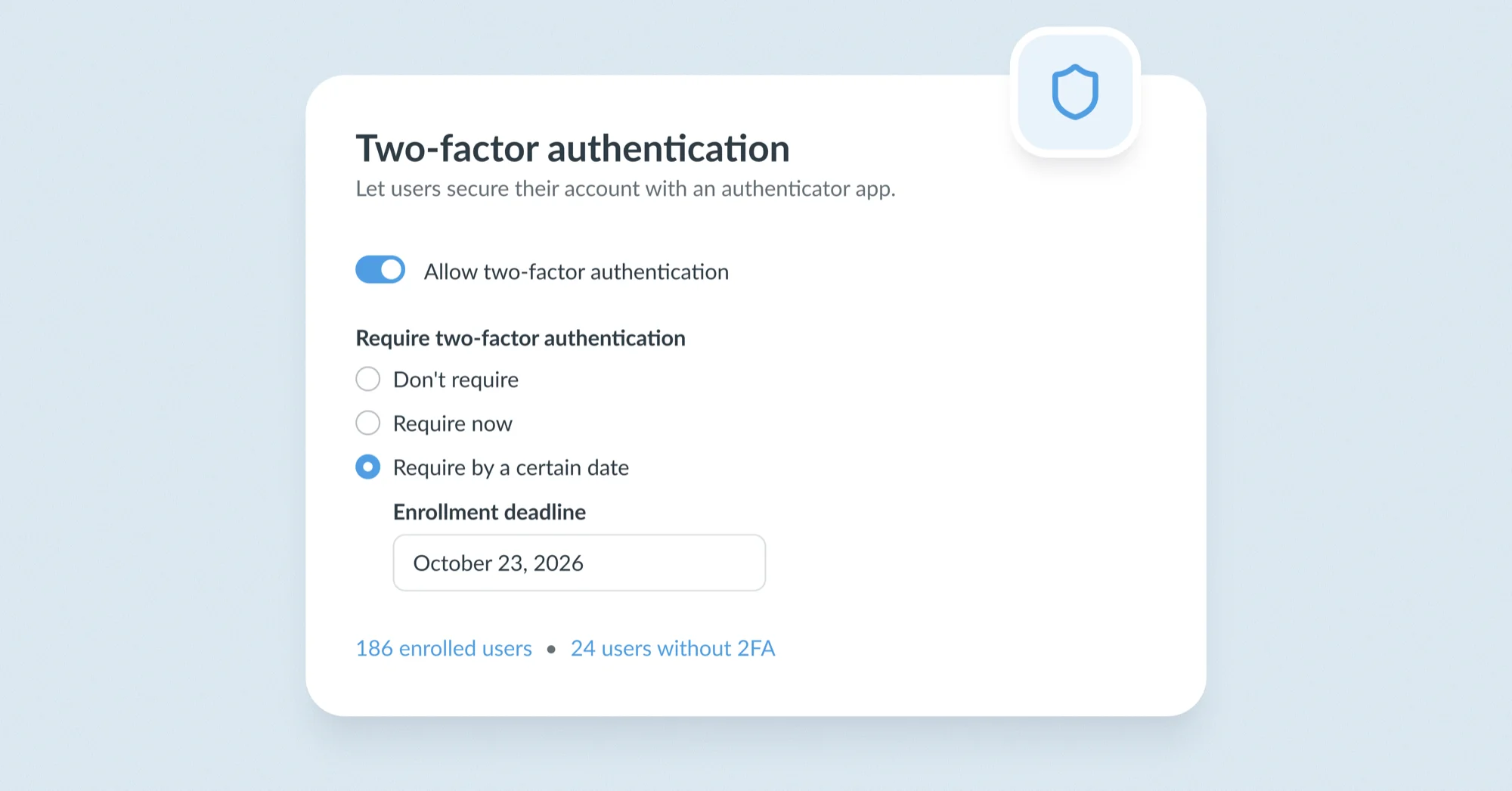
Admins can now require two-factor authentication for everyone who signs in with a password or LDAP, with an optional grace period so people can enroll before they’re signed out. Anyone who hasn’t enrolled is walked through setup at their next login. Admins can also see who has enrolled and who hasn’t.
Available on Pro and Enterprise.
Set it up: Admin → Settings → Authentication → Overview → Two-factor authentication card.
Restrict access to your Cloud instance by IP
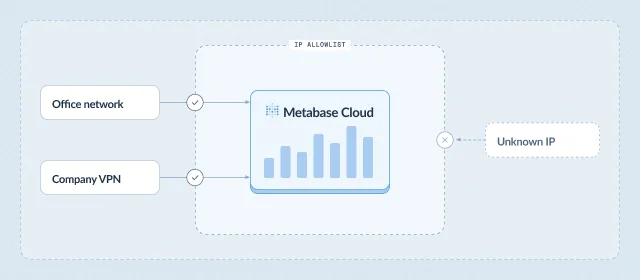
On Metabase Cloud, you can now restrict access to specific IP addresses or ranges, so your instance is only reachable from trusted networks.
Available on Pro on Metabase Cloud.
Set it up: Metabase Store → your instance settings → IP allowlist.
Choose which networks Metabase can reach
You can now set which networks Metabase is allowed to reach (for things like map tile servers, AI providers, etc). You can set it to only public addresses, public plus your private network, or whatever your setup needs.
On Metabase Cloud, connections to warehouses, webhooks, map tiles and AI providers are limited to public addresses by default.
Set it up (self-hosted): set MB_WAREHOUSE_ALLOWED_NETWORKS, MB_HTTP_CHANNEL_ALLOWED_NETWORKS, MB_MAP_TILE_SERVER_ALLOWED_NETWORKS, MB_LLM_ALLOWED_NETWORKS and MB_OIDC_ALLOWED_NETWORKS to external-only, allow-private or allow-all. Environment variable reference.
If a version you’re running ever has a critical vulnerability, self-hosted admins will see an upgrade banner they can’t dismiss, and Pro and Enterprise admins get advisories with download links for their exact version in Security Center.
For more detail on the hardening work and what it changes when you upgrade, see the Metabase 63.14 release notes.
AI
MCP gets a major upgrade: do (almost) anything in Metabase from your AI client
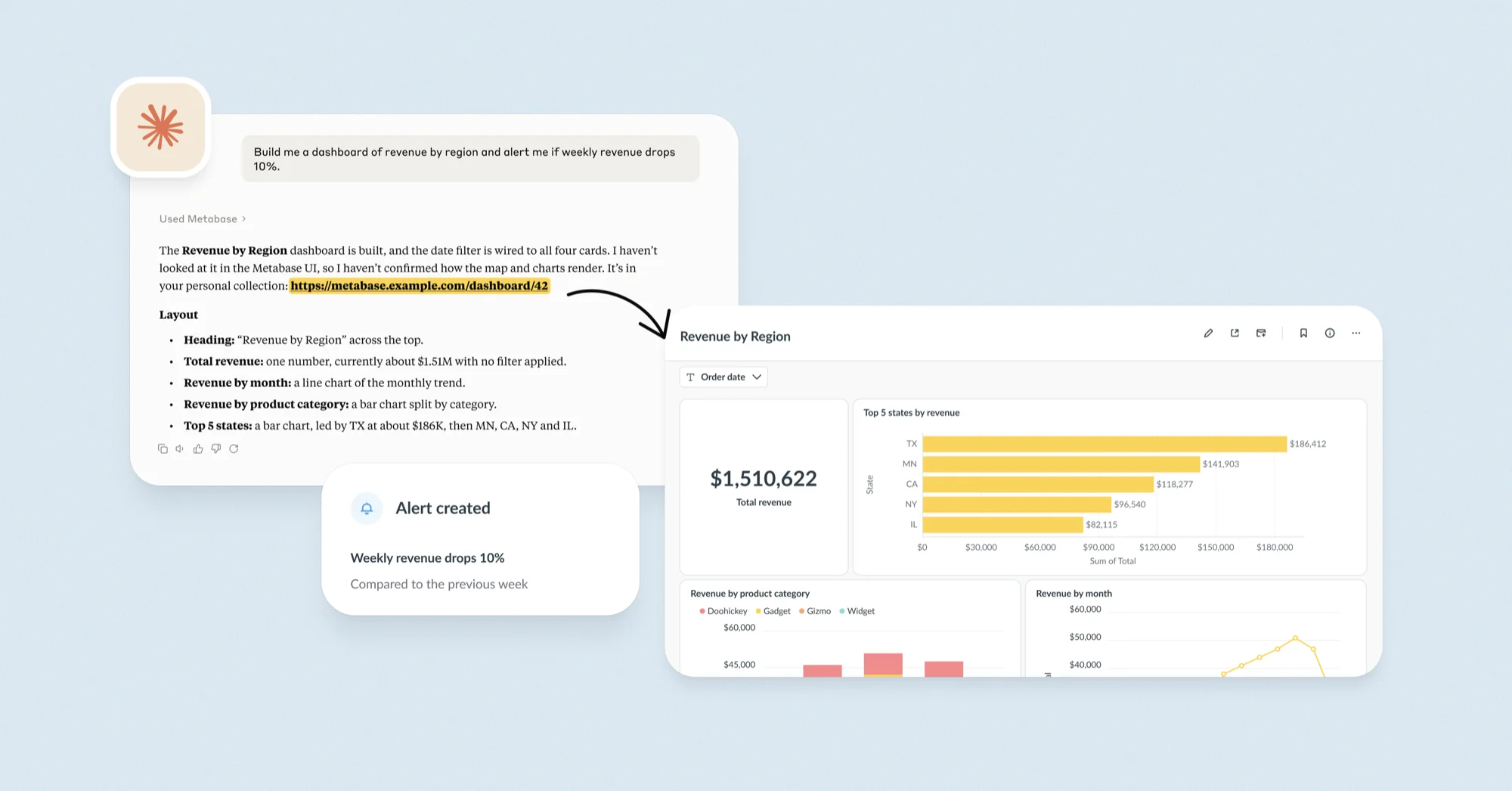
The new Metabase MCP gives your AI client (Claude, ChatGPT, Cursor, VS Code) more and better tools to query data and generate analytics using the guardrails, context, and permissions you’ve already defined and scoped:
- Agents can find and query the metrics, measures and segments your team has already defined. The new glossary tool looks up your business terms in the Data Studio glossary, so “active customer” means the same thing to your agent as it does to your team.
- Builds better reporting. Agents can browse your data and read all your content, then build on it: dashboards with cards, headings, text, tabs and filters; alerts and subscriptions; documents, models, SQL questions with variables, metrics, measures and segments. Everything they create is regular Metabase content you can verify, share and embed.
- Runs on least privilege. Every call runs as the person who connected with their Metabase permissions. AI clients start with read-only access to your content. When a tool needs more, like running SQL or scheduling deliveries to email or Slack, Metabase asks you to approve it first. Admins can see every tool call in MCP analytics, and can turn off the MCP server (or raw SQL through it) for the whole instance.
Available on every plan, including open source. Set up the MCP server.
Run Metabot on (almost) any model, including one you host yourself
Choose where your AI runs: a hosted provider, your own cloud, or an open model you run yourself with vLLM. Self-host Metabase, connect it to your own vLLM server, and your prompts, metadata, and query results never leave your network.
The list of providers you can connect to has expanded, now with support for:
- Self-hosted vLLM models
- Google Gemini Enterprise
- Mistral
- Z.AI
- DeepSeek
- Moonshot
- OpenRouter
These join existing support for Anthropic, OpenAI, AWS Bedrock, and Microsoft Azure. Connect with your API key and pay the LLM provider directly for AI, we don’t charge you anything for tokens. Read more about AI usage controls, including usage limits, and every supported provider.
You can now connect to as many providers as you like, including several of the same type (e.g. two Azure deployments), and pick your preferred model from each connected vendor.
Your keys only go where you send them: changing a provider’s base URL now requires re-entering its credentials, and provider URLs follow a network policy.
Available on all plans, including open source.
Set it up: Admin → AI → AI settings → Connect to a provider, then pick your provider and add your credentials.
Pick up where you left off with Metabot chat history
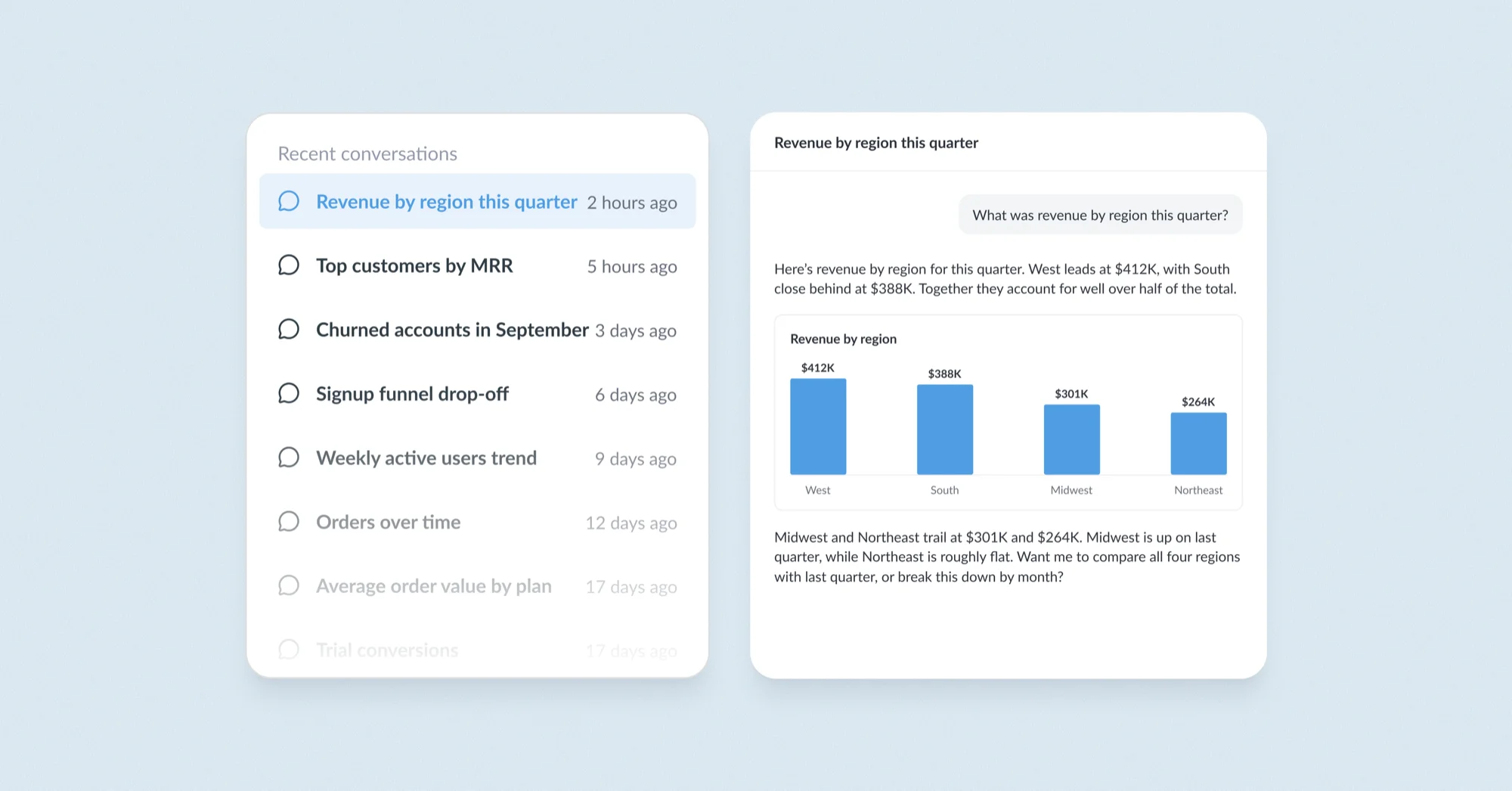
Past Metabot conversations appear in the sidebar and on the AI explorations page. Review past chats and jump back in. Available on all plans, including open source.
To try: Open Metabot → pick a past conversation from the sidebar.
See who’s doing what with the MCP and CLI with usage analytics
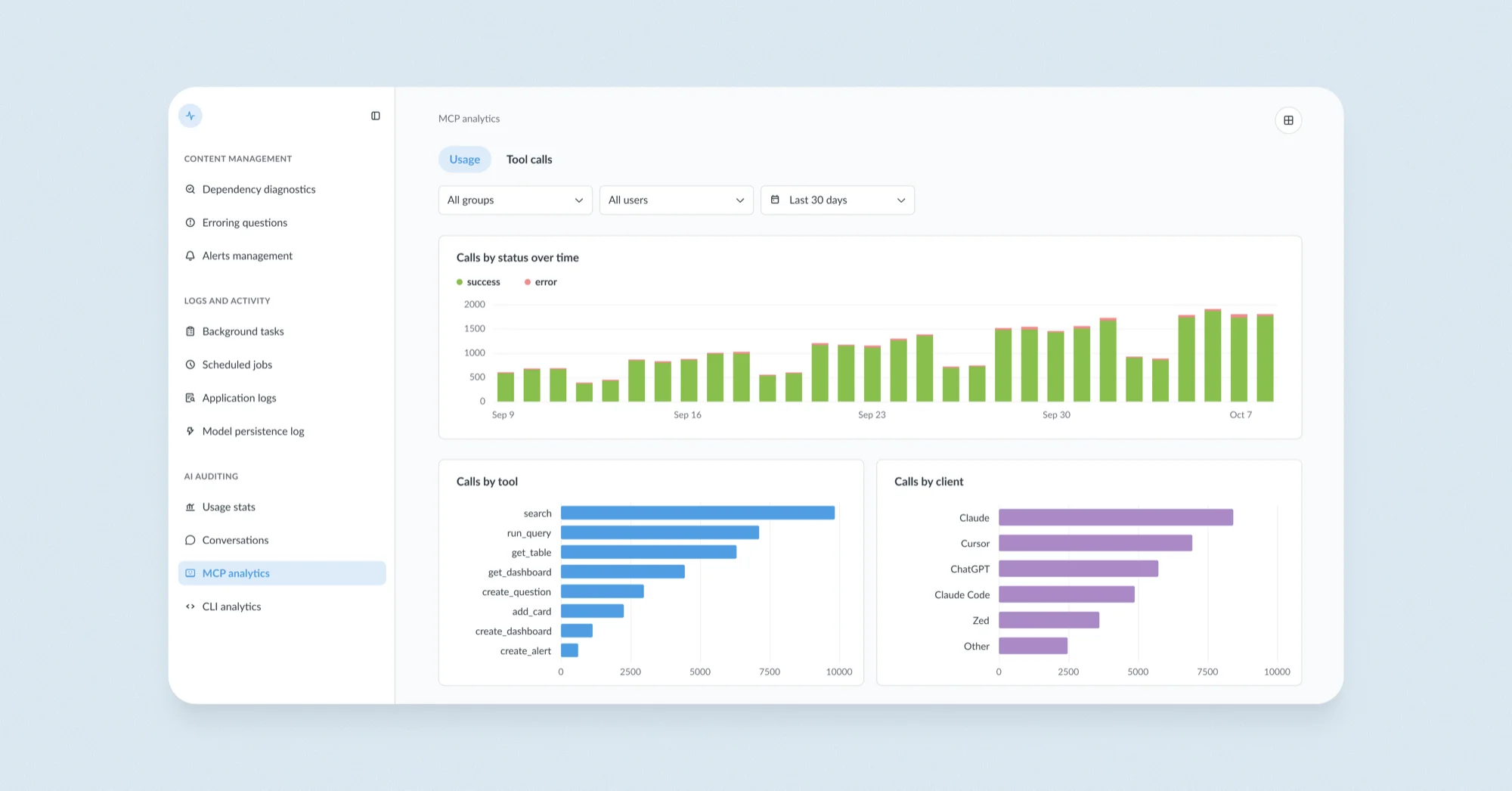
See which AI clients connect, which tools they call, by whom, how often, and what failed. Plus which CLI commands run and who runs them.
MCP and CLI analytics joins the growing range of AI governance functionality in Metabase, like controls for which groups can use AI and which features, token and message limits, system prompts to customize Metabot’s instructions, usage analytics and auditing for Metabot conversations, and more.
Usage analytics now live in the new Monitor section, where we’ve moved all monitoring and auditing tools. If you’re an admin, you’ll see it in the top-right nav dropdown.
Data Studio
Transform improvements: add indexes, lookback windows, and more
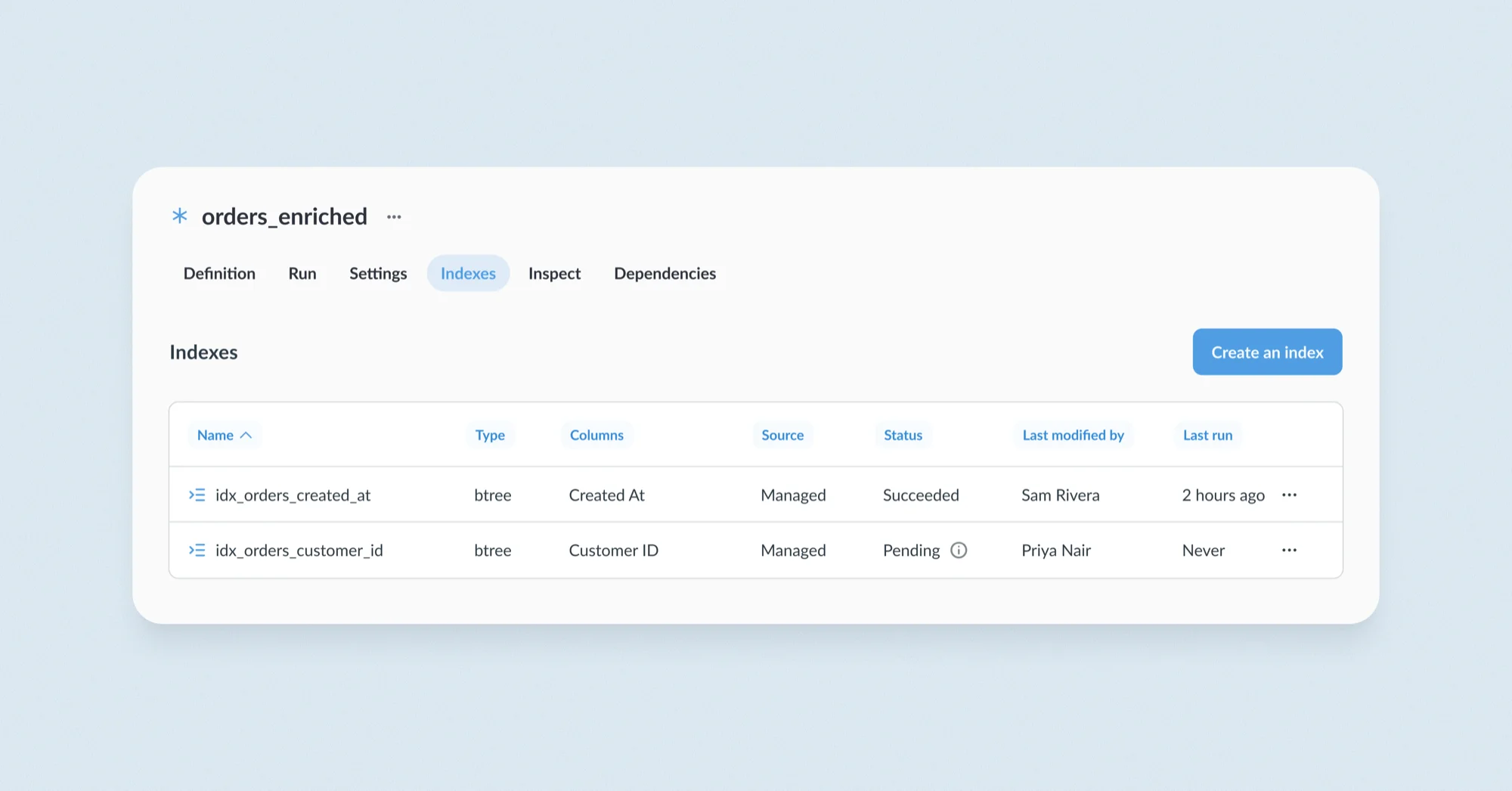
You can now you define indexes on the transform itself in the new Indexes tab. Indexes work with Postgres, MySQL, SQL Server, Snowflake, BigQuery, Redshift and ClickHouse, using whatever each one supports (secondary indexes, clustering keys, sort keys, etc). Available on every plan, including open source.
Lookback windows let incremental transforms pick up late-arriving data. You can also rerun everything upstream or downstream of a transform from the Run button, so a whole chain rebuilds in one go.
Admins can now also turn off Transforms entirely in Data Studio settings.
Embedded analytics
Embed custom visualizations with the Modular Embedding
Released in the core app in v62, custom visualizations are now supported by Modular Embedding (support for the SDK shipped in v63). If your team has built a chart type that Metabase doesn’t ship, write it in React and render it natively in your Metabase and in your embeds.
Show all collections in the embedded collection browser
Embedded apps can show org-specific and shared reports in one collection browser instead of building their own.
Other cool stuff
See what’s blocking in Remote Sync
When adding a collection to Remote Sync fails a dependency check, you’ll now see a modal that shows which other collections need syncing, including dependencies in collections that can’t be synced, like personal collections.
Collections are easier to navigate and find what you’re looking for
Search for content in collections by name, or last editor, and filter by content type. You can also bulk-select items to move, pin, bookmark, duplicate, or trash.
To try: Open a collection with 10+ items → search or filter by type → shift-click to bulk-select.
Curate the most useful breakout dimensions for metrics
Metrics used to expose every column from every related table. Now you can guide what people (and Metabot) see. You’ll see a Dimensions tab on the Metric page to curate which dimensions are exposed, with readable names and a default. Available in all plans.
To try: Open a metric → Dimensions tab → choose dimensions and a default.
Permalinks for databases, schemas and tables
Named, shareable permalinks for databases and schemas for a simpler way to share data with people, plus a dedicated table view, replacing /browse/database/:id URLs. Old URLs will still work.
Who moved my cheese
New Monitor section for admins
Monitoring tools were scattered across Admin, Data Studio and Collections. Now admins have one place to see what’s running, what’s failing, and what people and agents are doing. Easier to keep a clear view of what’s going on in your Metabase.
Breaking changes and FYIs
- v64 is an LTS version. Learn more about version support.
- The Metabase API only accepts documented use. Calls that rely on undocumented behavior are no longer supported and may stop working. For example, the card export endpoint now requires an
idfor every parameter. - View access is checked all the way down. If someone can’t view a model, metric or question that another question depends on, that question shows a permissions error.
- Database secrets aren’t exported with serialization. Imports still work.
- Action form prefill values are sent in the request body, not the URL.
- Metabase no longer encrypts an existing app database on startup. Use the
enable-encryptioncommand instead (see Encrypting your database connection details). ChangingMB_SESSION_SECRET_KEYsigns everyone out. - Requiring 2FA signs out sessions that weren’t 2FA-challenged once any grace period ends.
- React 18 support ending in the Modular Embedding SDK: We’re moving to React 19, and the SDK will drop support for React 18 in v66. The SDK already supports React 19, so you can upgrade any time. If you’re on Metabase Cloud and can’t upgrade by then, let us know and we’ll keep you on v64: help@metabase.com.
- Metabot no longer generates transforms. An exciting new AI toolkit for transforms is coming soon.
- Custom viz SDK 2.0. See the custom viz changelog for more details and remediation.
- See the changelog for all breaking changes.
Big thanks to everyone who contributed
Thanks to everyone who submitted bug reports, feature suggestions, and pull requests. Metabase gets better and better thanks to your efforts.
Hope you enjoy the release. If you want to get into the nitty-gritty, check out our changelog.
Cheers,
The Metabase team
Share this release
See previous releases
All releasesGet started with Metabase
- Free, no-commitment trial
- Easy for everyone—no SQL required
- Up and running in 5 minutes