


Embed a collection browser
Browser component is only available on Pro and Enterprise plans (both self-hosted and on Metabase Cloud).
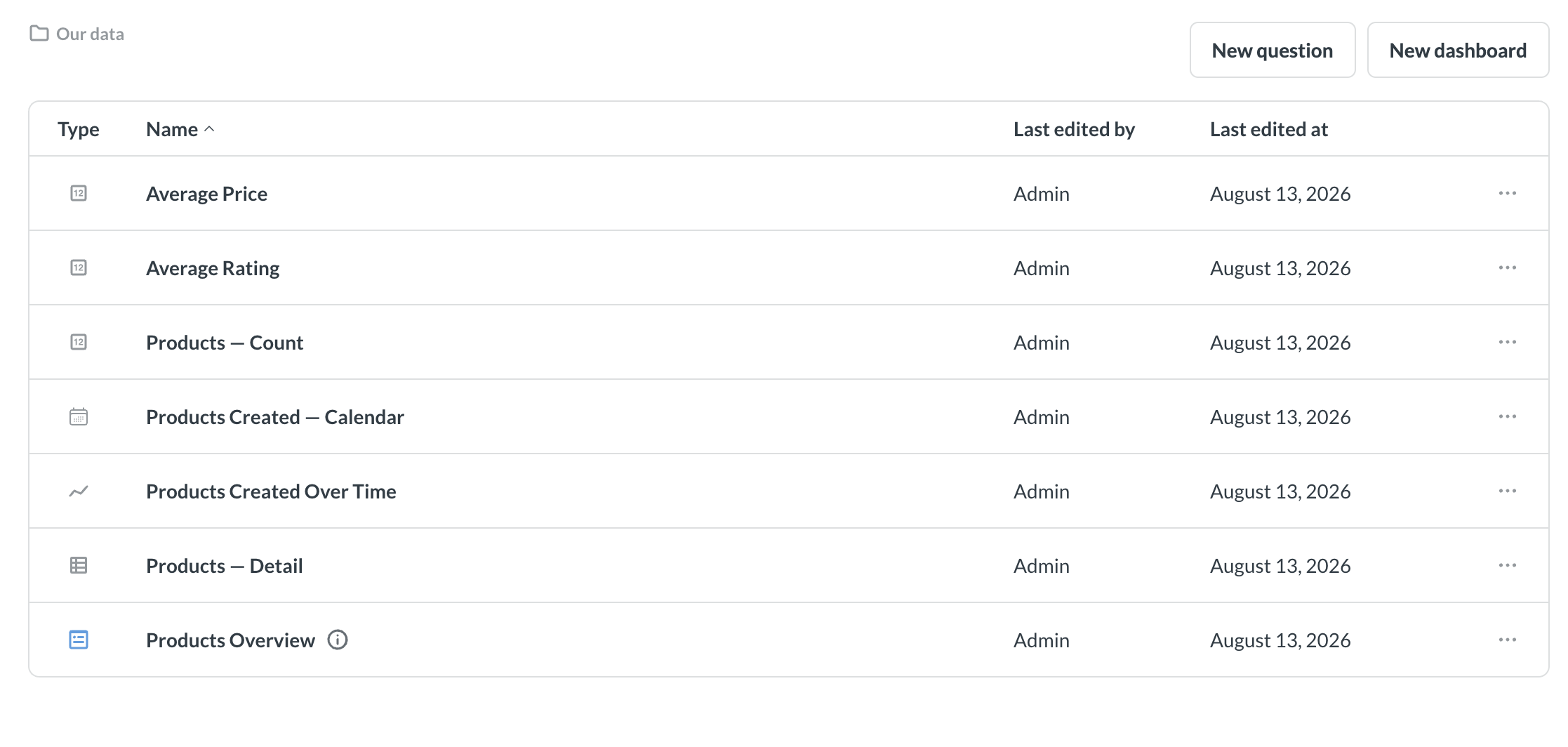
The collection browser lets people navigate through collections they have permission to view.
There are two ways to embed a collection browser:
- Web component: a whole browser. Clicking an item opens it inside the embed, with breadcrumbs, create buttons, and saving already built.
- React SDK: a list of items with breadcrumbs, plus a click handler. Nothing opens on its own, so you decide what a click does and build any create or save flow in your own app.
To see a collection browser, people need Metabase accounts, because Metabase uses collection permissions to work out what each person can see. So a collection browser only works in an embed that signs people in with SSO; it won’t work in a guest embed.
Web component collection browser
Point <metabase-browser> at the collection you want people to start in:
<metabase-browser initial-collection="123"></metabase-browser>
initial-collection is the only required attribute. It takes:
- A collection ID, like
123— the number in the collection’s URL. On Pro and Enterprise plans, you can use the collection’s entity ID instead, which stays the same when you serialize content from one Metabase to another. "root"for the top-level Our analytics collection."personal"for the personal collection of whoever’s viewing."tenant"for the tenant collection of whoever’s viewing. People who aren’t tenant members will get an error.
For the full list of attributes, see web component attributes.
Clicking an item opens it inside the embed
Clicking a dashboard or question opens it inside the embed, with breadcrumbs back to the collection. People can filter, summarize, and drill through anything they open.
By default, people won’t be able to save questions to the collection.
Let people save changes
If you want people to be able to edit and save the dashboards and questions they open, set read-only="false":
<metabase-browser initial-collection="123" read-only="false"></metabase-browser>
Under the hood, read-only decides which dashboard component people land on: a read-only browser opens dashboards for exploring, while read-only="false" opens them for editing.
Which collection people can save something to depends on whether it’s a new item or not:
- A new question or dashboard will be saved in the collection they’re browsing. The save dialog preselects that collection, and people can pick any other collection they can write to, which comes down to collection permissions. Everyone can always write to their own personal collection, so that shows up as an option even if you’ve not given people curate access to any collection.
- Changes to a dashboard or question they opened from the browser overwrite the original, wherever it lives. If they save a question as a new question instead, it goes to the collection they’re browsing. Either way, there’s no collection picker, so people can’t file it somewhere else.
People in a tenant see two writable options in that picker: their tenant collection, which Metabase labels Our data, and their own personal collection. Tenant collections and personal collections both give people curate access that you can’t turn off, so a tenant collection browser will always offer somewhere to save. People in a tenant have no access to Our analytics, so it won’t show up.
There’s no <metabase-browser> attribute that fixes the save target to one collection, the way target-collection does on <metabase-question>. Check out Let people save their changes.
Add new question and new dashboard buttons
The browser can show a New question button and a New dashboard button above the list of items.
with-new-questiondefaults totrue. New question ignoresread-only, so the button shows up even on a read-only browser.with-new-dashboardalso defaults totrue, but New dashboard only shows up when you setread-only="false".- Either button only shows up for people with curate access to the collection you named in
initial-collection.
So a default <metabase-browser> gives people New question and nothing else. Add read-only="false" and they get both buttons. To turn a button off, set its attribute to false. Here, people get New question but not New dashboard:
<metabase-browser
  initial-collection="123"
  read-only="false"
  with-new-dashboard="false"
></metabase-browser>
Because New question ignores read-only, people on a read-only browser can open the query builder and explore, but they won’t be able to save what they build, or overwrite an existing question.
The new question button opens the query builder with every table, model, and saved question people have access to. To narrow down the list of entity types people can choose, list the entity types you want in data-picker-entity-types. Limiting people to models, for example, means they build on your curated data rather than on raw tables:
<metabase-browser
  initial-collection="123"
  read-only="false"
  data-picker-entity-types="['model']"
></metabase-browser>
Let people follow links to other dashboards and questions
By default, clicking a link (like from a link card) from inside a dashboard does nothing, so people stay inside the collection you gave them. Turn on enable-entity-navigation to let them follow those links:
<metabase-browser
  initial-collection="123"
  enable-entity-navigation="true"
></metabase-browser>
People can still only open content their collection permissions allow.
React SDK collection browser
Modular embedding SDK is only available on Pro and Enterprise plans (both self-hosted and on Metabase Cloud).
The SDK’s CollectionBrowser lists what’s in a collection and tells you when someone clicks an item. It has no create buttons and doesn’t open anything on its own. You decide what a click does, and add whatever buttons you want. CollectionBrowser does render its own breadcrumbs, though, so people can navigate into subcollections and back out again.
import React from "react";
import {
  CollectionBrowser,
  MetabaseProvider,
  defineMetabaseAuthConfig,
} from "@metabase/embedding-sdk-react";

const authConfig = defineMetabaseAuthConfig({
  metabaseInstanceUrl: "https://your-metabase.example.com",
});

export default function App() {
  const collectionId = 123; // This is the collection ID you want to browse

  return (
    <MetabaseProvider authConfig={authConfig}>
      <CollectionBrowser
        collectionId={collectionId}
        pageSize={10}
        visibleEntityTypes={["dashboard", "question", "collection"]}
      />
    </MetabaseProvider>
  );
}
collectionId takes a collection ID (sequential or entity), or one of "root", "personal", or "tenant". It defaults to "personal", so unless you want people to start in their own personal collection, you should pass an explicit value.
For the full list of props, see CollectionBrowser props.
Decide what happens when someone clicks an item
Use onClick to render a Metabase component, route somewhere in your app, or open a modal.
onClick hands you the item that was clicked. Check item.model to find out what was clicked. Here, card is a question, and dataset is a model.
One quirk: when someone clicks on a collection, CollectionBrowser navigates into that collection and calls onClick. So skip "collection" in your handler, or you’ll move people twice.
import React, { useState } from "react";
import {
  CollectionBrowser,
  InteractiveDashboard,
  InteractiveQuestion,
  type MetabaseCollectionItem,
} from "@metabase/embedding-sdk-react";

export default function BrowseAndOpen() {
  const [dashboardId, setDashboardId] = useState<number | null>(null);
  const [questionId, setQuestionId] = useState<number | null>(null);

  const handleClick = (item: MetabaseCollectionItem) => {
    // Metabase's internal names for these differ from what people see:
    // a question is a "card", and a model is a "dataset".
    if (item.model === "dashboard") {
      setDashboardId(item.id as number);
    } else if (item.model === "card" || item.model === "dataset") {
      setQuestionId(item.id as number);
    }
  };

  if (dashboardId) {
    return <InteractiveDashboard dashboardId={dashboardId} />;
  }

  if (questionId) {
    return <InteractiveQuestion questionId={questionId} />;
  }

  return <CollectionBrowser collectionId="personal" onClick={handleClick} />;
}
Further reading
- Browser component reference
- Embed a dashboard
- Embed a chart
- Embed the query builder
- Appearance
- Collections
- Collection permissions
- Authentication
- Modular embedding SDK
- Modular embedding components
Read docs for other versions of Metabase.