





What does a knowledge-base health dashboard show in Metabase?
A knowledge-base health dashboard shows whether important content is current, owned, complete, and used. It combines content metadata from tools such as Confluence, SharePoint, Notion, Coda, Box, and Dropbox in one governed view.
For: Knowledge managers, operations, enablement, security, and program owners. Grain: one content item plus a required-topic inventory and optional activity events.
What does a knowledge base health dashboard look like?
Here’s the layout this guide builds: a summary row for the size of the library and its known problems, then freshness and ownership, then topic coverage, workspace activity, and external exposure. Read it before a review cycle to decide what gets updated, re-owned, or archived.
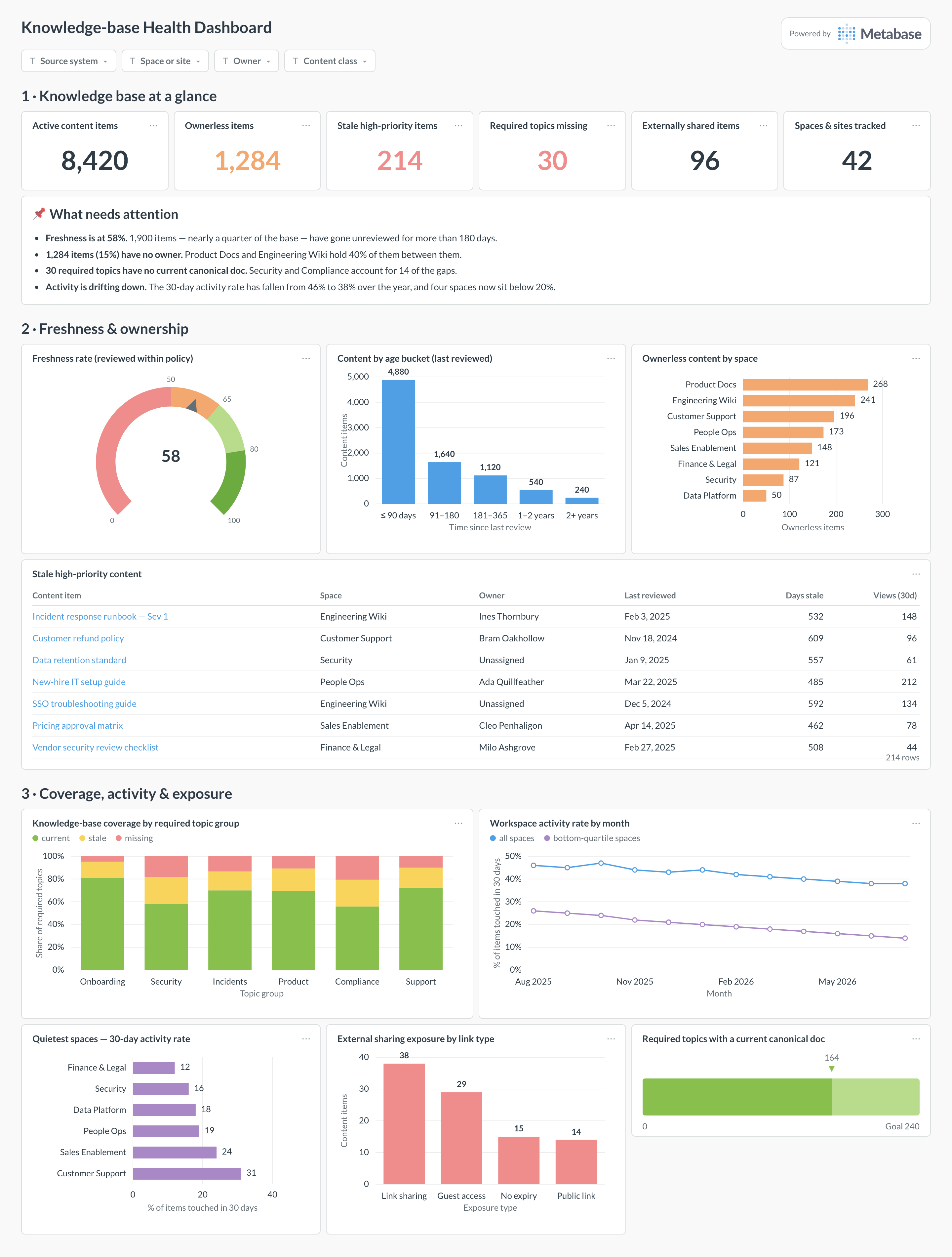
An example knowledge-base health dashboard in Metabase, built from content metadata synced from Confluence, SharePoint, or similar tools. Figures are illustrative.
Which cards belong on a knowledge-base health dashboard?
- Freshness rate and content by age bucket
- Ownerless content by space, site, folder, or workspace
- Knowledge-base coverage by required topic group
- Stale high-priority content with owner and last review
- Workspace activity rate with quiet and declining areas
- External sharing or permission risk where the source exposes it
What data does the dashboard need?
content_itemswith stable ID, type, container, owner, lifecycle, created, updated, and reviewed dates.required_knowledge_topicsmapping operational topics to canonical content.- Optional
content_activity_eventsfor views, edits, comments, sharing, and contributor trends. - A freshness-policy table by content class, criticality, or audience.
How do you build it?
- Sync content metadata and versions into a database or warehouse.
- Normalize sites, spaces, folders, boards, and docs into containers and content items.
- Join the required-topic inventory and apply freshness windows by content class.
- Build summary cards, drill-through cleanup tables, and owner/container filters.
Example card SQL
SELECT
container_name,
COUNT(*) AS active_items,
COUNT(*) FILTER (WHERE owner_id IS NULL) AS ownerless_items,
COUNT(*) FILTER (
  WHERE last_reviewed_at < CURRENT_DATE - INTERVAL '90 days'
) AS stale_items,
ROUND(
  100.0 * COUNT(*) FILTER (
    WHERE owner_id IS NOT NULL
      AND last_reviewed_at >= CURRENT_DATE - INTERVAL '90 days'
  ) / NULLIF(COUNT(*), 0),
  2
) AS healthy_content_rate
FROM content_items
WHERE archived_at IS NULL
GROUP BY container_name
ORDER BY healthy_content_rate ASC;