





What goes in an SLA & response-time dashboard in Metabase?
An SLA & response-time dashboard tracks whether you're keeping the promises you make to customers — first-response and resolution targets, breaches, and how open work is aging against the clock. Build it from support data synced into a database — see Zendesk, Front, or Freshdesk for the connection.
For: Support leaders, ops, account teams. Refresh: hourly. Source: modeled tickets with response/resolution timestamps and SLA targets (or modeled targets by priority).
What does an SLA & response-time dashboard look like?
Here’s the layout this guide builds. Attainment against each target sits at the top as a progress card, then the weekly attainment and response-time percentiles that show whether the trend is drifting, then where breaches concentrate by priority and team — closing with the open tickets whose clock is still running. Read it hourly during a busy week.
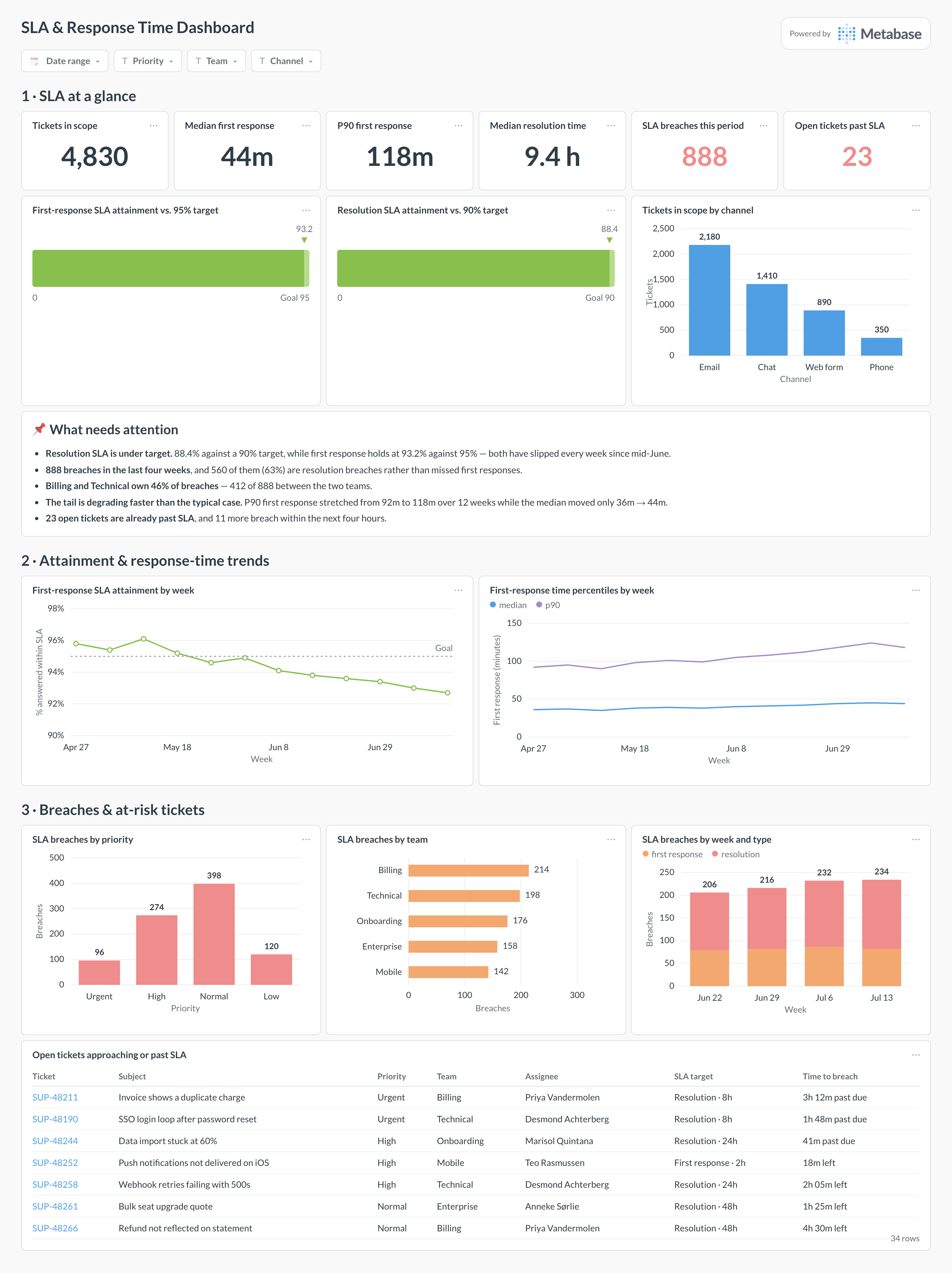
An example SLA and response-time dashboard in Metabase, built from Zendesk, Front, or Freshdesk data. Figures are illustrative.
Which cards belong on an SLA dashboard?
Headline KPIs
- First-response SLA attainment %
- Resolution SLA attainment %
- Breaches this period
- Median first-response time
Trend & risk
- SLA attainment by week
- Response-time percentiles (median and p90) over time
- Breaches by priority and by team
- Open tickets approaching or past SLA (table)
What data does an SLA dashboard need?
- A
ticketstable with created,first_response_at, andresolved_at. - SLA targets — from SLA policy fields, or modeled per priority/plan if the tool doesn’t store them.
- For business-hours SLAs, a business-hours calendar to subtract nights and weekends.
- Priority and team fields to break down breaches.
How do you build an SLA dashboard?
- Sync your help desk into a database (Zendesk, Front, or Freshdesk).
- Define SLA targets by priority; if measuring in business hours, subtract non-working time before comparing.
- Compute met/breached per ticket, then attainment by period.
- Add an at-risk table of open tickets nearing their target.
Example card SQL
-- First-response SLA attainment by week.
-- SLA target here is 4 business... simplified to calendar hours for the example.
SELECT
date_trunc('week', t.created_at)                        AS week,
COUNT(*)                                                AS tickets,
COUNT(*) FILTER (
  WHERE EXTRACT(EPOCH FROM (t.first_response_at - t.created_at)) / 3600.0 <= 4
)                                                       AS met_sla,
ROUND(100.0 * COUNT(*) FILTER (
  WHERE EXTRACT(EPOCH FROM (t.first_response_at - t.created_at)) / 3600.0 <= 4
) / NULLIF(COUNT(*), 0), 1)                             AS sla_attainment_pct
FROM tickets t
WHERE t.first_response_at IS NOT NULL
GROUP BY date_trunc('week', t.created_at)
ORDER BY week;