





What does an ad spend pacing dashboard show in Metabase?
An ad spend pacing dashboard shows whether budget is burning at the planned rate — before the month ends and the answer stops mattering. It joins daily spend from Google Ads, Meta Ads, LinkedIn Ads, and TikTok Ads against a budgets table, so over- and underspend surface by channel and campaign while there's still time to act.
For: performance marketers, marketing ops, and finance partners. Grain: one row per campaign per day per channel, joined to monthly budgets per channel and campaign.
What does an ad spend pacing dashboard look like?
Here’s the layout this guide builds, read mid-month rather than at month-end: budget burn and the projection at the top, then the run-rate and weekly spend charts that explain it, then the campaign tables that say which line items to turn up or down.
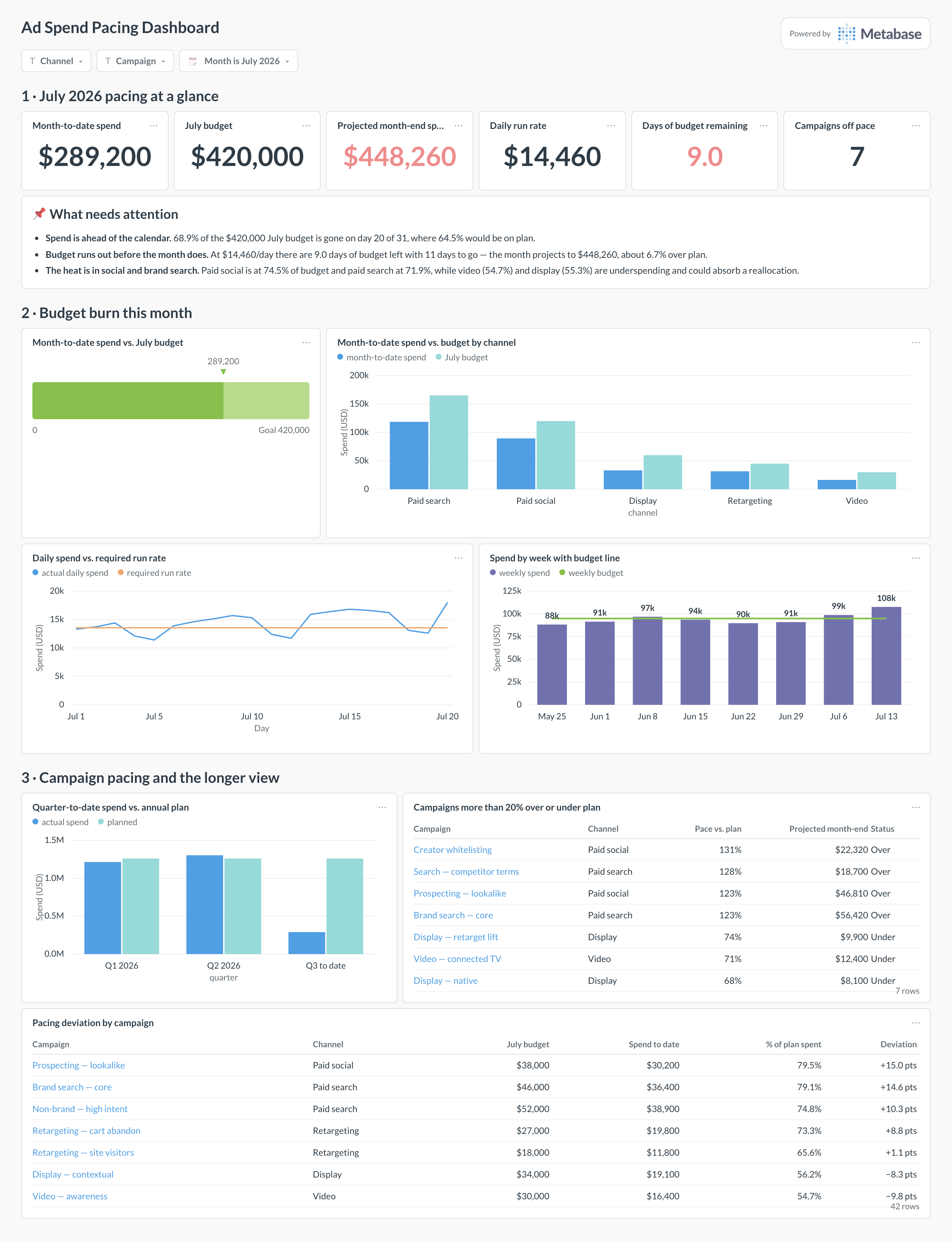
An example ad spend pacing dashboard in Metabase, built from Google Ads and Meta Ads spend joined to a budgets table. Figures are illustrative.
Which cards belong on an ad spend pacing dashboard?
- Month-to-date spend vs. budget by channel (progress or bar)
- Daily spend run rate vs. required run rate (line)
- Projected end-of-month spend vs. plan (number)
- Pacing deviation by campaign (table)
- Campaigns over or under 20% of plan (table)
- Days of budget remaining at the current rate (number)
- Spend by week with budget line (combo)
- Quarter-to-date vs. annual plan (bar)
What data does the dashboard need?
ad_performance_daily— the unioned per-channel spend model, one row per campaign per day (the same model behind the paid channel performance dashboard).budgetswith channel, campaign, month, and planned amount — usually maintained as a spreadsheet upload or a small warehouse table.- Optional flight dates per campaign, so flighted budgets pace against their window instead of the calendar month.
How do you build it?
- Sync daily spend from each ad platform into the unioned
ad_performance_dailymodel. - Land the budget plan as a
budgetstable — CSV upload into Metabase or a warehouse table — and agree who updates it when plans change. - Join actuals to plan on channel, campaign, and month; compute month-to-date spend, required run rate, and the linear projection.
- Build the cards, then attach alerts to the breach questions so pacing problems arrive in Slack, not in the month-end review.
Example card SQL
WITH mtd AS (
SELECT
  channel,
  SUM(spend) AS mtd_spend
FROM ad_performance_daily
WHERE stat_date >= date_trunc('month', CURRENT_DATE)
GROUP BY 1
),
channel_budgets AS (
-- budgets are stored per campaign; roll them up to the channel grain first
SELECT
  channel,
  SUM(planned_amount) AS budget
FROM budgets
WHERE month = date_trunc('month', CURRENT_DATE)
GROUP BY 1
)
SELECT
b.channel,
b.budget,
COALESCE(m.mtd_spend, 0) AS mtd_spend,
ROUND(
  COALESCE(m.mtd_spend, 0)
    / EXTRACT(DAY FROM CURRENT_DATE)
    * EXTRACT(DAY FROM date_trunc('month', CURRENT_DATE)
      + INTERVAL '1 month - 1 day'),
  2
) AS projected_month_end,
ROUND(
  COALESCE(m.mtd_spend, 0) / NULLIF(b.budget, 0) * 100, 1
) AS pct_of_budget_spent
FROM channel_budgets b
LEFT JOIN mtd m ON m.channel = b.channel
ORDER BY pct_of_budget_spent DESC;
Related
Metrics
Integrations
Dashboards
FAQ
What is an ad spend pacing dashboard?
Where does the budget table come from?
channel, campaign, month, and planned_amount, and land it in the warehouse however fits: a dbt seed, a scheduled load, or a CSV upload straight into Metabase (upload works through the UI and the Metabase CLI). What matters is that it lives next to ad_performance_daily so the join is one query, and that someone owns updating it when plans change.