



What goes in a DevSecOps dashboard in Metabase?
A DevSecOps dashboard puts security inside the delivery pipeline: scan coverage in CI, findings by pipeline stage, remediation speed by severity, secrets-scanning catches, dependency freshness, and how often security gates block a deploy. It complements the estate-wide vulnerability management view and the findings-deep AppSec findings dashboard.
For: security engineers, platform teams, and engineering leads. Grain: weekly, with live counts for open criticals. Source: scanner and CI APIs, normalized into one findings table.
What does a DevSecOps dashboard look like?
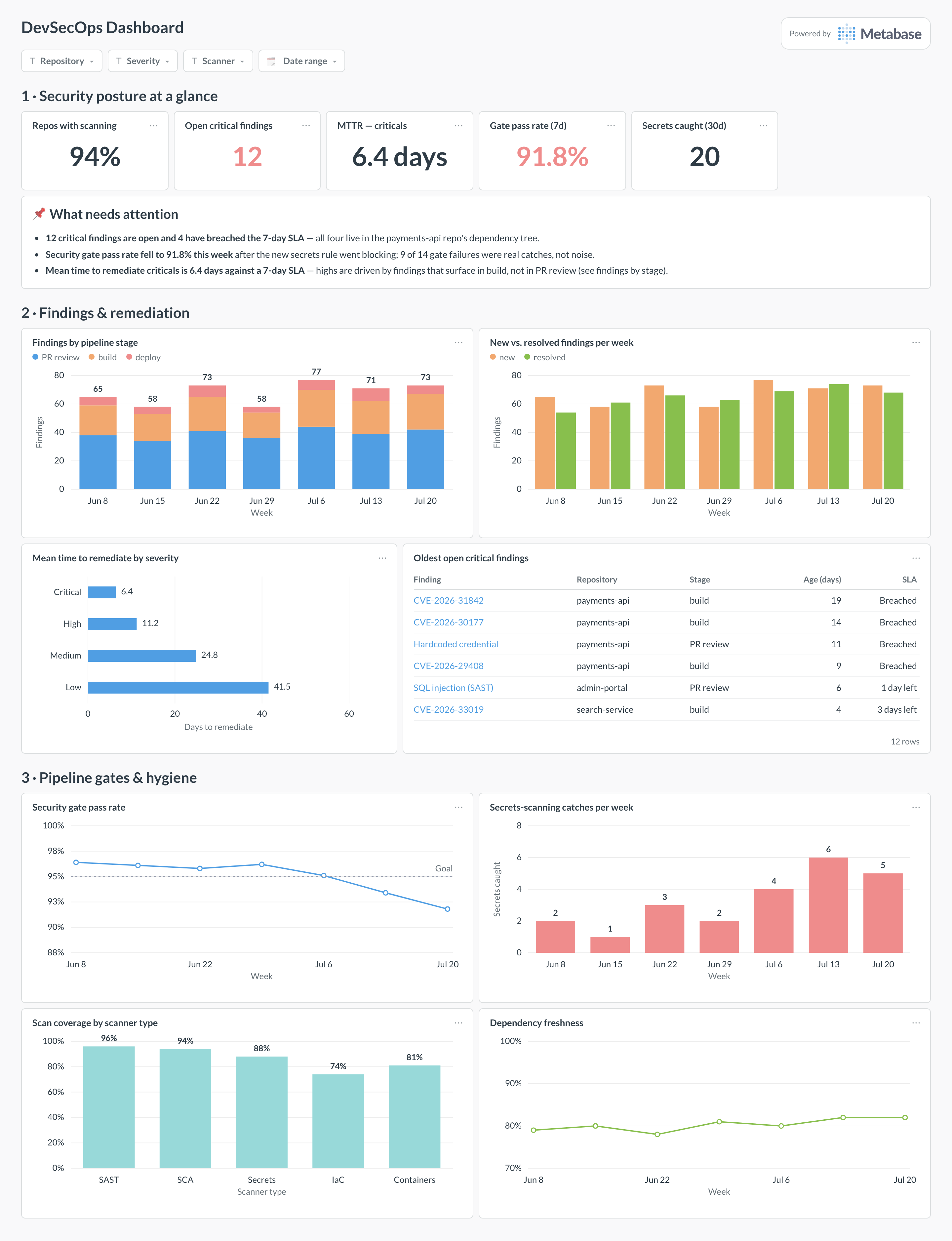
Here’s the layout this guide builds. Posture scalars and the attention card lead, so an SLA breach is impossible to miss; findings and remediation come next — where findings surface and how fast they die; pipeline gates and hygiene close the page with the controls that stop new debt from entering.
Which cards belong on a DevSecOps dashboard?
The eight below cover the loop: what the scanners see, how fast findings get fixed, and whether the gates are holding.
- Findings by pipeline stage — PR review, build, deploy, per week (stacked bar)
- New vs. resolved findings per week (bar)
- Mean time to remediate by severity (row)
- Oldest open critical findings, with age and SLA status (table)
- Security gate pass rate, weekly with a goal line (line)
- Secrets-scanning catches per week (bar)
- Scan coverage by scanner type — SAST, SCA, secrets, IaC, containers (bar)
- Dependency freshness — share of dependencies within 90 days of latest (line)
What data does the dashboard need?
- A normalized
security_findingstable —severity,detected_at,resolved_at,repo,pipeline_stage,scanner,sla_interval— merged from your SAST, SCA, and container scanners. - CI gate results per pipeline run: gate name, pass/fail, and whether the failure blocked a merge or deploy.
- Secrets-scanner events with repo, rule, and a resolved/revoked flag — counts only, never the secret material itself.
- A repo inventory with which scanner types are enabled per repo, for the coverage card.
- SCA dependency exports with pinned version, latest version, and release dates, for the freshness trend.
How do you build it?
- Pull findings from your scanners — Snyk, Semgrep, SonarQube — into one table, deduplicating on rule + location so a finding that appears in every nightly scan counts once.
- Tag each finding with the pipeline stage that surfaced it (PR review, build, deploy) from the CI context of the scan run.
- Encode your SLA per severity as an
sla_intervalcolumn and build the remediation model — resolved time minus detected time — that every remediation card reads. - Add gate results from CI check runs and the per-repo scanner inventory, then build the coverage and gate-rate cards against them.
- Add filters for repository, severity, scanner, and date range, and alert on the two numbers that matter daily: open criticals and gate pass rate.
Example card SQL
SELECT
f.severity,
COUNT(*) FILTER (WHERE f.resolved_at IS NULL)         AS open_findings,
ROUND(AVG(
  EXTRACT(EPOCH FROM f.resolved_at - f.detected_at) / 86400
) FILTER (WHERE f.resolved_at IS NOT NULL), 1)        AS mean_days_to_remediate,
COUNT(*) FILTER (
  WHERE f.resolved_at IS NULL
    AND now() - f.detected_at > f.sla_interval
)                                                     AS open_past_sla,
ROUND(
  100.0 * COUNT(*) FILTER (
    WHERE f.resolved_at IS NOT NULL
      AND f.resolved_at - f.detected_at <= f.sla_interval
  ) / NULLIF(COUNT(*) FILTER (WHERE f.resolved_at IS NOT NULL), 0), 1
)                                                     AS remediated_within_sla_pct
FROM security_findings f
WHERE f.detected_at >= now() - interval '90 days'
GROUP BY f.severity
ORDER BY
CASE f.severity
  WHEN 'critical' THEN 1 WHEN 'high' THEN 2
  WHEN 'medium' THEN 3 ELSE 4
END;
Related
Metrics
Integrations
Dashboards
FAQ
What is a DevSecOps dashboard?
How is this different from a vulnerability management dashboard?
Why break findings down by pipeline stage?
How do I keep secrets-scanning numbers honest?
What is a good security gate pass rate?
How should I measure dependency freshness?
Which severity SLA should the dashboard enforce?
sla_interval column) so the "open past SLA" count and the SLA compliance rate are computed, not eyeballed, and put breached findings in a table with names and ages — aggregates alone let old criticals hide.