





What goes in a sales pipeline dashboard in Metabase?
A sales pipeline dashboard shows the current health of the book: how much open pipeline exists at each stage, whether coverage is sufficient for quota, where deals convert and where they stall, and whether creation is keeping pace with what closes. It's the current-state counterpart to a sales forecast dashboard — health here, projection there.
For: sales leaders, RevOps, and frontline managers. Grain: one row per opportunity per daily snapshot. Source: CRM opportunities synced to the warehouse, with field history or daily snapshots.
What does a sales pipeline dashboard look like?
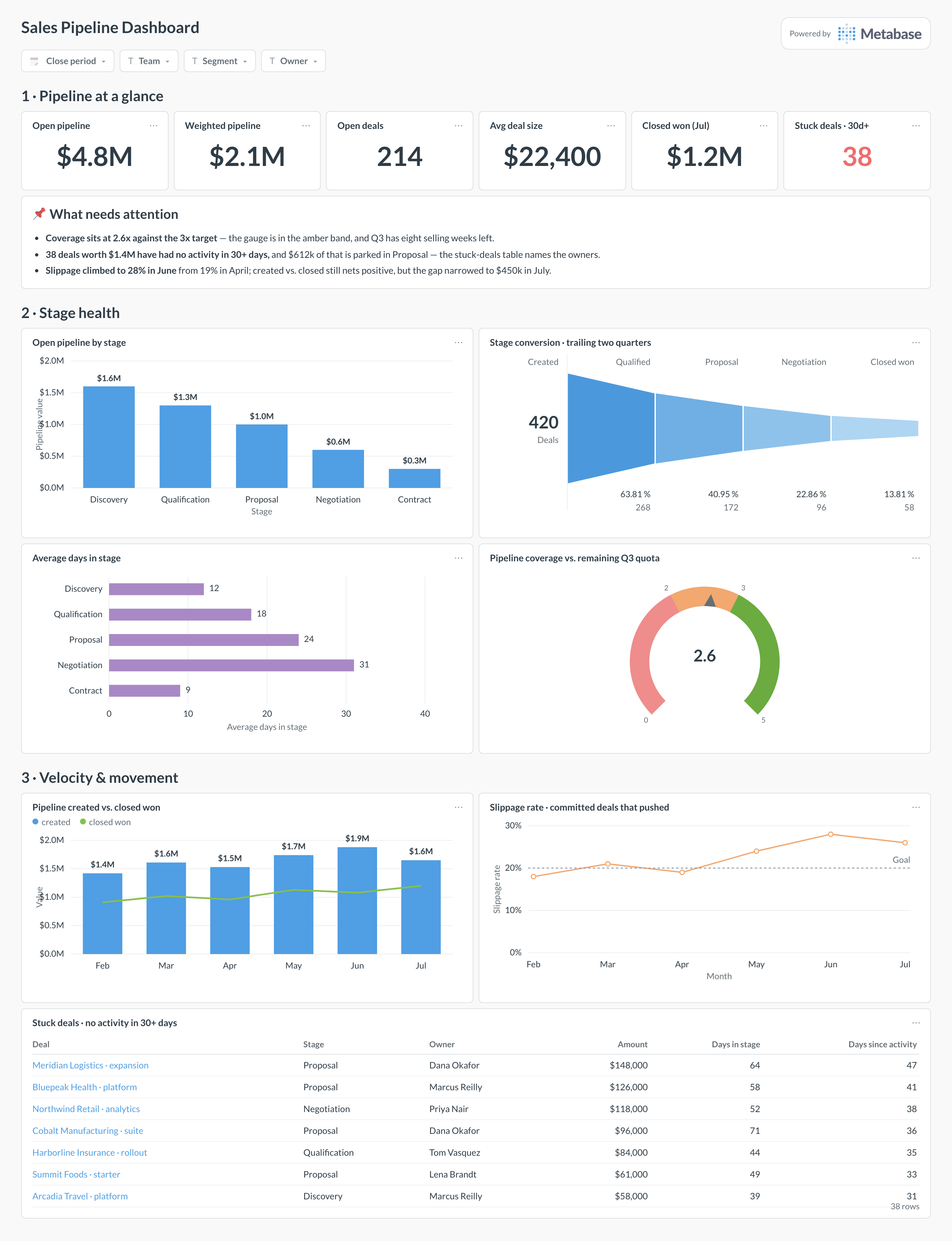
Here’s the layout this guide builds. The headline numbers — open and weighted pipeline, coverage, stuck deals — sit at the top for the weekly pipeline council read. Stage health comes next: value by stage, conversion between stages, dwell time, and the coverage gauge. Movement sits at the bottom — created versus closed, slippage, and the dollar-weighted stuck list that usually sets the meeting agenda.
Which cards belong on a sales pipeline dashboard?
The eight below cover the three failure modes of a pipeline: not enough of it, stuck in the wrong places, and leaking out the back through slippage.
- Pipeline headlines — open and weighted pipeline, open deals, average deal size, stuck deals (numbers)
- Open pipeline by stage, dollar value (bar)
- Stage-to-stage conversion — created through closed won (funnel)
- Average days in stage, against each stage’s median (row)
- Pipeline coverage versus target — open pipeline over remaining quota (gauge)
- Pipeline created versus closed won per month (combo)
- Slippage rate — committed deals that pushed their close date, monthly (line)
- Stuck deals — no activity in 30+ days, dollar-weighted (table)
What data does the dashboard need?
- An
opportunitiestable from the CRM withstage,amount,close_date,created_at, owner, and opportunity type. - Stage history —
stage_entered_atper stage, from field history or a stage-transition table — for dwell time and conversion. - A daily snapshot table of open opportunities, which is what makes slippage, aging trends, and created-versus-closed honest.
- An
activitiestable (calls, emails, meetings) withlast_activity_atper opportunity, to power the stuck-deal clock. - Quota per team or rep per period, for the coverage gauge’s denominator.
How do you build it?
- Sync CRM opportunities, stage history, and activities to the warehouse — the Salesforce, HubSpot, and Pipedrive guides cover connector options.
- Add a nightly snapshot job that appends every open opportunity’s stage, amount, and close date with a snapshot date — slippage and aging are computed from these, not from current state.
- Build one Metabase model defining the pipeline universe — which opportunity types, segments, and close-date window count — so every card shares it.
- Create the stuck-deal question: open deals with no activity in 30+ days or dwell time over twice the stage median, sorted by amount.
- Add filters for close period, team, segment, and owner, and subscribe the dashboard to the pipeline-council channel the morning of the meeting.
Example card SQL
WITH open_pipeline AS (
SELECT
  o.opportunity_id,
  o.stage,
  o.amount,
  o.close_date,
  o.owner_name,
  NOW()::date - o.stage_entered_at::date   AS days_in_stage,
  NOW()::date - o.last_activity_at::date   AS days_since_activity
FROM opportunities o
WHERE o.status = 'open'
  AND o.close_date <  DATE_TRUNC('quarter', NOW()) + INTERVAL '3 months'
)
SELECT
stage,
COUNT(*)                                   AS deals,
SUM(amount)                                AS pipeline_value,
ROUND(AVG(days_in_stage), 1)               AS avg_days_in_stage,
COUNT(*) FILTER (WHERE days_since_activity > 30)
                                           AS stuck_deals,
SUM(amount) FILTER (WHERE days_since_activity > 30)
                                           AS stuck_value
FROM open_pipeline
GROUP BY stage
ORDER BY MIN(CASE stage
WHEN 'Discovery'     THEN 1
WHEN 'Qualification' THEN 2
WHEN 'Proposal'      THEN 3
WHEN 'Negotiation'   THEN 4
WHEN 'Contract'      THEN 5
END);
Related
Metrics
Integrations
Dashboards
FAQ
How is this different from a sales forecast dashboard?
What pipeline coverage ratio should we target?
How do I find stuck deals without relying on reps to flag them?
Should the dashboard show weighted or unweighted pipeline?
How do I measure slippage?
OpportunityFieldHistory) or a daily snapshot of open opportunities in the warehouse. Then slippage rate is deals (or value) that pushed divided by what was committed at period start. Snapshots are the more robust route and also power the created-versus-closed and stage-aging cards, so build them once.