A SOC dashboard tracks the security operations center as an operation: alert volume by severity and source, triage speed (MTTA and MTTR), false-positive rate, escalations to incidents, and analyst workload. It’s the management layer over the SIEM console — the console is where analysts triage; this is where the SOC lead sees whether triage is keeping up. Metabase builds it from SIEM, EDR, and case-management exports, alongside alert quality and incident response trends.
For: SOC leads, security managers, and detection engineers. Grain: one row per alert, with acknowledge/resolve timestamps. Refresh: hourly for the queue cards; the trends are weekly reads.
What does a SOC dashboard look like?
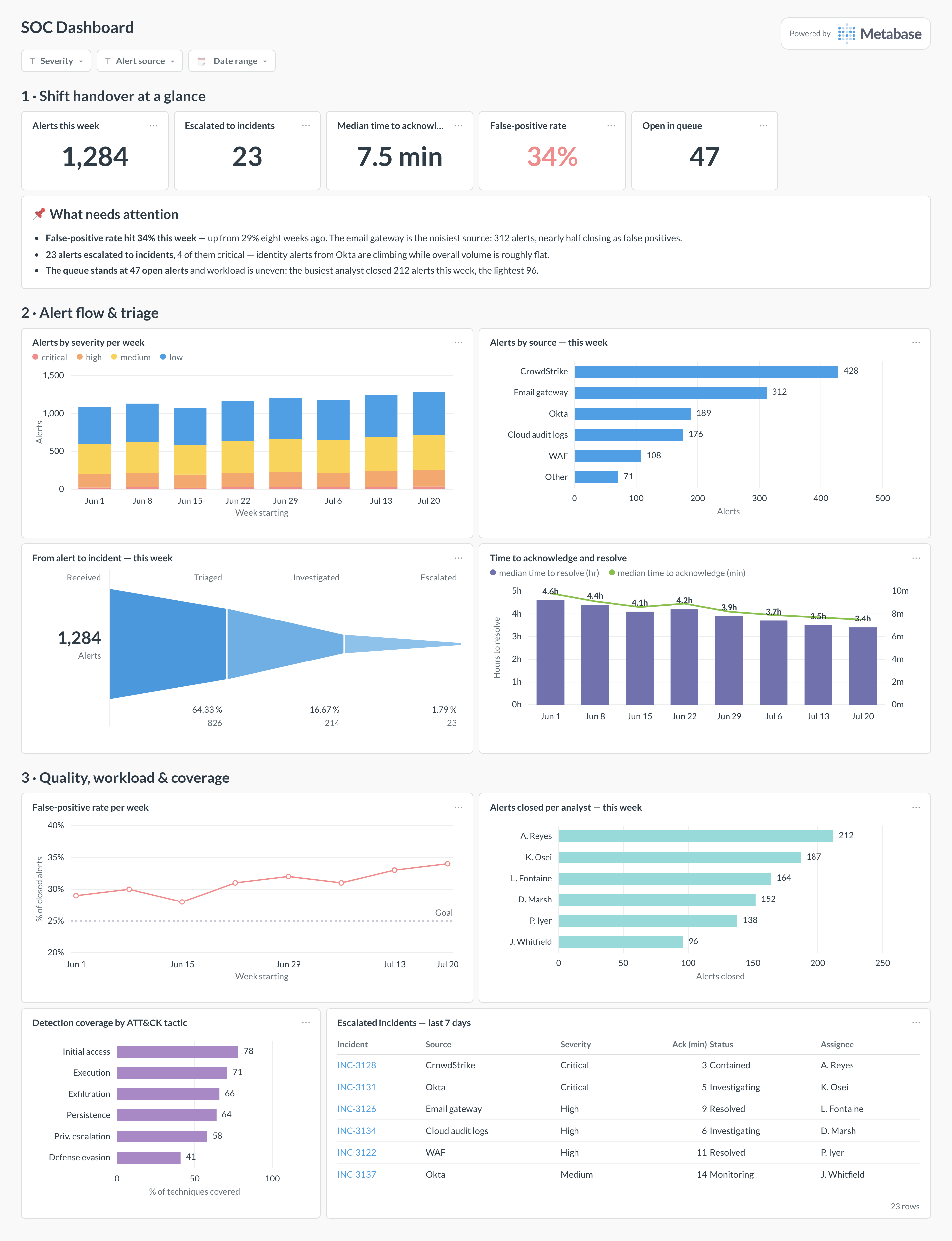
Here’s the layout this guide builds. The shift-handover row leads — volume, escalations, acknowledge time, false-positive rate, and the open queue — so an incoming shift reads one line; alert flow and triage follow, tracing alerts from source through the funnel to incidents; quality, workload, and coverage close the page, because those are the levers the SOC lead pulls week to week rather than shift to shift.
An example SOC dashboard in Metabase, built from SIEM, EDR, and case-management exports. Figures are illustrative.
Which cards belong on a SOC dashboard?
The eight below cover throughput, speed, quality, and capacity — the four things that decide whether a SOC is coping or silently backing up.
Alerts by severity per week — volume and mix over the last eight weeks (stacked bar)
An escalated_incident_id column (or an incidents table keyed to alerts) so escalations can be counted and joined.
A detection_rules table with rule status and mapped ATT&CK techniques, for the coverage card.
Analyst shift or roster data if you want workload normalized per shift rather than raw counts.
Paging records (e.g., PagerDuty) if off-hours load and paging noise should appear alongside — see the alert quality dashboard for that cut.
How do you build it?
Schedule exports from the SIEM/SOAR into your warehouse — hourly for the alerts table, daily for rules — keyed on alert_id so re-syncs upsert cleanly.
Enforce dispositions at closure in the source tool; the false-positive card is only as good as the discipline behind that field.
Model triage durations once (created → acknowledged → resolved, as minutes), using medians in every card so one weekend alert can’t skew a week.
Build the funnel from alert states and the coverage card from the rule-to-technique mapping; both are ordinary grouped queries, not special tooling.
Add filters for severity, alert source, and date range; pin the queue and handover cards to the top and subscribe the SOC channel to a start-of-shift snapshot.
Example card SQL
Weekly alert volume, MTTA, MTTR, and false-positive ratePostgreSQL
SELECT
  date_trunc('week', a.created_at)                       AS week,
  COUNT(*)                                               AS alerts,
  COUNT(*) FILTER (WHERE a.severity = 'critical')        AS critical,
  PERCENTILE_CONT(0.5) WITHIN GROUP (
    ORDER BY EXTRACT(epoch FROM a.acknowledged_at - a.created_at) / 60
  )                                                      AS mtta_minutes,
  PERCENTILE_CONT(0.5) WITHIN GROUP (
    ORDER BY EXTRACT(epoch FROM a.resolved_at - a.created_at) / 3600
  ) FILTER (WHERE a.resolved_at IS NOT NULL)             AS mttr_hours,
  ROUND(
    100.0 * COUNT(*) FILTER (WHERE a.disposition = 'false_positive')
      / NULLIF(COUNT(*) FILTER (WHERE a.disposition IS NOT NULL), 0), 1
  )                                                      AS false_positive_pct,
  COUNT(*) FILTER (WHERE a.escalated_incident_id IS NOT NULL)
                                                         AS escalated_to_incident
FROM alerts a
WHERE a.created_at >= now() - interval '8 weeks'
GROUP BY 1
ORDER BY 1;
It’s the security operations center’s management view: how many alerts arrived, from where, how fast they were acknowledged and resolved, how many became incidents, and whether the analysts are drowning. It is not the live triage console — that stays in your SIEM or SOAR. The neighboring views are worth keeping distinct too: incident response trends tracks detections and containment over weeks from EDR data, and alert quality dissects paging noise. This dashboard is the shift-and-week operational layer between them.
What's the difference between MTTA, MTTD, and MTTR?
MTTD (mean time to detect) runs from when the malicious activity happened to when a detection fired — it measures your tooling. MTTA (time to acknowledge) runs from the alert firing to an analyst picking it up — it measures queue health and staffing. MTTR (time to resolve) runs to closure — it measures the whole pipeline. Use medians rather than means for all three: one weekend-spanning alert would otherwise wreck the average, and the median is what a typical alert actually experiences.
How do I measure false-positive rate honestly?
Require a disposition on every closed alert — true positive, false positive, or benign true positive — and compute the rate only over dispositioned closures. The benign-true-positive category matters: an alert that correctly fired on authorized activity (a pentest, an admin script) is not a false positive, and lumping them together makes detection engineering chase the wrong rules. Break the rate down by source and by rule, because a 34% overall rate is usually three noisy rules, not a hundred mediocre ones — that per-rule view is the whole job of the alert quality dashboard.
Should the SOC use Metabase as its real-time screen?
No — and it’s worth being clear-eyed about why. Real-time triage belongs in the SIEM console, where an analyst can pivot from an alert into raw events; a BI dashboard on a one-to-five-minute refresh is the wrong tool for that. What Metabase adds is everything the console is bad at: joining alert data across your EDR, identity provider, and email gateway; trending MTTA and false-positive rates over months; and giving the SOC lead a shift-handover and weekly-review page that management can also read without a SIEM seat.
How do I track analyst workload without creating bad incentives?
Never rank on closure count alone — that pays analysts to grab easy alerts and close fast. Show closures alongside at least one quality signal: reopen rate, escalation accuracy (of the alerts they escalated, how many were confirmed), or the severity mix they handled. A workload chart’s legitimate purpose is balance, not league tables: the busiest analyst closing 212 alerts while the lightest closes 96 is a rota problem or a skills-routing problem, and that’s the conversation the card should start. Keep per-person views inside the team.
What does detection coverage by ATT&CK tactic actually count?
Map each detection rule to the ATT&CK techniques it can catch, then compute the percentage of techniques per tactic with at least one active, tested rule. Two honesty rules keep the chart meaningful: a disabled or perpetually-noisy rule doesn’t count, and one rule shouldn’t claim a technique it only theoretically touches. Coverage is a breadth metric, not a quality one — pair it with the false-positive rate so adding noisy rules can’t masquerade as progress, and prioritize gaps by which tactics show up in incidents you’ve actually had.
Where does the data come from?
Export your alert and case records from the SIEM or SOAR — Splunk can schedule search results to a warehouse, and most case-management tools have export APIs. Add EDR detections from CrowdStrike or SentinelOne, identity alerts from Okta, and paging records from PagerDuty if that’s how alerts reach humans. The key fields are timestamps — created, acknowledged, resolved — plus severity, source, disposition, and an incident ID for escalations; everything on this page derives from those.