What goes in an IT monitoring dashboard in Metabase?
An IT monitoring dashboard is the operations team's live view of the whole estate — servers, network devices, endpoints, and SaaS services — showing what's up, what's alerting, and where latency or disk capacity is drifting. It goes wide where a server monitoring dashboard goes deep, and Metabase builds it from monitoring rollups landed in your warehouse.
For: IT operations and the on-call rotation. Grain: one row per device per check, rolled up to 5-minute and hourly tables. Refresh: every 1–5 minutes for status cards; hourly rollups for trends.
What does an IT monitoring dashboard look like?
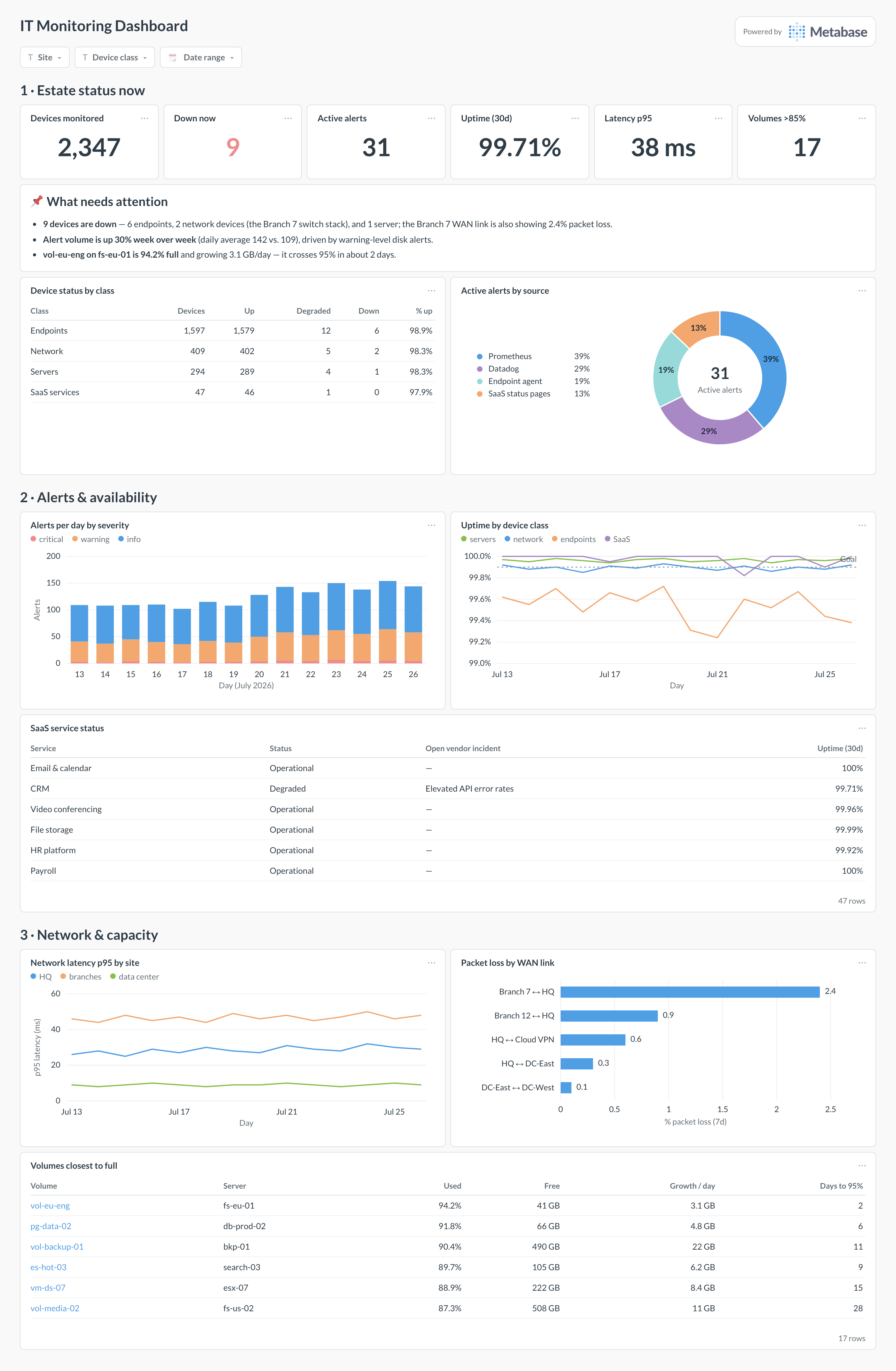
Here’s the layout this guide builds. Estate status leads — devices down and active alerts are the two numbers on-call actually acts on — followed by alert and availability trends, with network health and disk capacity at the bottom, where drift shows up days before it becomes an outage.
An example IT monitoring dashboard in Metabase, built from monitoring checks and rollups in the warehouse. Figures are illustrative.
Which cards belong on an IT monitoring dashboard?
The eight below answer the on-call question in order: is anything down, is anything about to be, and is the network the reason?
Device status by class — up, degraded, down across servers, network, endpoints, and SaaS (table)
Active alerts by source — which tool is firing (donut)
Alerts per day by severity, two weeks (stacked bar)
Uptime by device class, daily, against a 99.9% goal (line)
Network latency p95 by site (line)
Packet loss by WAN link (row)
Volumes closest to full, with free space and growth (table)
SaaS service status — current state and 30-day uptime per service (table)
What data does the dashboard need?
devices — inventory with device_id, device_class, site, and an active flag, usually from the CMDB or the monitoring tool’s own registry.
device_checks — one row per device per check with timestamp and up/degraded/down status.
network_metrics — per-link latency, packet loss, and utilization samples from SNMP or your NMS.
disk_usage — per-volume capacity, used bytes, and snapshot date for headroom and growth.
How do you build it?
Land monitoring data in the warehouse on a schedule: pull the Prometheus or Datadog APIs every few minutes, or mirror collector output straight to a checks table.
Build a “latest status” model with DISTINCT ON (device_id) so status cards read a few thousand rows, not the whole history.
Create hourly rollups for uptime, latency, and alert volume — the trend cards query these, keeping refresh fast.
Add the capacity table from disk_usage, computing daily growth per volume and sorting by percent used.
Add filters for site, device class, and date range, and set auto-refresh to one minute if the dashboard runs on a wall display.
Example card SQL
Current device status by classPostgreSQL
WITH latest AS (
SELECT DISTINCT ON (device_id)
  device_id,
  status,
  checked_at
FROM device_checks
WHERE checked_at >= now() - interval '15 minutes'
ORDER BY device_id, checked_at DESC
)
SELECT
d.device_class,                      -- server / network / endpoint / saas
COUNT(*)                                        AS devices,
COUNT(*) FILTER (WHERE l.status = 'up')         AS up,
COUNT(*) FILTER (WHERE l.status = 'degraded')   AS degraded,
COUNT(*) FILTER (WHERE l.status = 'down')       AS down,
COUNT(*) FILTER (WHERE l.device_id IS NULL)     AS not_reporting,
ROUND(100.0 * COUNT(*) FILTER (WHERE l.status = 'up')
  / NULLIF(COUNT(*), 0), 2)                     AS pct_up
FROM devices d
LEFT JOIN latest l ON l.device_id = d.device_id
WHERE d.is_active
GROUP BY d.device_class
ORDER BY down DESC, degraded DESC;
An IT monitoring dashboard is the operational view of the whole IT estate: which devices are up or down right now, how many alerts are firing and from where, what network latency and packet loss look like, and which disks are running out of headroom. It spans every device class — servers, network gear, endpoints, and the SaaS services the company depends on — so the operations team watches one page instead of four consoles. In Metabase you build it from monitoring data landed in the warehouse, refreshed every few minutes.
How is this different from a server monitoring dashboard?
Scope. A server monitoring dashboard goes deep on one device class — per-group CPU, memory, disk forecasts, service status. An IT monitoring dashboard goes wide instead: every class at a shallower grain, with up/down status, alert volume, and network health across the estate. Use this page to spot that something is wrong and roughly where; click through to the server, network, or endpoint view to see why. Trying to fit per-host CPU charts for 300 servers onto the estate page is how monitoring dashboards become unreadable.
Should Metabase replace Prometheus or Datadog for monitoring?
No — it complements them. Prometheus and Datadog handle high-resolution scraping, alert evaluation, and paging; keep that. What they are worse at is the estate-wide rollup: joining monitoring data with your CMDB to get status by business unit, sharing a live wall display with people who have no Grafana login, and putting alert volume next to ticket data. Land rollups in the warehouse on a 1–5 minute schedule and let Metabase be the shared pane of glass, not the pager.
How do I get device up/down status into a warehouse?
Three common routes. Pull the monitoring API on a schedule (Prometheus's query API, Datadog's monitor and metric endpoints, or your NMS's REST API) and append the results to a checks table. Or have the collector write through — many shops mirror check results to Kafka or directly to Postgres. Or, cheapest, run a small probe job of your own for the shallow layer: ICMP and TCP checks per device every minute. Whichever route, keep one row per device per check with a timestamp, and derive current status as the latest row — never overwrite in place, or you lose the history the uptime cards need.
Why should I chart alert volume, not just current alerts?
Because alert volume is a health signal about the monitoring system itself. A team firing 400 alerts a day has trained itself to ignore them, and the one that matters drowns; the alert noise rate — the share of alerts that led to no action — tells you whether thresholds need retuning. Charting volume by source also catches the classic failure where one flapping device or one bad deploy generates half the week's alerts. If the volume trend rises while incidents stay flat, you have a tuning problem, not a reliability problem.
What refresh rate and data grain should this dashboard use?
Status cards should refresh every 1–5 minutes from near-current data; trend cards can sit on 5-minute or hourly rollups. Keep raw per-check rows for a week or two, then aggregate — a year of 30-second checks for 2,000 devices is hundreds of millions of rows that no dashboard query needs. The practical pattern is two tables: a small "latest status" table the status cards hit, and an hourly rollup the trend cards hit. Set the dashboard to auto-refresh for wall displays, and keep every card's query under a few seconds so the refresh doesn't queue.
How do I monitor SaaS services alongside my own devices?
Treat each SaaS product as a device row with a different check type. Most vendors publish a status page with an API or RSS feed (statuspage.io-hosted pages expose JSON), so a small job can poll each one and append status to the same checks table your probes write to. Add your own synthetic check where it matters — an authenticated API call against the vendor tells you about your tenant, which vendor status pages are notoriously slow to admit. Then the status-by-class card simply gains a "SaaS" class, and outages show up in the same place as everything else.