



What goes in a real-time analytics dashboard in Metabase?
A real-time analytics dashboard tracks event throughput, consumer lag, end-to-end latency percentiles, late and dropped events, top topics, and sink freshness for a Kafka-style streaming platform. Metabase doesn't consume the stream itself — it queries the stores the stream lands in, like ClickHouse or Druid, plus broker metrics landed as one-minute rollups.
For: streaming platform engineers and every team consuming the stream. Grain: one-minute rollups of broker, consumer, and sink metrics. Refresh: auto-refresh at one minute — freshness is refresh interval plus sink latency.
What does a real-time analytics dashboard look like?
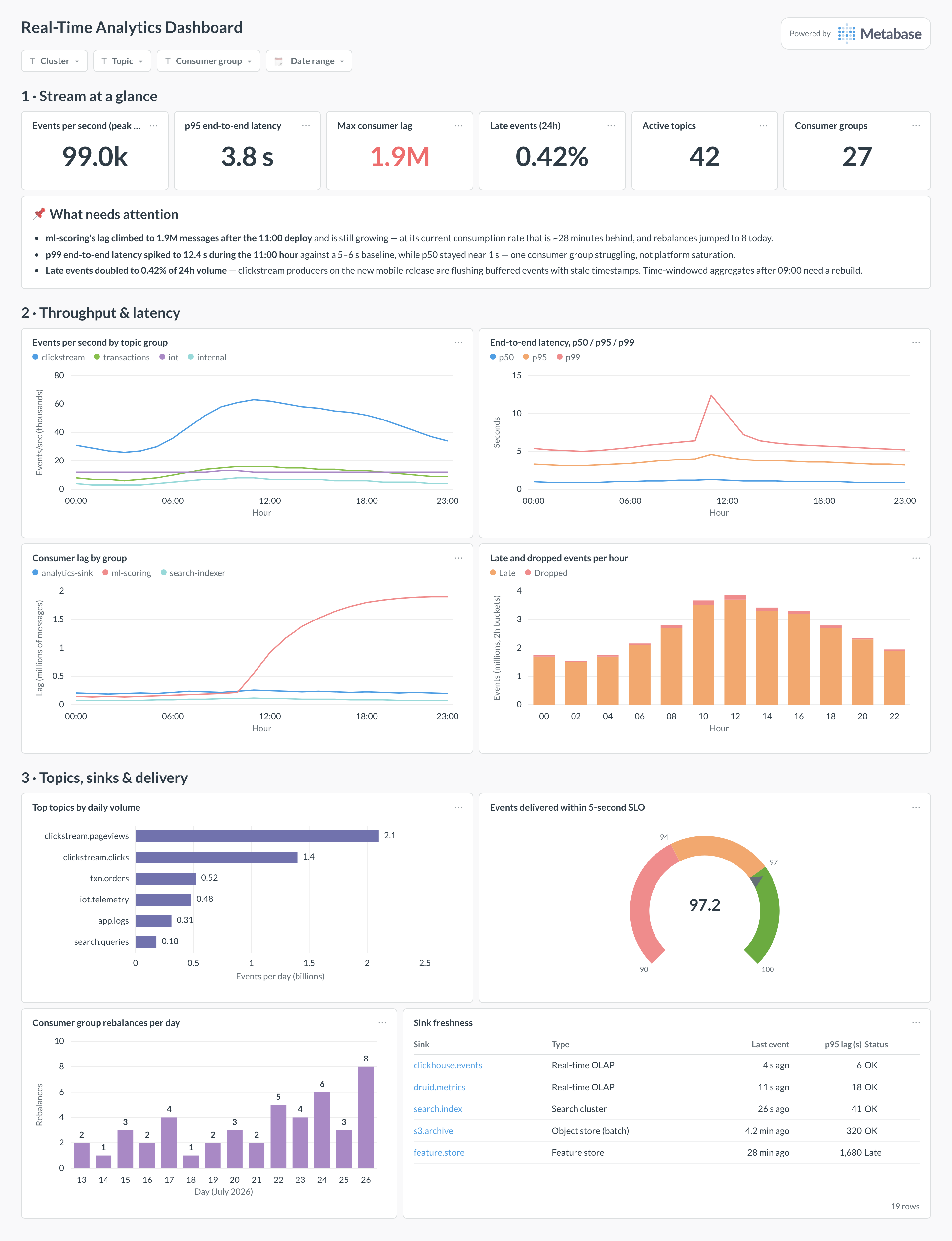
Here’s the layout this guide builds. Current throughput, lag, and latency sit at the top because streaming incidents unfold in minutes; the throughput and latency trends come next to show whether the platform is keeping up; topics, delivery SLO, and per-sink freshness fill the bottom for diagnosis.
Which cards belong on a real-time analytics dashboard?
The eight below cover flow, delay, and correctness — is data moving, how far behind is it, and is it right.
- Events per second by topic group (line)
- End-to-end latency, p50 / p95 / p99, hourly (line)
- Consumer lag by group, hourly (line)
- Late and dropped events per hour (stacked bar)
- Top topics by daily volume (row)
- Events delivered within the 5-second SLO (gauge)
- Consumer group rebalances per day (bar)
- Sink freshness — last event and p95 lag per sink (table)
What data does the dashboard need?
- Broker metrics — messages in per topic, bytes, and partition counts — from the platform’s metrics exporter, rolled up per minute.
- Consumer group offsets and computed lag per group and topic, sampled on the same schedule.
- Event-level timestamps in the sink: producer
event_tsand sinkingested_at, for latency percentiles and late-event counts. - A sink registry — sink, type, freshness SLO — so the freshness table is a join against live watermarks.
- Consumer group lifecycle events (rebalances, restarts) if the platform exposes them; rebalance storms explain most lag mysteries.
How do you build it?
- Land broker and consumer metrics into your real-time store as one-minute rollups — a small consumer job or the metrics exporter’s remote-write does this continuously.
- Make sure every event carries a producer timestamp, and record ingestion time in the sink — the latency and late-event cards are differences between the two.
- Connect the store to Metabase (see the ClickHouse guide) and build shared models for the rollups: one for flow, one for lag, one for event timing.
- Build the eight cards, converting lag to time-to-drain in SQL, and derive sink status from each sink’s own SLO rather than a global threshold.
- Add filters for cluster, topic, and consumer group, set auto-refresh to one minute, and alert the platform channel when lag growth or the late share crosses its threshold.
Example card SQL
SELECT
toStartOfMinute(ingested_at)                          AS minute,
count()                                               AS events,
round(quantile(0.50)(
  dateDiff('millisecond', event_ts, ingested_at)) / 1000.0, 2)
                                                      AS p50_s,
round(quantile(0.95)(
  dateDiff('millisecond', event_ts, ingested_at)) / 1000.0, 2)
                                                      AS p95_s,
round(quantile(0.99)(
  dateDiff('millisecond', event_ts, ingested_at)) / 1000.0, 2)
                                                      AS p99_s,
countIf(event_ts < ingested_at - INTERVAL 5 MINUTE)   AS late_events
FROM events.stream_landing
WHERE ingested_at >= now() - INTERVAL 24 HOUR
GROUP BY minute
ORDER BY minute;
Related
Metrics
Integrations
Dashboards
FAQ
What is a real-time analytics dashboard?
Can Metabase read Kafka directly?
How do I measure end-to-end latency?
event_ts, record an ingested_at when the sink writes them, and chart percentiles of the difference. Percentiles, not averages: streaming latency is long-tailed, and an average hides the p99 spike that pages someone. The p50 tells you the pipeline's cruising speed, p95 what most consumers experience, p99 what breaks SLOs. Watch for the two failure shapes: all percentiles rising together means the pipeline is saturated; p99 alone rising means one partition, broker, or consumer is struggling while the rest keep up.