




What goes in an IT operations dashboard in Metabase?
An IT operations dashboard is the daily command view for the team that keeps systems running: incidents opened and resolved, MTTR against its goal, change success rate, scheduled maintenance, and who is carrying the on-call load. Metabase builds it from the incident and change records you already keep in Jira, PagerDuty, or incident.io — synced to a warehouse where they can finally be joined.
For: IT operations managers, NOC leads, and on-call engineers. Grain: one row per incident, change, or page. Refresh: hourly for review; 60-second auto-refresh on a NOC display.
What does an IT operations dashboard look like?
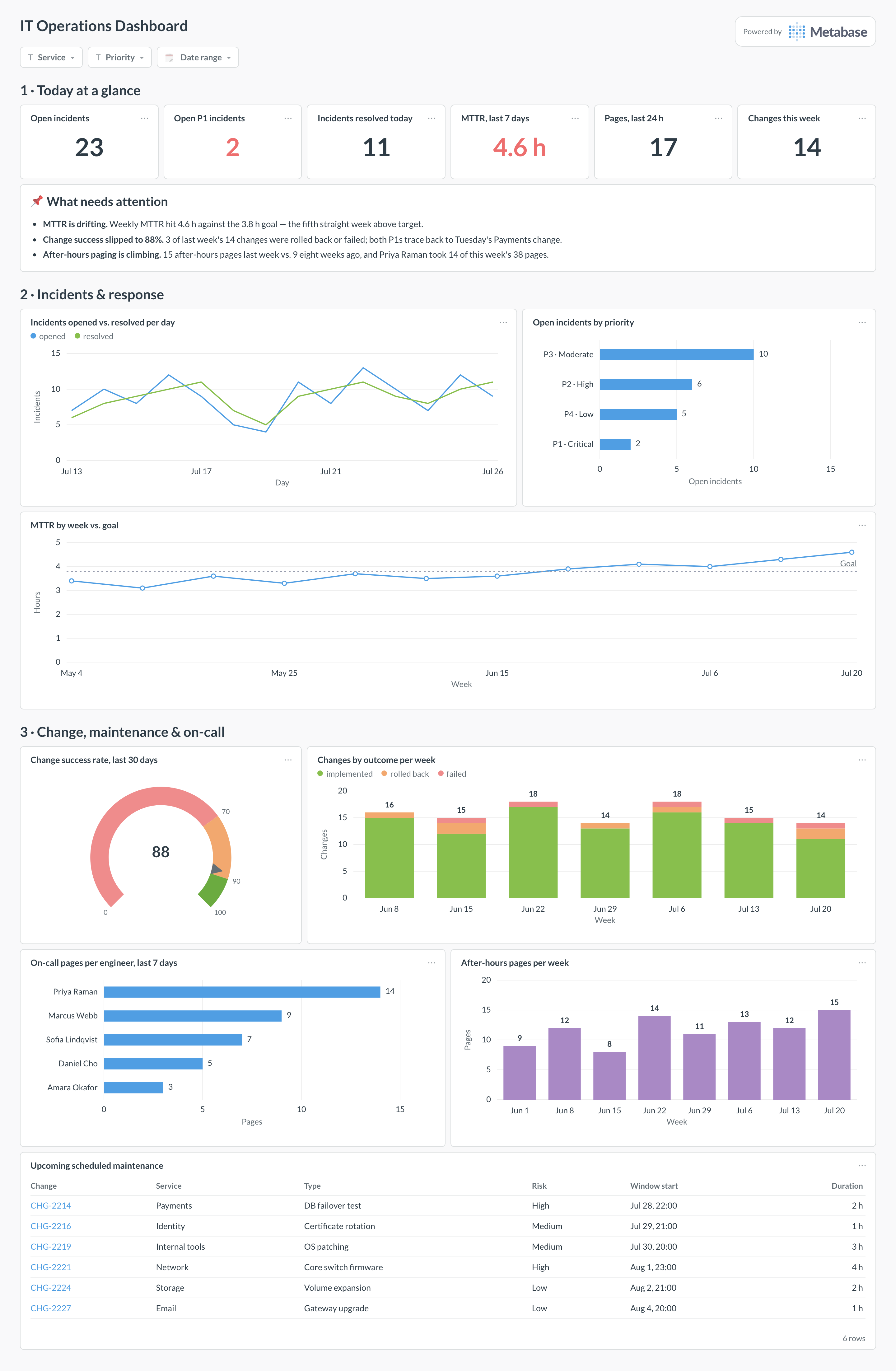
Here’s the layout this guide builds. Today’s position sits at the top — open incidents, MTTR, and paging volume — so the morning stand-up starts from one row of numbers. Incident flow and response speed come next, because that’s the work of the day; change outcomes, the maintenance calendar, and on-call load close the page for the weekly review.
Which cards belong on an IT operations dashboard?
The eight below cover the three questions an ops lead asks every morning: what’s broken, how fast are we fixing it, and what are we about to change?
- Incidents opened vs. resolved per day, past two weeks (line)
- Open incidents by priority, P1 through P4 (row)
- MTTR by week against its goal (line)
- Change success rate, past 30 days (gauge)
- Changes by outcome per week — implemented, rolled back, failed (stacked bar)
- On-call pages per engineer, past 7 days (row)
- After-hours pages per week (bar)
- Upcoming scheduled maintenance, with window and risk (table)
What data does the dashboard need?
- An
incidentstable:incident_id,service,priority,opened_at,acknowledged_at,resolved_at,status. - A
changestable:change_id,service,change_type,window_start,risk, and anoutcomeof implemented, rolled back, or failed. - A
pagestable from your paging tool:page_id,engineer,triggered_at, and whether it fell inside business hours. - A
maintenance_windowstable (or the subset ofchangesflagged as scheduled maintenance) with start, end, and affected service. - A small
servicesdimension so incidents, changes, and pages roll up to the same service names.
How do you build it?
- Sync incidents, pages, and on-call schedules from PagerDuty, incident.io, or Jira into your warehouse on a schedule — the joins below need them as tables, not API calls.
- Define MTTR once in a Metabase model:
resolved_at − opened_atin hours, excluding suppressed and duplicate incidents, so every card computes response time identically. - Build the change-outcome cards from the
changestable, counting a change as failed if it was rolled back or caused an incident within 24 hours of its window. - Join
pagesto the on-call schedule to attribute each page to the engineer who received it, then split by business hours for the after-hours trend. - Add dashboard filters for service, priority, and date range, and set a 60-second auto-refresh on the copy that runs on the NOC display.
Example card SQL
WITH opened AS (
SELECT
  i.opened_at::date            AS day,
  COUNT(*)                     AS incidents_opened
FROM incidents i
GROUP BY 1
),
resolved AS (
SELECT
  i.resolved_at::date          AS day,
  COUNT(*)                     AS incidents_resolved,
  AVG(
    EXTRACT(EPOCH FROM i.resolved_at - i.opened_at) / 3600
  )                            AS mttr_hours
FROM incidents i
WHERE i.resolved_at IS NOT NULL
  AND i.status <> 'suppressed'
GROUP BY 1
)
SELECT
COALESCE(o.day, r.day)                 AS day,
COALESCE(o.incidents_opened, 0)        AS incidents_opened,
COALESCE(r.incidents_resolved, 0)      AS incidents_resolved,
ROUND(r.mttr_hours::numeric, 1)        AS mttr_hours
FROM opened o
FULL JOIN resolved r ON r.day = o.day
WHERE COALESCE(o.day, r.day) >= CURRENT_DATE - 30
ORDER BY 1;
Related
Metrics
Integrations
Dashboards
FAQ
How is an IT operations dashboard different from an ITSM dashboard?
How should I calculate MTTR so the number is trustworthy?
opened_at to resolved_at, not to closed_at — tickets often sit "resolved, awaiting confirmation" for days. Second, the filter: exclude suppressed and duplicate incidents, or a noisy monitor that auto-resolves in seconds will flatter the average. Third, the aggregate: put the definition in one shared Metabase model so every card computes it the same way. Pair it with MTTA to separate slow acknowledgment from slow repair.