




What is unsubscribe rate, and how do you measure it in Metabase?
Unsubscribe rate is the share of delivered emails whose recipients opted out — unsubscribes over delivered, per campaign. It’s the feedback channel your audience actually uses: the number that tells you when frequency, targeting, or content crossed a line. Measure it in Metabase from campaign stats synced from Klaviyo, Mailchimp, ActiveCampaign, or SendGrid.
unsubscribes ÷ delivered per campaign. Under 0.5% is typical, under 0.2% is good — but read it next to spam-complaint rate, because a complaint costs you deliverability and an unsubscribe doesn’t. Spikes localize problems; spikes after a re-engagement send can be the plan working. What does an unsubscribe rate chart look like in Metabase?
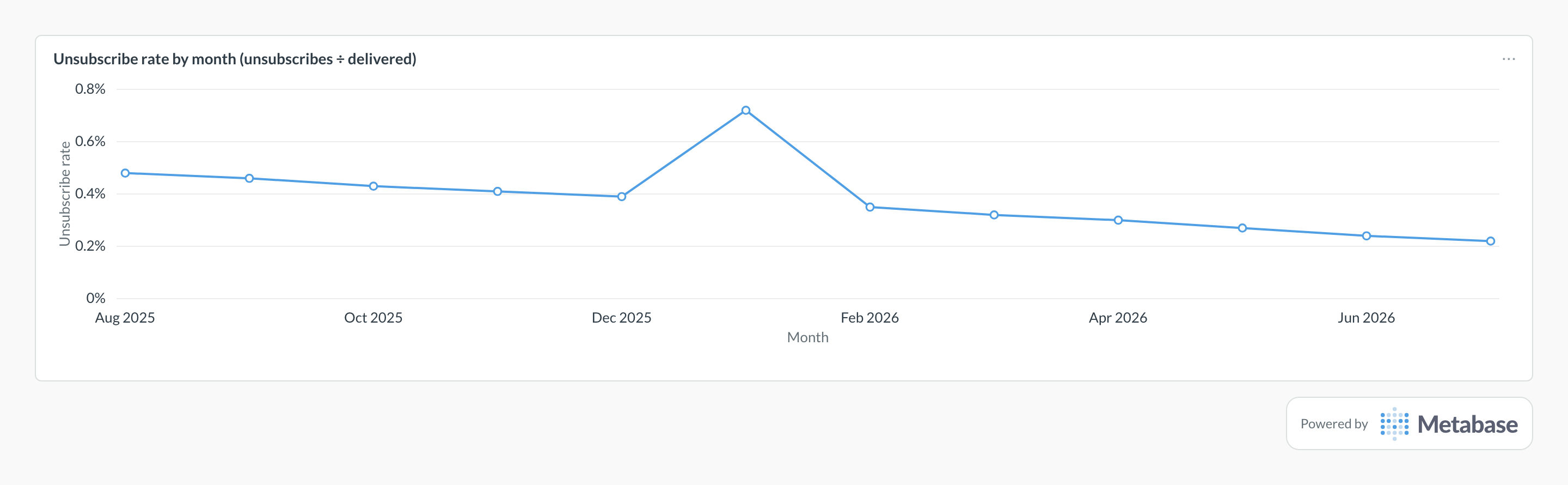
Chart unsubscribes as a share of delivered emails by month and watch the baseline: the drift down from about 0.48% to 0.22% is better segmentation and send discipline paying off. A one-month spike like Jan 2026’s isn’t automatically bad — here it’s a re-engagement campaign clearing out dormant subscribers — so check which campaign and segment drove it before reacting.
What unsubscribe rate measures
It measures audience tolerance, campaign by campaign. A stable baseline means your frequency and targeting match what people signed up for; a spike localizes a problem to a specific segment, send, or cadence change. The denominator is delivered, not sent — mail that bounced never gave anyone the chance to opt out, and bounce rate is its own metric. And it’s half of a pair: the same send also produces spam complaints, and mailbox providers only punish one of the two. Gmail’s sender guidelines expect bulk senders below a 0.1% complaint rate, with 0.3% as the threshold where deliverability visibly suffers. An easy unsubscribe is your pressure valve — it keeps annoyed recipients out of the complaint column.
Since 2024, one-click unsubscribe (RFC 8058) is mandatory for bulk senders to Gmail and Yahoo, so opt-outs increasingly happen in the mail client rather than on your landing page. Your tracking has to capture both paths.
What data does it need?
- Campaign-level stats with
delivered,unsubscribes, andspam_complaintsper send — synced to your warehouse via Airbyte, Fivetran, or dlt from your email platform. campaign_name,sent_at, andsegment_idso spikes can be localized to a send, a cohort, or a cadence.- Campaign type or tag (newsletter, promo, re-engagement) — hygiene sends are supposed to spike, and you want to read them separately.
- Opt-outs from both paths: landing-page unsubscribes and header-based one-click unsubscribes.
SQL patterns
SELECT
  date_trunc('month', c.sent_at) AS month,
  c.campaign_name,
  SUM(c.delivered)     AS delivered,
  SUM(c.unsubscribes)  AS unsubscribes,
  ROUND(
    100.0 * SUM(c.unsubscribes) / NULLIF(SUM(c.delivered), 0), 3
  ) AS unsubscribe_rate_pct
FROM campaign_stats c
WHERE c.sent_at >= CURRENT_DATE - INTERVAL '12 months'
GROUP BY 1, 2
ORDER BY 1, unsubscribe_rate_pct DESC;SELECT
s.segment_name,
SUM(c.delivered) AS delivered,
ROUND(
100.0 * SUM(c.unsubscribes) / NULLIF(SUM(c.delivered), 0), 3
) AS unsubscribe_rate_pct,
ROUND(
100.0 * SUM(c.spam_complaints) / NULLIF(SUM(c.delivered), 0), 3
) AS spam_complaint_rate_pct
FROM campaign_stats c
JOIN segments s ON s.id = c.segment_id
WHERE c.sent_at >= CURRENT_DATE - INTERVAL '90 days'
GROUP BY 1
ORDER BY spam_complaint_rate_pct DESC;Pitfalls
Where this metric applies
- Klaviyo + Metabase — campaign and flow-level unsubscribes and complaints
- Mailchimp + Metabase — campaign reports with unsubscribes and abuse reports
- ActiveCampaign + Metabase — campaign and automation opt-out stats
- SendGrid + Metabase — unsubscribe and spam-report events per send