




In this release
Metabase 59
Data Studio, the analyst workbench, AI SQL gen in Open Source, boxplot chart, and more.

The Metabase Team
· Mar 5, 2026 · 10 min read- If you’re self-hosting Metabase, you (or your admin) can follow the docs on how to upgrade.
Feel like you just finished an upgrade? Try Metabase Cloud for free to get automatic upgrades and excellent technical support.
This release is one piece of a bigger story. We wrote a post that connects the dots across everything we've shipped this year.
Meet Data Studio, where you structure data and define your semantic layer
Data Studio is a workbench for analysts. It has a set of tools data teams can use to shape and curate data to make it easier for non-technical people and Metabot to get answers from data. It is included in all versions of Metabase, with some features only available in Pro and Enterprise plans, including a new set of analyst permissions to separate data curation from admin responsibilities.
What’s in Data Studio, you ask?…
Use SQL or Python to transform raw data into analytics-ready tables
Transforms let you shape raw tables into usable datasets that humans and AI agents can make sense of and query. Use SQL transforms for straightforward modeling - join tables, clean up column headers and fields, and reshape information. You can create a SQL transform with a SQL query, in the query builder, or from an existing saved question. Opt for Python when you have complex logic that SQL can no longer handle, and unblock advanced use cases without pushing work into another tool. Create folders to organize transforms, and push to your git repo using remote sync for safe keeping and collaboration.
Get a built-in assistant for transform code generation in SQL and Python. Speed up transform authoring with Metabot, or an extra set of robot eyes for debugging (available as an add-on).
Dependencies graph to understand the blast radius of a change before you make it
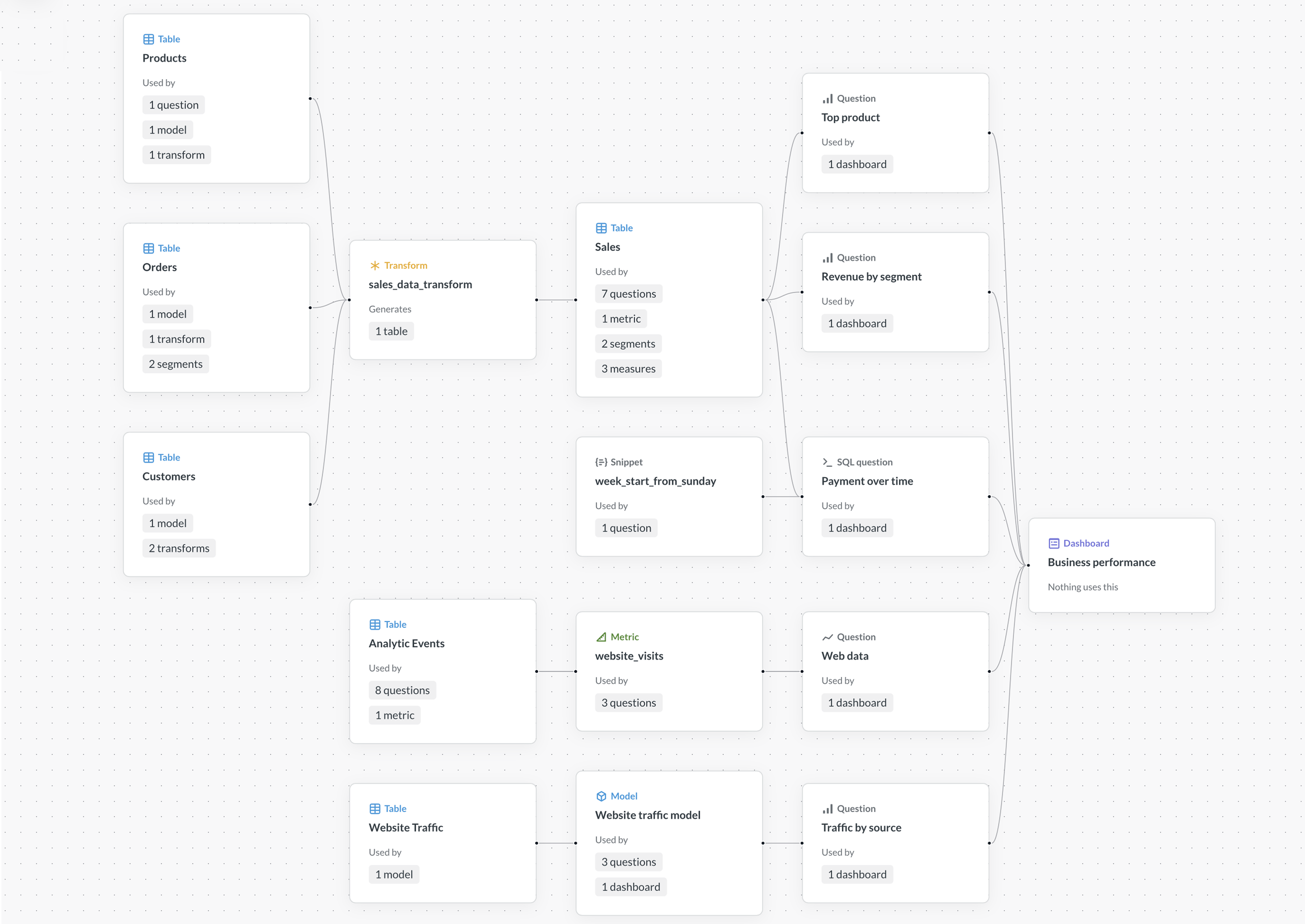
Get a visual map of dependent entities so you can understand what will be affected before making upstream changes in the dependency graph. Select any entity to see its dependencies and how they fit together. Get a high level overview, like the number of questions or transforms that depend on a table, and drill-down into details by clicking on the entity count to see specifics, like which collection or dashboard a question lives in.
The dependencies graph powers automatic dependency checks that was released in v57. If a dashboard or query depends on something you’re changing or removing, you’ll see a warning so you can fix it.
Build a semantic library for your most important data
The Library is a source of truth where you publish tables and metrics once you’ve formatted them for others to use for analytics. Data and metrics you publish to your Library are surfaced first to your analytics-users as starting data in the Query Builder, signalling to your team what’s usable and trustworthy. Only those with curate permissions can publish tables and metrics to the Library. Admins and people with the new data analyst permission type can modify Library content, but once created the Library itself can’t be renamed, moved, or deleted. You can prepare tables to publish to your Library (or unpublish) from the Data Structure section of the Data Studio.
You can sync your Library to your git repo using remote sync. This gives you change history and the ability to version-control your content and sync it across environments.
Bulk edit metadata and table visibility in Data Structure, a searchable overview of tables
Add context to your data to make data easier to end-users to work with in Data Structure. This is an upgrade to the table metadata editor, with expanded features to view, sort, organize tables, and manage metadata:
- Set table and field visibility
- Edit table and column names and types
- Sync and scan tables
- Assign owners to tables
- Switch entity type
- Define and add segments and measures
Data Structure is where you prepare tables before publishing to your Library for easier discovery and use for analytics. You can also view non-editable table metadata, like row count, dependents and dependencies, and define and manage segments and measures here.
Diagnostics to find and fix broken dependencies
Get visibility into broken entities, like tables, questions, and models, and root causes without the detective work in dependency diagnostics. Making a change that impacts something downstream will surface it in Dependency Diagnostics with details to take action, by highlighting missing columns, where it lives in your collections, and more.
The unreferenced entities view makes it easier to clean up items made to be reusable, like models, metrics, and snippets that, well, aren’t being used. Just watch out for where unreferenced doesn’t mean unused, like standalone questions that aren’t in dashboards - usage analytics comes in handy for this.
Reusable table segments and measures for pre-defined filters and aggregations
Segments are a set of predefined filters on a table; measures are for aggregations. These are reusable blocks that make it easier for people and Metabot to run queries on their own. Segments show up in the Filter section of the query builder. Measures appear in Summarize. Create official saved calculations, so you have one version of an aggregation, like ‘Net Promoter Score’, not 3 slightly different definitions that lead to numbers that don’t match.
59 doesn’t stop at Data Studio, we shipped a ton of other stuff too
AI SQL generation magic comes to Open Source
Get single-shot, prompt-based SQL generation inside the SQL editor in Open Source self-hosted Metabase instances. Describe your question in natural language (English works best, for now), including at least one reference to a table, and Metabot will spin it into a SQL query. No Metabot add-on required, just BYO Anthropic key to activate.
We have Box and Whisker (aka boxplot) charts meow now
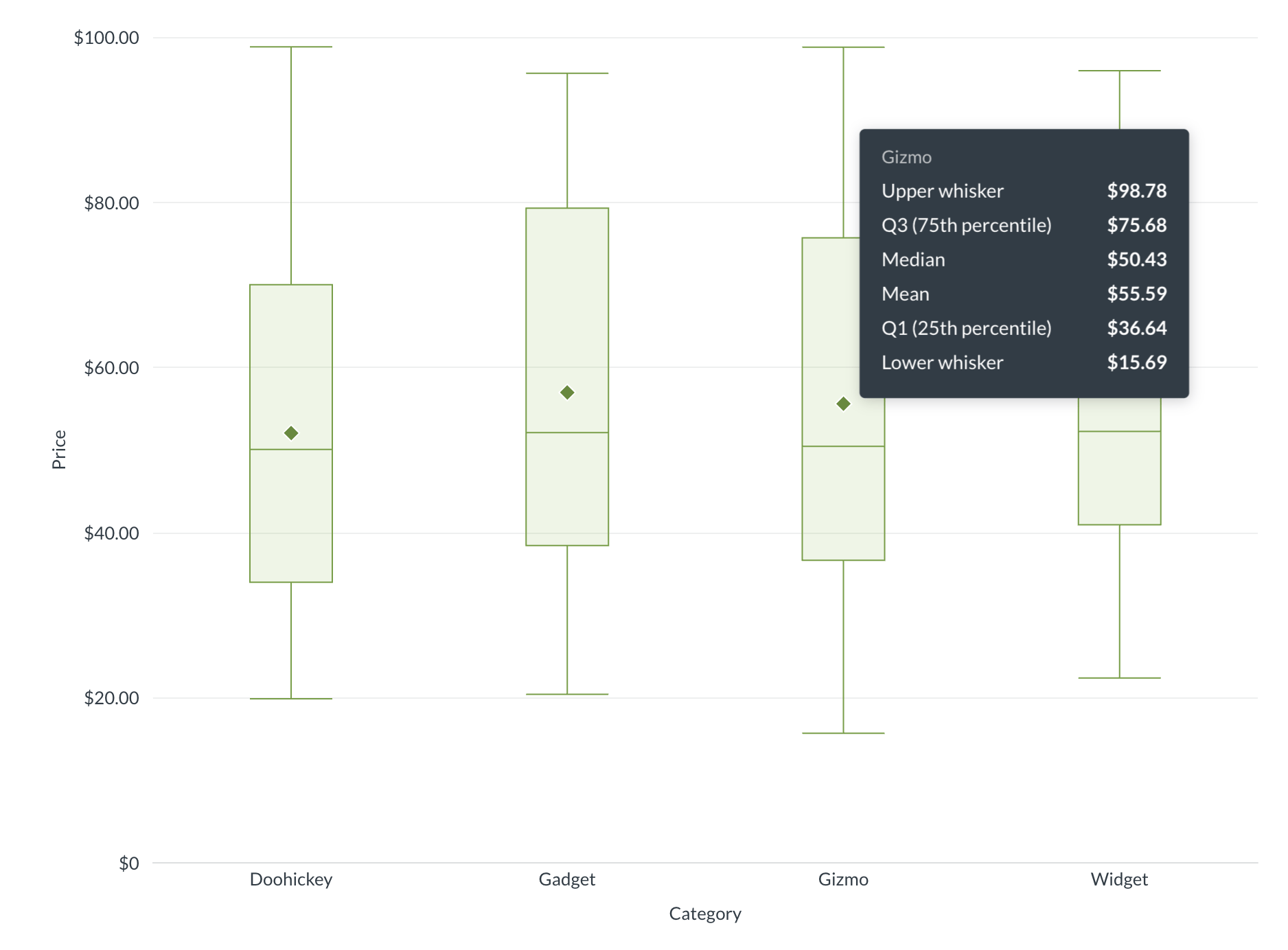
One of our most-requested viz types has officially landed in Metabase. Boxplots shine when you need to compare how spread out values are across categories, like order value distribution by region, support ticket resolution times by team, or experiment results across cohorts. You can choose whiskers to extend and which points to show, toggle on mean value, and include a goal line in the visualization settings. All values related to a box can be surfaced in tooltips.
Find box and whisker charts in your visualization options. They’re ready to be added to your dashboards, documents, or embedded in your app.
Conditional colors for Number charts
Make status and threshold-based charts easier to read at a glance. Set conditional colors based on value, e.g.:
🟢 0-500
🟠 500-1000
🔴 1000-5000
Agent API for programmatic semantic layer access
A new, versioned API that exposes the semantic layer defined in Metabase (tables, metrics, etc). This allows external systems to discover data, write and execute queries programmatically for things like headless BI apps, non-Metabot AI agents, other integrations.
Grant write permissions only to the features that need them
Some features, like Transforms, need write permissions to your database. You can now set up a writeable connection to your database for just those features, while routing all other database calls through your main, read-only connection.
Simplified entity picker for questions in the query builder
Creating a new question in the query builder now comes with more of a guided start by reducing the number of options for picking a starting dataset or model. The new-look entity picker is not just for the query builder - you’ll also get this simplified experience when creating a new collection, and in the Dependency Graph in Data Studio.
Pro tip: if you’ve got your Library set up it makes the picking starting datasets even easier with more curated options.
Building with embedded analytics? We also have updates for you
Simpler Tenant provisioning via JWT SSO
Tenants were launched in v58 as a simpler way to setup and manage multi-tenant analytics to ensure customers can’t access each others’ data.
You can now provision Tenant attributes programmatically via JWT SSO, automatically assigning the correct attributes to users for reliable data segregation. This reduces manual configuration and minimizes the risk of misconfigured access.
Modular Embedding now supports content localization
Translate all content in embedded charts and dashboards, including chart titles and data labels. All components support local content translations, except for Metabot, which works best in English.
More Modular Embedding improvements
- Embed SQL editor via modular embedding Customer-facing SQL creation and editing was previously only available with full-app embedding, now you can embed the SQL editor with Modular Embedding and the SDK.
- Alerts available on questions embedded with Modular Embedding and SDK Customers can subscribe themselves to get alerts via email on questions, in addition to dashboard subscriptions which we made available with modular embedding and the SDK from v58. Alert emails from embedded components don’t contain links so your customers don’t see Metabase-y content or links.
- Support for dashboard auto-refresh
You can now pass the refresh interval via a prop in the SDK and modular embedding in
StaticDashboard,InteractiveDashboard, andEditableDashboardcomponents for Guest and SSO-authenticated embeds.
Heads up: model persistence is on its way out
With the launch of Data Studio, we’ll be deprecating model persistence in favor of transforms. You don’t need to change anything today, but we’ll be phasing out model persistence in a future release as teams move to this more flexible approach.
Breaking changes
- ClickHouse: connection string options require
clickhouse_settings_prefix. Server settings in the additional connection string options must be prefixed withclickhouse_settings_, otherwise they won’t take effect. See ClickHouse docs.
Big thanks to everyone who contributed!
Thanks to @robertcommit and everyone else who submitted bug reports, feature suggestions, and pull requests. Metabase gets better and better thanks to your efforts.
Hope you enjoy the release. If you want to get into the nitty-gritty, check out our changelog. To see what other features we have in the works, see our product roadmap.
Cheers, The Metabase team
Share this release
See previous releases
All releasesGet started with Metabase
- Free, no-commitment trial
- Easy for everyone—no SQL required
- Up and running in 5 minutes