





These are the docs for the Metabase master branch. Some features documented here may not yet be available in the current release. Check out the docs for the current stable version, Metabase v0.62.
Table variables
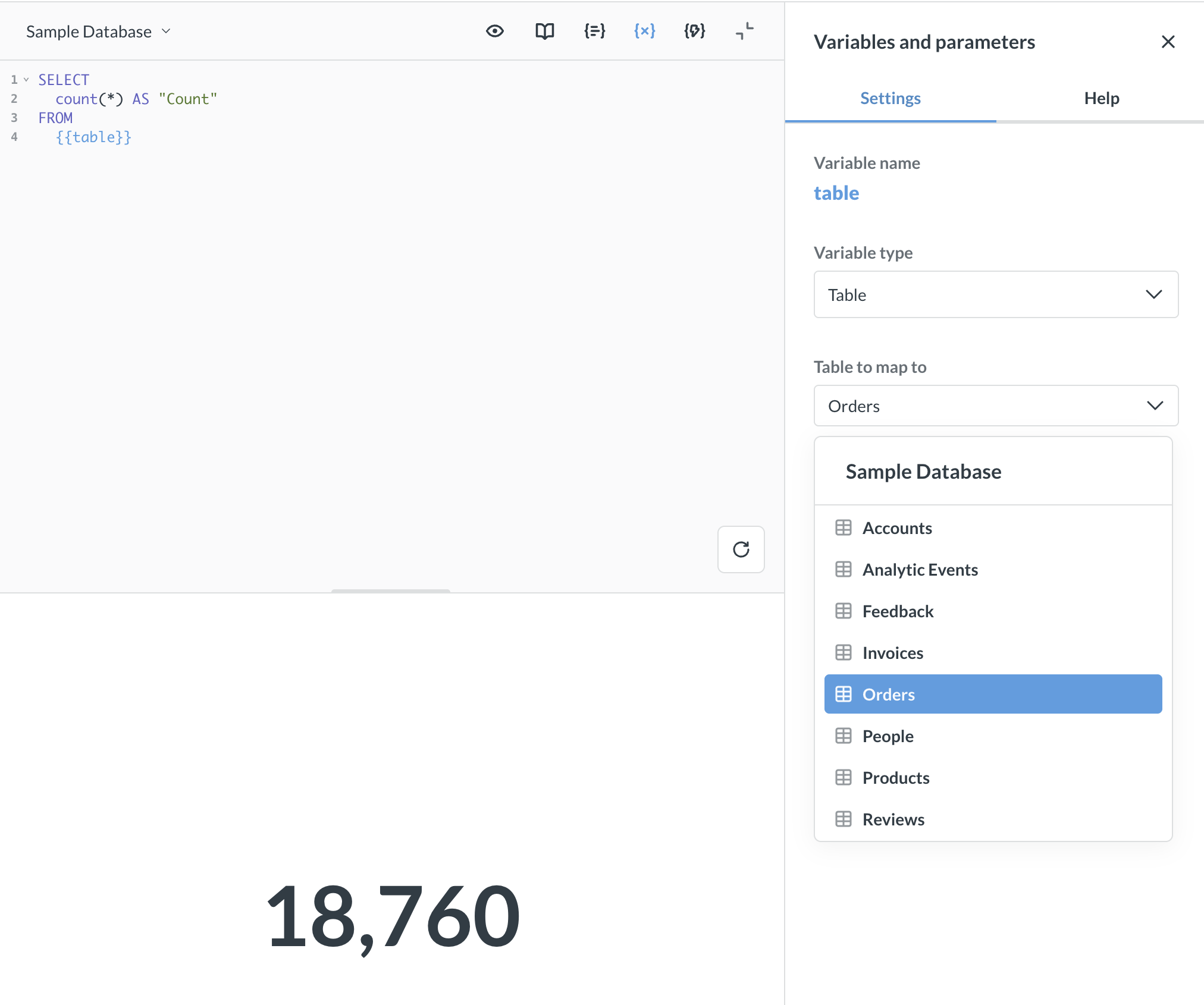
Table variables let you write a SQL query with a placeholder for the table name. When you run the query, Metabase substitutes the variable with the schema and table name.
Table variables are especially useful when combined with snippets, so you can write a generic query once and reuse it across different tables.
Adding a table variable to a query
Use double braces where you’d normally write a table name:
SELECT
  COUNT(*)
FROM
  {{table}}
You can use table variables anywhere a table name would go, including FROM and JOIN clauses:
SELECT
  t.*,
  p.title
FROM
  {{table}} AS t
  JOIN {{products_table}} AS p ON t.product_id = p.id
See Referencing table variables.
Setting the variable type to Table
After adding a {{variable}} to your query:
- Open the Variables sidebar (it should appear automatically).
- Change the variable type to Table.
- Under Table to map to, select a table from the picker (Required).
- Depending on how you want to refer to the table variable in the query, toggle Emit table alias on or off, see Referencing table variables.
When you run the query, Metabase replaces the variable with the selected table’s schema and table name. To preview the code Metabase will run, click the eye icon.
Reference table variables
There are two ways you can refer to the table variable in the rest of the query:
-
If you want to use the variable’s name, you’ll need to toggle on Emit table alias in the variable’s settings. Your queries will look like this:
SELECT var_name.id, p.title FROM {{var_name}} JOIN products as p on var_name.product_id = p.id -
If you want to specify an alias, you must toggle Emit table alias off and manually add aliases to your query. You may want to specify your own alias if you already have a long query with existing aliases, and you just want to swap the table for a table variable. Your queries will look like this:
SELECT
    o.id,
    p.title
FROM
    {{var_name}} as o JOIN products as p on o.product_id = p.id
Using table variables with snippets
One neat thing you can do is combine table variables with snippets. You can write a generic query as a snippet and reuse the snippet in multiple questions, each mapped to a different table.
For example, create a snippet called “row count” with:
SELECT
  COUNT(*)
FROM
  {{table}}
Then insert the snippet into different questions:
{{snippet: row count}}
In each question, open the Variables sidebar and map {{table}} to a different database table. This way, the same snippet can count rows in Products, Orders, or any other table.
Limitations
- Not available as dashboard filter parameters. You can’t connect a table variable to a dashboard filter widget. Table variables must be set directly on each question.
- SQL queries only. Table variables are available in native SQL queries, not in the query builder.
- No input widget. There’s no input widget for people to plug in a table. You must select the table to insert into the variable from the variables sidebar.
- Not supported in transforms. Table variables aren’t available in transforms yet.
Further reading
Read docs for other versions of Metabase.