What goes in an IT infrastructure dashboard in Metabase?
An IT infrastructure dashboard is the "what do we run, and where's the headroom?" page: asset inventory by type and age, virtualization CPU/RAM headroom, storage capacity trends, network utilization, and the licenses and warranties about to lapse. Where an IT monitoring dashboard watches the estate minute by minute, this one plans it quarter by quarter — Metabase builds it from CMDB, hypervisor, and storage snapshots in your warehouse.
For: infrastructure leads and capacity planners. Grain: one snapshot per asset per day, from CMDB, hypervisor, storage, and SNMP exports.
Refresh: nightly.
What does an IT infrastructure dashboard look like?
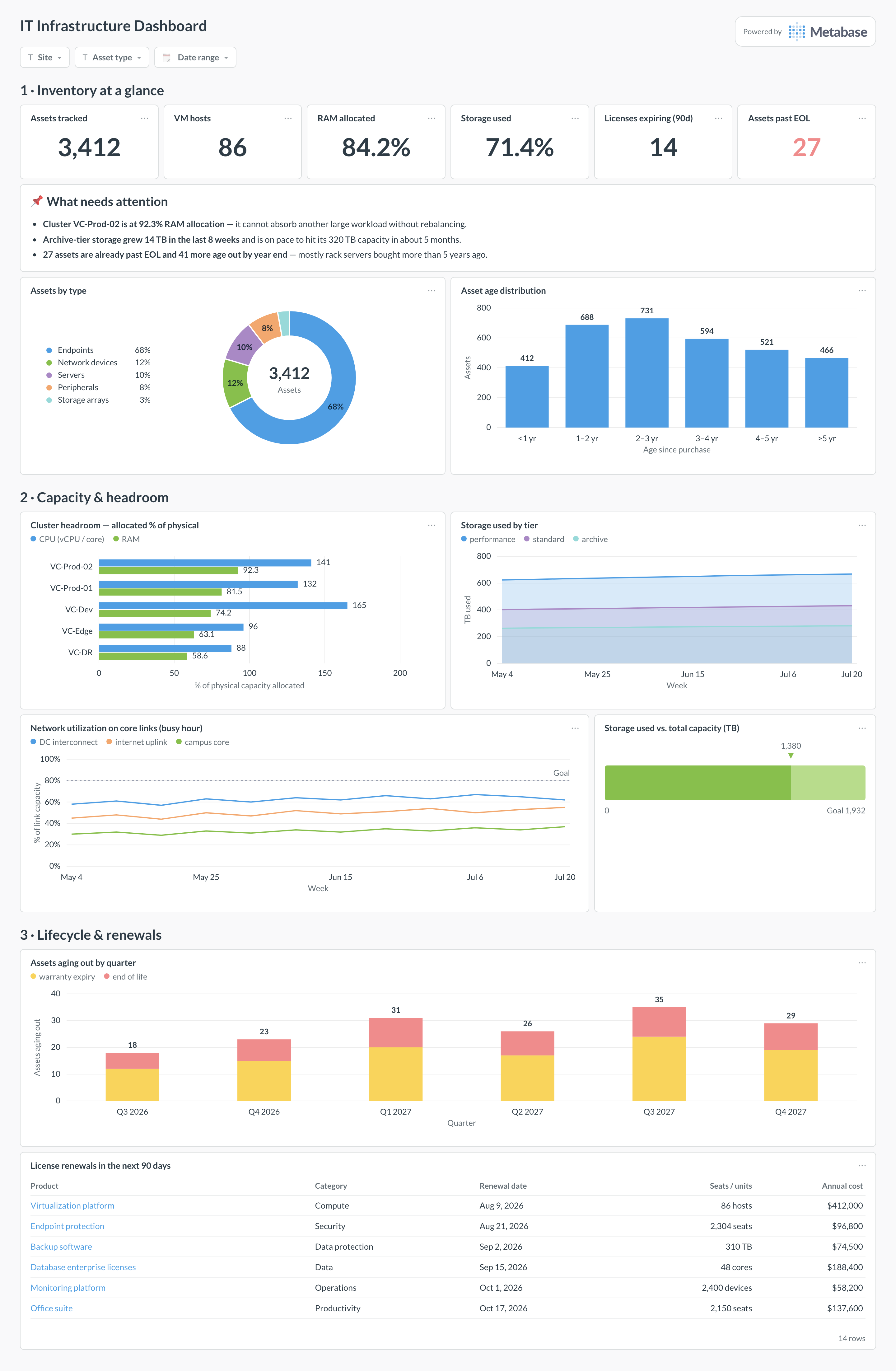
Here’s the layout this guide builds. Inventory leads so the estate’s shape is established first; capacity and headroom sit in the middle — cluster allocation, storage growth, network utilization — because that’s the part that changes purchase decisions; lifecycle and renewals close the page, where expiring licenses and aging hardware queue up next year’s spend.
An example IT infrastructure dashboard in Metabase, built from CMDB, hypervisor, and storage snapshots. Figures are illustrative.
Which cards belong on an IT infrastructure dashboard?
The eight below cover the three planning questions in order: what exists, how much room is left, and what expires next.
Assets by type — servers, network, storage, endpoints (donut)
Asset age distribution, in years since purchase (bar)
Cluster headroom — CPU and RAM allocated versus physical, per virtualization cluster (row)
Storage used versus capacity, weekly trend per tier (area)
Storage pool headroom — used against total capacity (progress)
Network utilization on core links, busy-hour percent (line)
License renewals in the next 90 days, with seats and cost (table)
Assets aging out of warranty or EOL by quarter (bar)
What data does the dashboard need?
assets — CMDB export with asset ID, type, model, site, purchase date, warranty_end, and eol_date.
vm_hosts and virtual_machines — hypervisor inventory with physical cores and RAM per host, and vCPU/RAM allocations per VM.
storage_snapshots — per-pool capacity and used bytes, one row per day, tagged by tier.
link_utilization — per-link capacity and busy-hour throughput from SNMP polling.
licenses — product, seats, renewal date, and annual cost from procurement or the SAM tool.
How do you build it?
Schedule nightly snapshots from the CMDB, hypervisor API, storage arrays, and SNMP into the warehouse — capacity cards chart trends, so append rather than overwrite.
Join hypervisor and CMDB data on asset ID and fix the mismatches first; every headroom number inherits its accuracy from this join.
Build a cluster-headroom model computing allocated versus physical CPU and RAM per cluster (the SQL below), and point the row card and KPI scalars at it.
Compute days-to-full per storage pool from 60–90 days of growth, and chart used capacity against total per tier.
Add filters for site, asset type, and date range, and subscribe the infrastructure team monthly for capacity reviews.
Example card SQL
CPU and RAM headroom by virtualization clusterPostgreSQL
SELECT
h.cluster,
COUNT(DISTINCT h.host_id)                          AS hosts,
SUM(h.cpu_cores)                                   AS physical_cores,
SUM(v.vcpus_allocated)                             AS vcpus_allocated,
ROUND(100.0 * SUM(v.vcpus_allocated)
  / NULLIF(SUM(h.cpu_cores), 0), 1)                AS cpu_alloc_pct,
SUM(h.ram_gb)                                      AS physical_ram_gb,
SUM(v.ram_gb_allocated)                            AS ram_allocated_gb,
ROUND(100.0 * SUM(v.ram_gb_allocated)
  / NULLIF(SUM(h.ram_gb), 0), 1)                   AS ram_alloc_pct,
SUM(h.ram_gb) - SUM(v.ram_gb_allocated)            AS ram_headroom_gb
FROM vm_hosts h
LEFT JOIN (
SELECT
  host_id,
  SUM(vcpus)   AS vcpus_allocated,
  SUM(ram_gb)  AS ram_gb_allocated
FROM virtual_machines
WHERE state = 'running'
GROUP BY host_id
) v ON v.host_id = h.host_id
WHERE h.is_active
GROUP BY h.cluster
ORDER BY ram_alloc_pct DESC;
An IT infrastructure dashboard answers "what do we run, and where's the headroom?" It inventories the estate — assets by type and age, virtualization clusters, storage arrays, network links — and shows how much capacity each has left: host CPU and RAM headroom, storage growth against total capacity, link utilization, and the licenses and warranties about to expire. It is a planning tool, not an alarm panel: the audience is whoever decides what to buy next quarter, and the useful grain is daily or weekly, not real time.
How does this differ from an IT monitoring or IT health dashboard?
By time horizon. An IT monitoring dashboard is about the next hour — what is down, what is alerting. An IT health dashboard is a leadership scorecard over weeks. The infrastructure dashboard is about the next two quarters: whether the virtualization cluster can absorb another project, when storage runs out at the current growth rate, and which hardware ages out of support. If a card would change a purchase order rather than a pager response, it belongs here.
Where does the inventory data come from?
Three layers, joined on an asset ID. The CMDB (or asset-management tool) supplies the catalog: type, model, site, purchase date, warranty and EOL dates. The hypervisor API — vCenter, Proxmox, Hyper-V — supplies hosts, VMs, and their CPU/RAM allocations. SNMP or your network tools supply link capacity and utilization, and the storage arrays report capacity and used bytes. Land each as a daily snapshot in the warehouse rather than querying live: capacity questions are trend questions, and the trend only exists if yesterday's numbers were kept.
Should I chart allocated or actually-used CPU and RAM?
Both, and label which one each card shows. Allocation (vCPUs and RAM assigned to VMs versus physical capacity) is what limits whether you can place a new workload, and it is the number a capacity plan commits to — but most shops deliberately overcommit CPU, so 130% allocation can be healthy while 130% utilization is an outage. The clean pattern: allocation for the headroom-by-cluster card, actual utilization for the trend card, and an explicit footnote on the overcommit ratio your team considers acceptable, because that ratio is a policy, not a fact.
How do I estimate when storage runs out?
Fit growth over a trailing window and divide the remaining space by it: days to full = (capacity − used) / average daily growth over the last 60–90 days. A short window overreacts to one-off events like a migration; a long one hides a recent acceleration, so chart used capacity with the trend line rather than publishing a single number. Treat the estimate as an ordering device — which array to deal with first — not a deadline, and re-check it after any archival or dedupe project, which can move the date by a year.
How do I keep the inventory from going stale?
Reconcile it against something that cannot lie. Inventory decays because the CMDB is updated by humans, while the hypervisor and the network see reality — so add a card counting discrepancies: VMs running on a host the CMDB thinks is retired, devices responding to SNMP that no asset record matches, assets marked active with no telemetry for 30 days. Review it monthly and treat a rising discrepancy count as the real finding. Every other number on the dashboard — headroom, compliance, expiry exposure — inherits its accuracy from this reconciliation.
Should cloud infrastructure be on the same dashboard?
Usually not on this one. Cloud capacity is elastic, so "headroom" means something different — you are tracking spend and commitment coverage, not physical limits; that story lives on an infrastructure cost dashboard or an AWS monitoring dashboard. What does belong here is the on-prem footprint that cloud workloads depend on — interconnect utilization, backup targets, identity servers — plus a simple count of workloads per environment, so the "what do we run" answer stays complete even as it spans both.