





These are the docs for the Metabase master branch. Some features documented here may not yet be available in the current release. Check out the docs for the current stable version, Metabase v0.62.
Query-based transforms
On Metabase Cloud, you need the Basic transforms add-on to run query-based transforms.
With query-based transforms, you can write a query in SQL or Metabase’s query builder, and then write the results of the query back into the database on schedule.
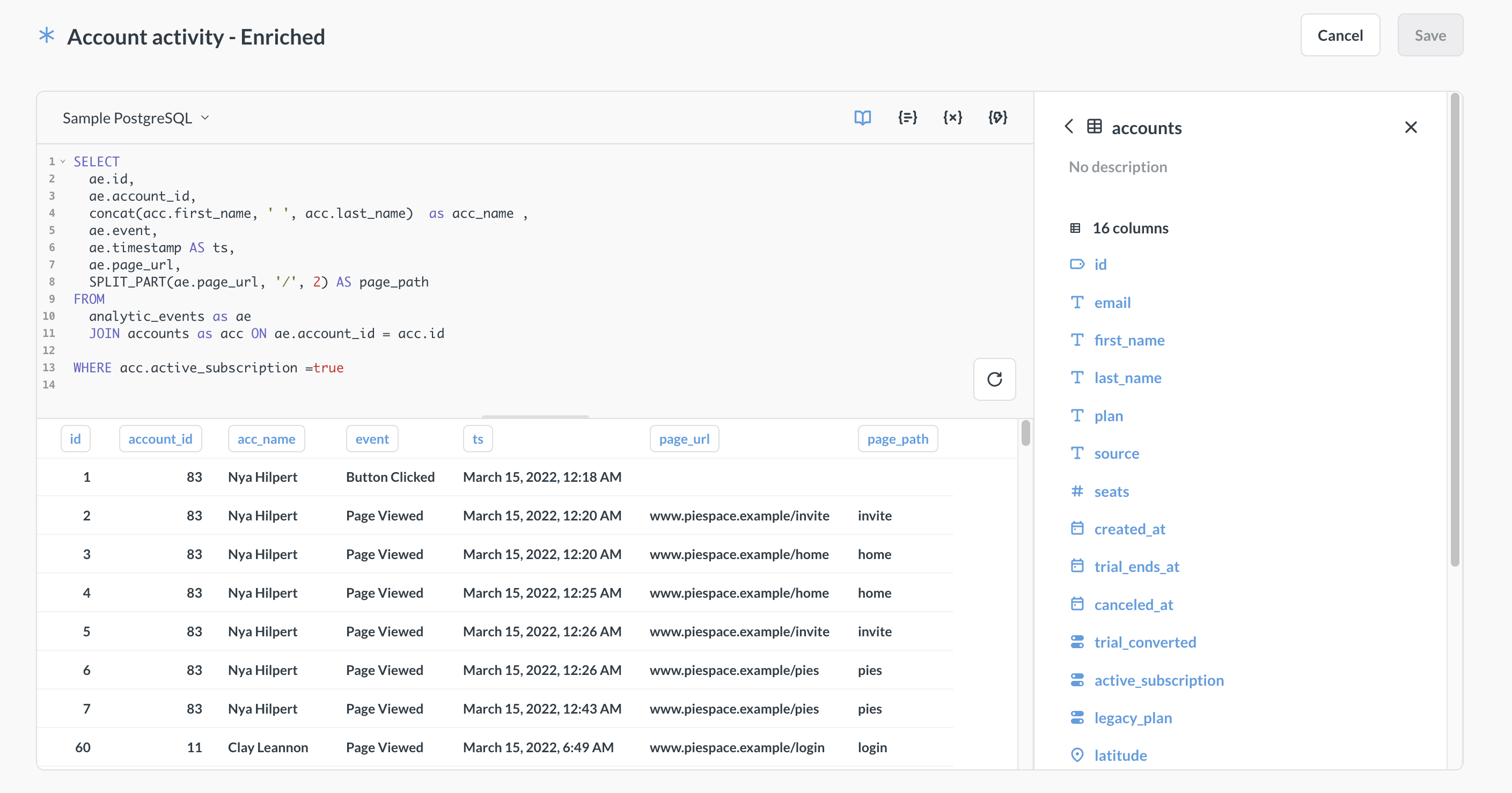
For general information about Metabase transforms, see Transforms.
How query-based transforms work
- In Metabase, you create a
SELECTquery either using SQL or Metabase’s graphical query builder. - When the transform first runs, your database executes the transform’s query.
- Your database writes the results of the query to a new table.
- The new table is synced to Metabase.
- On subsequent transform runs, your database will overwrite that table with the updated results unless you configure your transform to be incremental.
Create a query-based transform
On Metabase Cloud, you need the Basic transforms add-on to create query-based transforms.
- Enable transforms.
-
Go to Data studio > Transforms.
-
Click + New and pick “Query builder”, “SQL”, or “Copy of existing question”.
Currently, you can’t convert between different transform types (like converting a query builder transform to a SQL-based transform, or a SQL transform into a Python transform). If you want to change your transform built with the query builder into a SQL transform, you’ll need to create a new transform with the same target and tags, and delete the old transform.
-
Write your transform query as you would normally write a query in Metabase. See Query builder and SQL editor documentation for more information.
Not all databases support transforms, see Databases that support transforms.
-
To test your transform, press the Run button at the bottom of the editor.
Previewing a query transform in the editor will not write the result of the transform back to the database.
-
Click Save in the top right corner and fill out the transform information:
- Name (required): The name of the transform.
- Schema (required): Target schema for your transform. This schema can be different from the schema of the source table(s). You create a new schema by typing its name in this field. You can only transform data within a database; you can’t write from one database to another.
- Table name (required): Name of the target table. Metabase will write the results of the transform into this table, and then sync the table in Metabase.
- Folder (optional): The folder where the transform should live. Click on the field to pick a different folder or create a new one.
- Incremental transformation (optional): see Incremental query transforms
- Optionally, assign tags to your transforms. Tags are used by jobs to run transforms on schedule.
Variables in SQL transforms
SQL transforms support variables ({{my_variable}} ), which are only useful when combined with snippets.
For (a really simple) example, let’s say you want to count rows per week across several tables. You could create a snippet called “rows per week” containing the full query with a {{table}} variable:
SELECT
  date_trunc('week', created_at) AS week,
  count(*) AS row_count
FROM {{table}}
GROUP BY week
ORDER BY week
That way you can use the snippet to create multiple transforms, each sourced from different tables. Each transform’s entire SQL is just:
{{snippet: rows per week}}
In each transform’s variable panel, set the default value of table to the target table (e.g., orders, returns, subscriptions). See table variables.
If you ever need to change the query (say, to switch from weekly to daily granularity), you update the snippet once and every transform picks up the change on its next run.
Transform variable must be optional, or have a default value
Parameters in transforms must either:
- Wrap the variable in optional blocks (
[[ ]]). - Supply a default value.
The reason transform variables must have a default value (or be optional) is that transforms run on a schedule, so there’s no way to pass a value to the variable when the job runs the transform.
Run a query transform
See Run a transform. You’ll see logs for a transform run on the transform’s page.
Incremental query transforms
By default, on every transform run after the first one, Metabase will process all the data in all input tables, then drop the existing target table, and create a new table with the processed data. You can tell Metabase to only write new data to your target table by marking your transform as incremental.
Prerequisites for incremental transforms
Your data has to have certain structure for incremental transforms to work. See Prerequisites for incremental transforms.
How incremental query transforms work
For a transform to run incrementally, you’ll need to pick a column (“checkpoint”) that Metabase needs to check for new values. Then, behind the scenes, Metabase will add a filter around your transform query that will filter the results of the query for values greater than the last written checkpoint value.
Make a query transform incremental
Use table variables for incremental SQL transforms
If you built your transform in the graphical query builder, you can skip right to marking the transform as incremental.
If you are writing your incremental transform in raw SQL, you’ll need to add a table variable into your SQL code, with the table variable replacing the table with the checkpoint column.
For example, let’s say you have a transform that retrieves order id, total and product title:
SELECT
  orders.id,
  orders.total,
  products.title
FROM
   orders JOIN products on orders.product_id = products.id
To make this transform incrementally load the data based on new values of orders.id column, you need to:
- Add a table variable, for example `` replacing
ordersin theFROMstatement; - In the table variable settings, connect the table variable to the
orderstable; - Replace other references to the table in your query with either:
- The name of the table variable (if you have “Emit table alias” toggled on in variable’s setting).
- Your own handcrafted alias for the variable.
So your query will look like this:
SELECT
  orders_var.id,
  orders_var.total,
  products.title
FROM
    JOIN products on orders_var.product_id = products.id
In this query,orders_var is connected to the orders table in variable settings, and “Emit table aliases” toggled on in the variables sidebar.
Once your query has table aliases, you can mark the transform as incremental using the orders.id column in the transform’s settings.
Mark transform as incremental
To make a query transform incremental:
- Go to the transform’s page in Data studio > Transforms.
- Switch to Settings tab.
- In Column to check for new values, select the column in one of the source tables that Metabase should check to determine which values are new. Only some columns are eligible. See prerequisites for incremental transforms.
Convert models to transforms
Converting models to transforms is only available on Pro and Enterprise plans (both self-hosted and on Metabase Cloud).
If you have models you’d like to migrate to transforms, Metabase can convert them for you. When you convert a model, Metabase:
- Creates a new transform based on the model’s query.
- Runs the transform to create the output table in your database.
- Replaces every question, dashboard, and other item that used the model with the transform’s output table.
- Converts the original model to a question.
You must be an admin to convert models, and the model’s database must support transforms.
To convert a model into a transform:
- Review Replacing data sources docs for overview and limitations of the process.
- Open Data Studio and select Transforms in the sidebar.
- Click Tools > Migrate models.
- Find the model you want to convert and click it to open its details panel. The panel shows the model’s name, database, and collection, and a list of items that depend on it.
- Click Convert to a transform.
- Fill out the transform settings. See Create a transform for the overview of settings.
- Click Convert to a transform.
Metabase runs the conversion in the background. A status indicator at the bottom of the screen shows progress.
If the transform run fails, Metabase stops and leaves the model unchanged—nothing is replaced.
If the transform runs successfully, but the source swap fails afterward, the transform and its output table are kept. The model is left unchanged. You can complete the migration manually using Replace data sources to point the remaining content from the model to the transform’s output table.
Once conversion completes, all content that previously queried the model now queries the transform’s output table. The original model just becomes a question.
Newly created tables will be created with default permissions and will not inherit the model’s permissions. As an alternative, consider manually creating and running the transform first, setting up the permissions, then using Replace data sources to swap the model for the transform’s output table once you configured permissions.
Read docs for other versions of Metabase.